SOLIRIS IB
4
An optional rain sensor with a floating contact can be connected to the SOLIRIS IB. In case of rain,the blind/awning is retracted automatically.
The red LED is illuminated. In this situation all manual commands and sun control commands are inhibited.They are again possible as soon as
the rain stops.
4.1.1 Awning mode
The SOLIRIS IB offers a range of extra programmable functions,allowing a greater level of comfort. The additional programming capability of the
SOLIRIS IB depends on the operating mode selected (chapter 4.1).
Precondition for programming
During programming,no information (e.g. sun,wind,etc) must come in (LED unlit),set the sun control sliding switch to Sun control OFF .
It is best to raise the blind/awning to its highest position (retracted).
Once the blind/awning is in its final position (retracted),the relay must have switched off (either automatically after 3 minutes or press the button.
Mode of operation
4.1
In awning mode,each time or is pressed this constitutes a move command.This mode is set by default in factory.
Programming awning mode:
Press for approx.2 seconds. The red and yellow LEDs flash alternately. Then press for approx.2 seconds until the yellow LED lights up
briefly twice (briefly once – pause – briefly once).
➜ Awning mode is programmed.
4.1.2 Venetian blind mode
Test: The programming of the operating mode can be tested. Press briefly
➜ the LED allocated to the set operating mode lights up briefly.
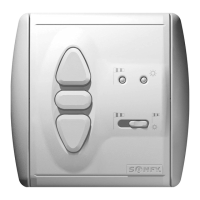
Yellow LED :awning mode.
Red LED : Venetian blind mode.
We reserve the right to make changes due to technical improvements.
4
Programming:
In the venetian mode,each time or are pressed briefly,this constitutes a move command.
A slat tilt command can be programmed (chapter 4.3).
Programming venetian blind mode:
Press for approx.2 seconds. The red and yellow LEDs flash alternately. Then press until the red LED lights up briefly twice (briefly once –
pause – briefly once).
➜ Venetian blind mode is programmed.


 To Next Page
 Loading...