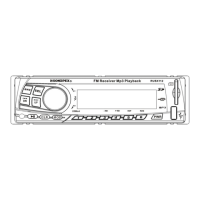
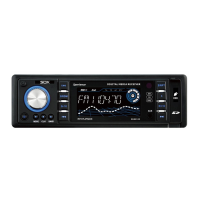
1. SD Slot
2. Preset Radio Station Scan 4 or skip 10 tracks while playing MP3
music
3. Preset Radio Station Scan 1
4. Preset Radio Station Scan 5 or REP (set loop music)
5. Preset Radio Station Scan 2
6. Preset Radio Station Scan 6 or RDM (select random track)
7. Preset Radio Station Scan 3 or go back 10 tracks while playing MP3
music
8. Display Screen
9. USB Slot
10. Volume Control Knob
11. Time function button /press 3 seconds for control clock
12. Auto frequency selection / sound / time turn down button
13. Voice function button
14. Disc pause / play button
15. Auto frequency selection / song / time turn up button
16. Mode button
17. Band loudness button selection
18. Power turn on / off
19. AUX Slot
2-1 Basic Operation
2-1-1 On/Off
The unit is set to play radio station at the first time; and after, when turn
on the unit will return to the last played station/mode. (Ex: USB/SD/MC
playback, AUX line-in or Radio)
Power on: when system is off, press [PWR] button to turn on unit.
Power off: when system is on, press long [PWR] button to turn off unit.
2-1-2 Tuning In a Station
When system is on, press [MOD] button, mode will change in the
following order: “RADIO—USB/SD/MMC—AUX—RADIO”
If display “NO DEV”, in that case the USB/SD is moved
2-1-3 Sound adjustment
The adjustment mode will change in following order: Bass—Treble –
Balance—Loud—Volume. When changing adjustment mode, the LCD
screen will display the character;
Turn to [VOL] switch in cyclical movement to finish the adjustment.
Volume adjustment: when in lack station or press [SEL] button to [VOL]
display, turn to [VOL] switch to up/down volume.
· Bass: press [SEL] button to “BAS” display, turn to [VOL] switch to up /
down to adjust bass.
· Treble: press [SEL] button to “TRE” display, turn to [VOL] switch to up
/ down to adjust treble.


 To Next Page
 Loading...