SPECIFICATION
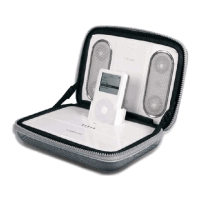
The excellent sound quality of the i-F2 comes from our highly professional design, which includes a
customized Hi-Fi Neodymium driver, digital amp, and the latest digital equalizer circuitry
Specifications:
Power output: 2W*2
Speaker channel: 2 channel stereo output
Impedance: 12Ω
Frequency:120Hz-20KHz
Signal to noise ratio: 85dB±2 (0.5M & 1W)
Speaker Drivers:neodymium- magnetic drivers @ 1.25” X 4
TROUBLE SHOOTING
SYMPTOM POSSIBLE PROBLEM SOLUTION
Power is not turned on Position the power switch to the “on” position.
Universal power supply
cord isn’t connected to
a wall outlet and/ or
the power supply
connector is not
plugged into jack on
the back of the i-F2
system.
Plug the universal power supply into a wall outlet and plug
the power supply connector into AC input jack on the side of
the i-F2 system.
Surge protector (if
used) isn’t powered
on.
If the universal power supply cord is plugged into a surge
protector, make sure the surge protector is switched on.
Power
LED not
lit when
AC
adapter
plugged
in
Wall outlet is not
functioning.
Plug another device into a wall outlet (same outlet) to
confirm the outlet is working.
SYMPTOM POSSIBLE PROBLEM SOLUTION
The
battery
life
indicator
at the left
end turns
red
Warning: Charge
required.
Charge the batteries before re-playing i–Fusion system.
Remote t is out of the
valid scope
Remove it to the valid scope
Some object disturbs
between the i-F2 and
the remote
Remove the object or remove the remote to the valid scope
w/o any disturbance between.
Remote
no
function
The battery inside the
remote is dead
Replace the battery(Refer to the illustrations in the Quick
Connect instruction for detail operation)
Verify the universal power supply cord is plugged into a wall
outlet and the AC input jack on the side of the i-F2 system.
Verify rechargeable battery is charged if the universal power
supply isn’t being used.
Power is not turned on.
Verify the power switch has been positioned to the “ON”
position, the stand-by button has been pushed and the LED is
illuminated.
Press the “+” button to increase the volume. Volume is set too low.
Check volume level on alternate audio source device and set
at mid-level.
No sound
from the
speakers
iPod is not seated into
the docking station.
Remove iPod and re-seat it in the docking station.


 To Next Page