Connections
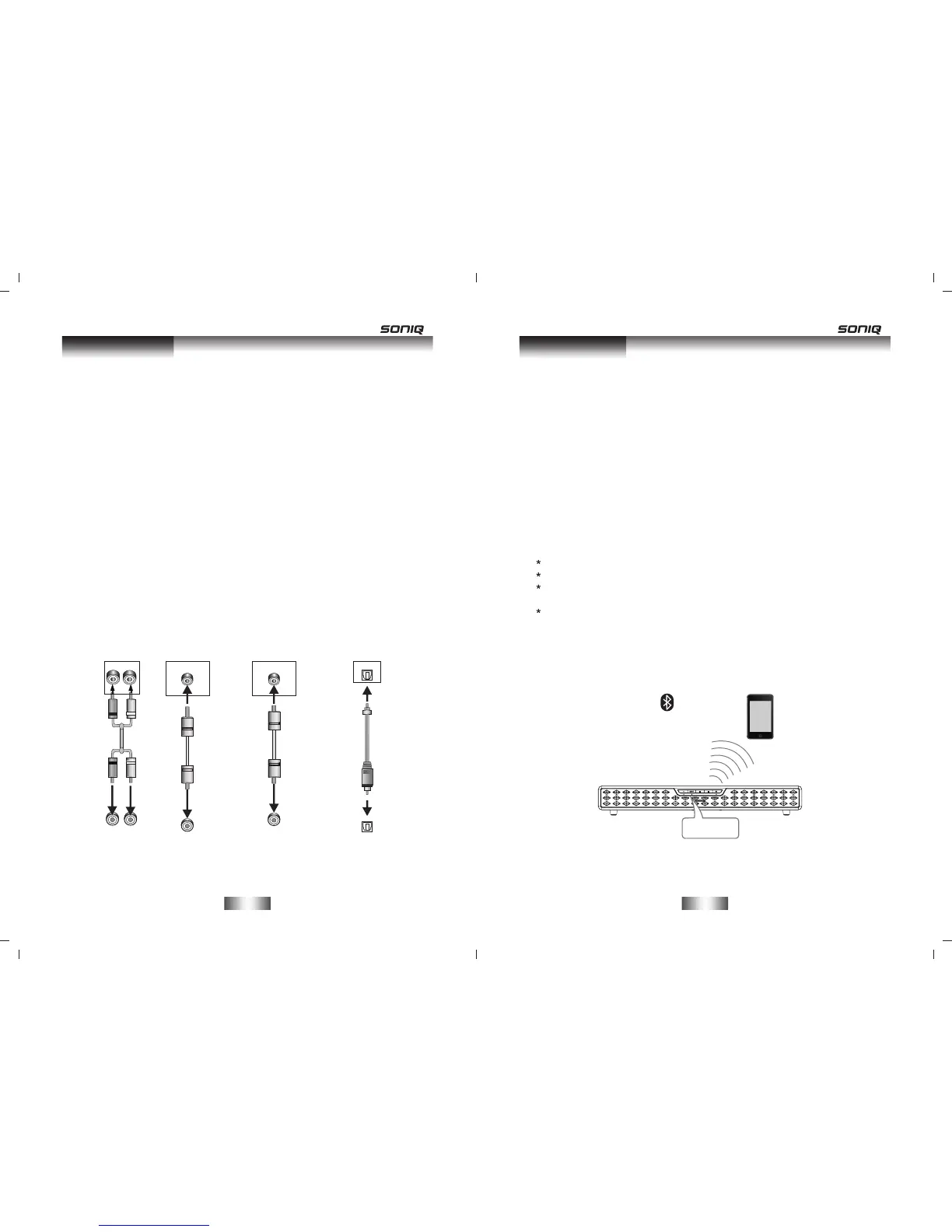
AUX IN/LINE IN
This sound base has an extra group of audio input terminals. You
can input the analogue stereo audio signals from extra devices
such as VCD, CD, VCR, DVD player, etc.
Use the audio cable to connect the stereo audio output terminals of
a VCD, CD, VCR,DVD player to the stereo input terminals AUX
IN/LINE IN of this sound base.
Its corresponding signal source is AUX IN/LINE IN which can be
available by pressing [AUX]/[LINE] on the remote control.
Coaxial Digital Audio
Use a coaxial cable to connect the coaxial input of this sound base
to the coaxial output of VCD, CD, VCR, DVD player .
Optical Input
Use the optical cable to connect the optical input of this sound
base to the optical output of VCD, CD, VCR, DVD player.
Digital Audio Input
Digital Audio Output
COAXIAL
COAXIAL
OPTICAL
Optical Input
Optical Output
AUX Output
AUX Input
R
L
L
R
Line Output
LINE IN
Line Input
AUDIO INPUT
AUDIO OUTPUT
-6-
Connections
-7-
BLUETOOTH
Power on the sound base, When the red indicator and the blue
indicator flashing alternately, the sound base is in searching
bluetooth signal status, use your smart phone to search the
bluetooth signal of the sound base, select HB413 on your list, the
sound base will synchronize to play songs on your smart phone
while they connected successfully.
The blue indicator keeps flashing once per 2 seconds means
bluetooth was connected, disconnected the bluetooth on the smart
phone to switched off the bluetooth connection.
Disconnected the previous paired bluetooth device before you
connect new bluetooth device.
Bluetooth
Model:HB413
Bluetooth connection range is 10 meters.
The model HB413 in your smart phone was not deleted.
In bluetooth mode,[PLAY/PAUSE],[NEXT], [PREVIOUS],
[VOLUME+/-] etc. are also active.
The sound base needs to input the password 0000 when the
matching bluetooth device is under version 2.1.
Note:


 To Next Page
 Loading...