Need help?
Do you have a question about the Sonnet Echo ExpressCard Thunderbolt Adapter and is the answer not in the manual?
Lists items included in the product package and required accessories like a Thunderbolt cable.
Specifies hardware and OS requirements for the Echo adapter, including computer type and OS version.
Provides guidance on finding the latest documentation and updates on the Sonnet Website.
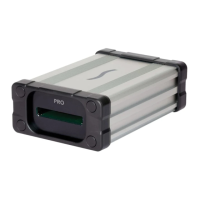
Familiarize yourself with the adapter and cards before use, referencing figures for slots and ports.
Details on connecting the adapter to a computer or other Thunderbolt devices, noting hot-plugging support.
Instructions on correctly inserting and removing ExpressCard cards, emphasizing gentle handling and clicks.
Notes on device drivers for ExpressCard/34 cards and the need for external power for some peripherals.
Explains that only PCIe-based ExpressCard/34 adapters are supported, not USB-based ones.
Lists technical specifications including connectors, data transfer speeds, bus interface, and dimensions.
Directs users to the Sonnet Website for a list of compatible cards and notes on potential compatibility.
Information on supporting SxS memory cards, requiring the proper driver installation from the Sonnet Website.
Lists critical safety precautions, including avoiding disassembly, drops, foreign objects, and liquids.
Provides contact information for Sonnet Customer Service in the USA and instructions for outside the USA.
Encourages users to visit the Sonnet website for current product information and to register their product.
 General
| Type | Thunderbolt Adapter |
|---|---|
| Compatibility | Mac and Windows systems with Thunderbolt |
| Host Interface | Thunderbolt |
| Data Transfer Rate | Up to 10 Gbps |
| Card Compatibility | ExpressCard/34 |
| Power Source | Bus powered |
| Interface | Thunderbolt |
| Ports | ExpressCard/34 |
| Bus Type | PCI Express |

 To Next Page