EasyManua.ls Logo

Sonnet USB 3.0 ExpressCard/34 - User Manual

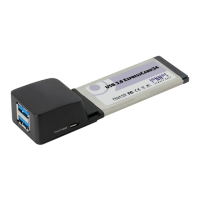
Sonnet USB 3.0 ExpressCard/34
3 pages
Print Icon
To Next Page IconTo Next Page
Loading...
Quick Start Guide for USB 3.0 ExpressCard/34
You Should Have
The following item should be included in your product package:
One USB 3.0 ExpressCard/34 adapter
The following is required for installation:
Internet connection (for driver download)
System Requirements
Sonnet’s USB 3.0 ExpressCard/34 requires the following in order
to operate in your system:
ExpressCard/34 or ExpressCard/54 slot
Mac OS
®
X Version 10.6 or later; Windows
®
7, Windows Vista
®
,
or Windows XP with SP2 or later installed
Remember to register your product online at http://registration.sonnettech.com to be informed of future upgrades and product releases.
Software updates and links are available from the Sonnet Website at www.sonnettech.com. Online support form available at http://supportform.sonnettech.com.
Sonnet Technologies Customer Service hours are Mon.-Fri., 7 a.m.–4 p.m. Pacific Time Customer Service Phone: 1-949-472-2772 E-mail: support@sonnettech.com
Sonnet Technologies, Inc., California USA • Tel: 1-949-587-3500 Fax: 1-949-457-6349
©2011 Sonnet Technologies, All rights reserved. Dio, Sonnet, the Sonnet logotype, Simply Fast and the Simply Fast logotype are trademarks of Sonnet Technologies, Inc. iPad, iPod, iPhone, Mac, the Mac logo, MacBook,
and Mac OS are trademarks of Apple Inc., registered in the United States and other countries. Other product names are trademarks of their respective owners. Product specifications subject to change without notice.
QS-USB3-2PM-E34-E-C-100711
USB
3
.
0
ExpressCard
|
34
SuperSpeed USB ExpressCard
®
Adapter
Support Note: We recommend you make a backup of
important information on your system’s current hard
drive(s) prior to installing new hardware or software.
Question and Answer IconNeed help?

Do you have a question about the Sonnet USB 3.0 ExpressCard/34 and is the answer not in the manual?

Summary

USB 3.0 ExpressCard;34 Adapter Quick Start

Package Contents

Lists the item included in the product package: One USB 3.0 ExpressCard/34 adapter.

Installation Requirements

Specifies the requirement for installation: Internet connection for driver download.

System Requirements

Details the system requirements for operating the Sonnet's USB 3.0 ExpressCard/34 adapter.

Important Support Note

Recommends backing up system information before installing new hardware or software.

Mac User Installation

Software Download and Installation Steps for Mac

Detailed steps for downloading and installing the necessary software for Mac OS X.

Known Limitations and Advice (Mac)

Mac OS X Driver Limitations

Details limitations of the Mac OS X driver regarding USB 2.0/1.1 devices and specific USB 3.0 devices.

Installation and Ejection Advice

Provides advice on connecting USB cables before insertion and safely ejecting devices before disconnection.

Cable and Power Requirements

Explains requirements for USB 3.0 cables and outlines power delivery specifications of the adapter.

Peripheral Compatibility and Power

Discusses peripheral software needs, risks of disconnecting during data transfer, and external power requirements.

Windows User Installation

Software Download and Installation Steps for Windows

Steps for downloading and installing software for Windows 7, Vista, and XP.

Known Limitations and Advice (Windows)

Safe Removal Procedures

Details safe removal procedures for Windows, including ejecting devices and safely removing the Sonnet card.

Peripheral Software and Data Transfer

Discusses peripheral software needs and risks associated with disconnecting devices during data transfer.

Power and Cable Considerations

Covers power delivery, external power needs, and USB cable requirements for optimal performance.

Sonnet USB 3.0 ExpressCard/34 Specifications

General IconGeneral
Form FactorExpressCard/34
Data Transfer RateUp to 5 Gbps
Compatible Operating SystemsWindows 8, Windows 7, Vista, XP
Ports2x USB 3.0
PowerBus-powered

Related product manuals