2
Exterior
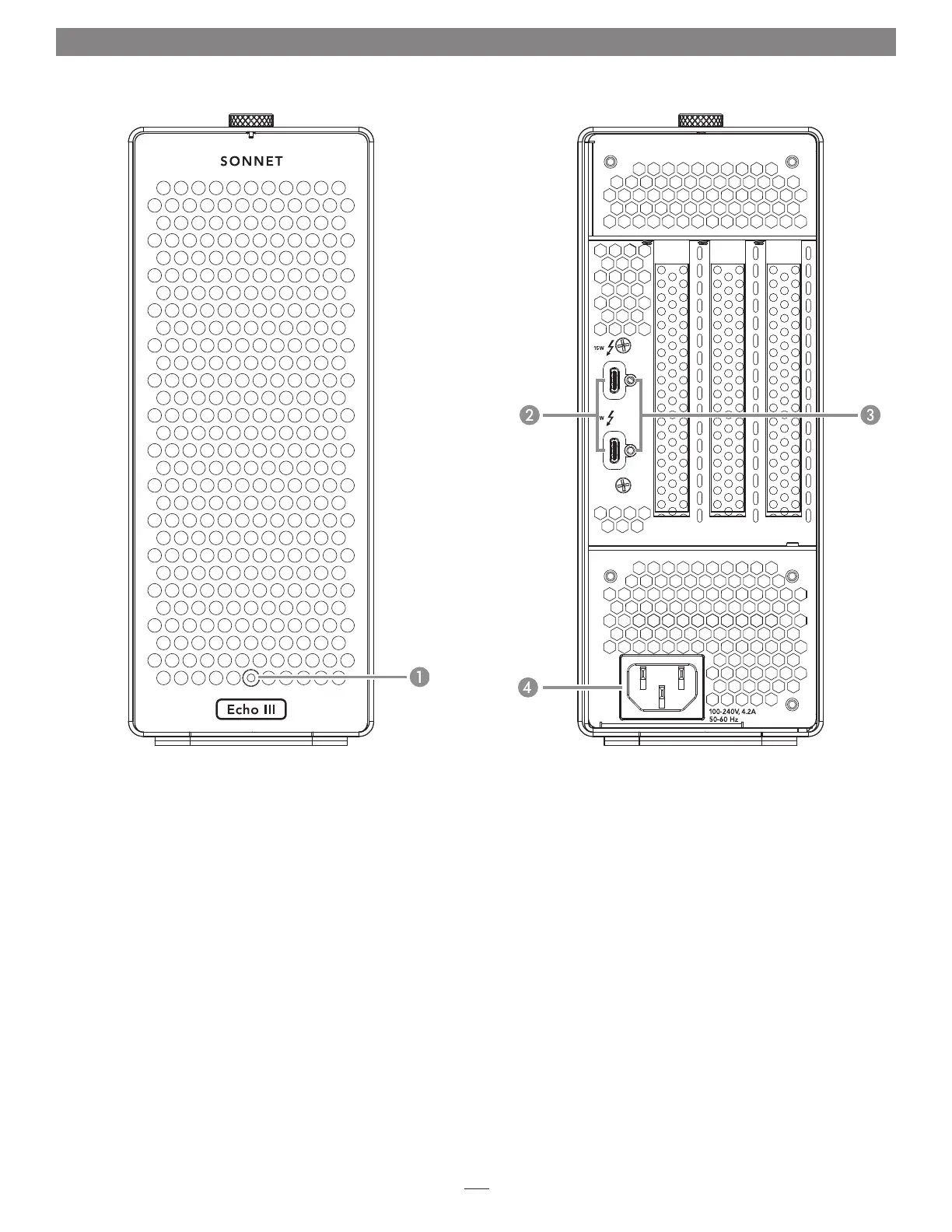
1 – Power Indicator LED
This indicator lights when the Echo III Desktop is powered, the
Thunderbolt cable between the chassis and your computer is
plugged in securely, and the computer powered on. Note that if
the Echo chassis is connected to another Thunderbolt device
instead of directly to the computer, any other Thunderbolt
device connected between the computer and Echo chassis
must also be powered on before the Echo chassis’ power
indicator will light up.
2 – Thunderbolt Ports
Connect the included Thunderbolt cable, or comparable
Thunderbolt 3 (40Gbps) cable, between either port and your
computer’s Thunderbolt port (or other Thunderbolt device in
the chain connected to the computer).
The second port may be used to connect to another
Thunderbolt peripheral device, display(s), or USB device
(when connected with the proper cable).
3 – Threaded Nuts for ThunderLok 3
Attach the included Thunderbolt connector retainer clip here.
Also compatible with ThunderLok 3L.
4 – Power Input Socket
Connect the included AC power cable here.
Chapter 2 – Echo III Desktop Description


 To Next Page