WARNING: RAID 5 and 10 configuration improves
data accessibility and reliability during normal
operations. However, you still need a good backup strategy
for long-term protection of your data.
Support Note: In all modes except JBOD, Sonnet
strongly recommends you use four identical drives
in the Fusion R400 RAID USB 3.0. Due to varying operating
characteristics, the use of different drives may lead to issues
ranging from reduced total capacity, to louder operation, to
RAID failures.
3
3 – Drive Mode Descriptions
The following two pages describe the various drive modes
supported by the R400 RAID USB 3.0. To configure the
Fusion R400 RAID USB 3.0’s drives, refer to Select Drive
Mode on page 5.
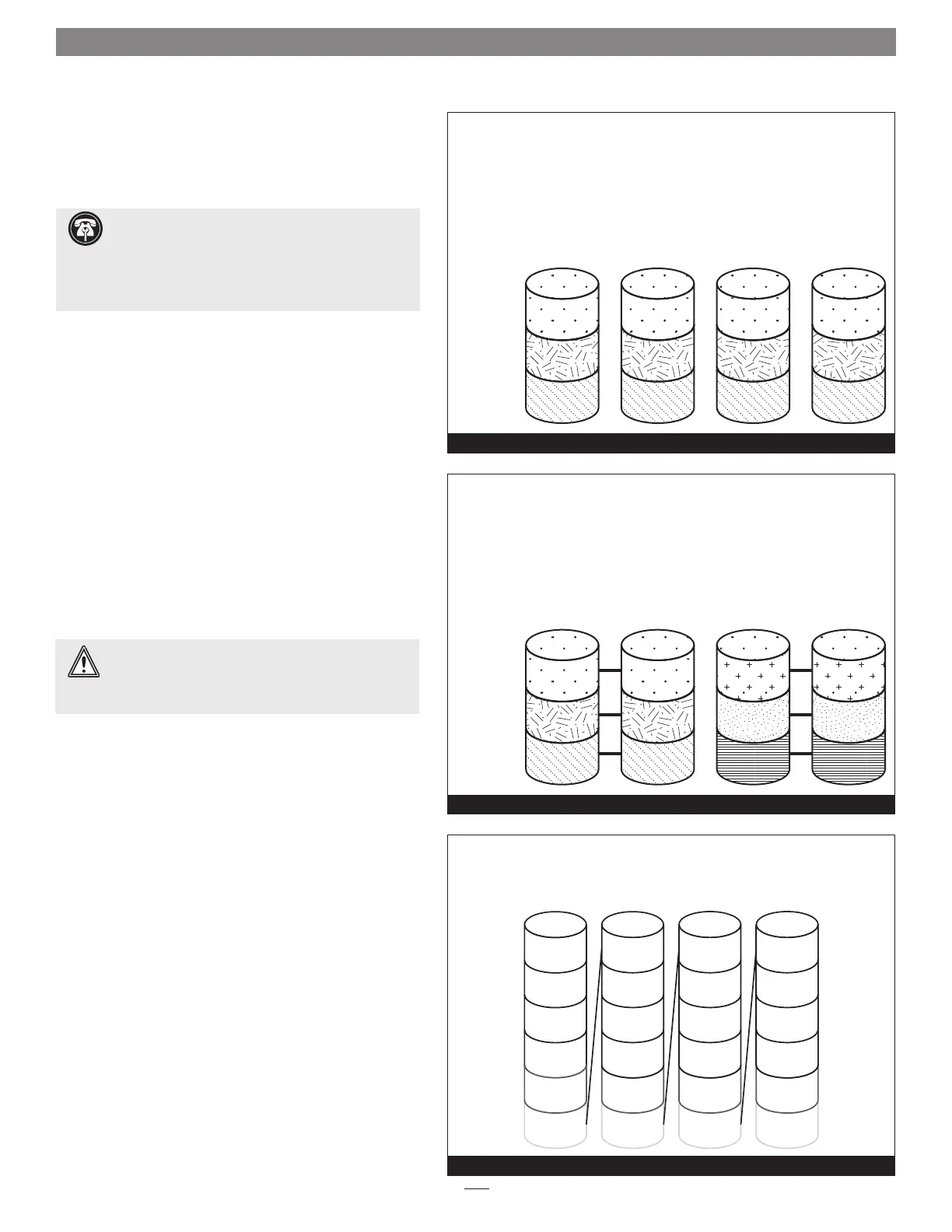
RAID 0: Striping, No Redundancy
RAID 0 (striping) is based on the concept that increased
performance can be achieved by simultaneously accessing
data across multiple drives, increasing data transfer rates while
reducing average access time by overlapping drive seeks.
Drives are accessed alternately, as if stacked one on top of the
other. Although RAID 0 is typically used by applications
requiring high performance for non-critical data, when
used in the R400 RAID USB 3.0 it’s only advantage next to
RAID 5 is increased formatted capacity. RAID 0 provides
no data protection; If one drive fails, all data within that
stripe set is lost. See Figure 5.
When configured as a RAID 0 volume, the volume size is
equal to the full capacity of the drives.
RAID 10: Striping, Mirror Spans Two Drives
RAID 10 increases data transfer rates while ensuring security
by writing the exact same data simultaneously to two or
more different drives. Any one of the four drives can fail, and
the volume will continue to function. RAID 10 is used in
applications requiring higher performance and redundancy,
combining the attributes of RAID Levels 1 and 0. See
Figure 6.
RAID 10 offer 50% of the total capacity of the four drives.
Span: Concatenation, Volume Spans Four Drives
Span mode creates a single, large volume that spans all four
drives, writing files to the capacity of the first drive, then the
second drive, and so on. See Figure 7. Span mode provides
no data protection.
When configured as a spanned volume, the total volume
size depends on the drive with the smallest capacity.
Disk 1
Stripe 1
Stripe 2
Stripe 3
Disk 2Disk 3Disk 4
RAID 0: Striping, No Redundancy
Figure 5
Disk 1
Data 1
Data 3
Data 5
Data 1
Data 3
Data 5
Stripe 1
Stripe 2
Stripe 3
Disk 2
Data 1
Data 3
Data 5
Data 2
Disk 3
Data 4
Data 6
Data 2
Data 4
Data 6
Disk 4
Data 2
Data 4
Data 6
RAID 10:
Striping, Mirror Spans Two Drives
Figure 6
Disk 1
Data 1
Data 2
Data 3
Data 4
Data 5Data 29 Data 53 Data 77
Data 6Data 30 Data 54 Data 78
Disk 2
Data 25
Data 26
Data 27
Data 28
Disk 3
Data 49
Data 50
Data 51
Data 52
Disk 4
Data 73
Data 74
Data 75
Data 76
Span (Concatenation, Big)
Figure 7



 To Next Page