EasyManua.ls Logo

Sonoff PSF-B Series - User Manual

Sonoff PSF-B Series
13 pages
Print Icon
To Next Page IconTo Next Page
Loading...
PSF-B04 Application Guide
1.Product Introduction
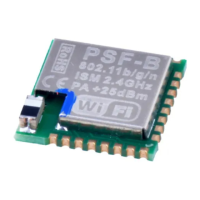
PSF-B04 is a 4-channel ultra-low-power Wi-Fi switch module based on ESP8285. It’s
specially designed for mobile devices and Internet of Things applications with the most
competitive package size and ultra-low energy consumption technology in the industry.
Connecting users’ devices to the Wi-Fi wireless network for remote or local area network
communication to achieve networking. This module can be used as a switch control for 4
household appliances. Either it can be controlled by the device button, or remotely
controlled by connecting to APP (eWeLink).
PSF-B04 has various packaging methods, and the antenna supports ceramic
antennas. It can be widely used in smart grid, smart transportation, smart home,
handheld devices, industrial control and other fields.
Product Features:
Built-in 32bit MCU, and can double as an application processor
Support wireless 802.11 b/g/n standard
Wi-Fi @2.4 GHz, support WPA/WPA2 security mode
+20.5dBm maximum outputpower in 802.11b mode
Support devicebutton control
Support timer schedule
Support Wi-Fi remote control
Support compatible pairing mode /quickpairing mode
Support OTA upgrade
2.Electrical Characteristics
2.1 Rated parameters
Conditions: VDD=3.3V±10% , GND=0V; test at room temperature 25°C.
Type
Parameters
Model
PSF-B04
Main chip
ESP8285
Hardware interface
UART, GPIO
Operating Voltage
2.7V~3.6V
Question and Answer IconNeed help?

Do you have a question about the Sonoff PSF-B Series and is the answer not in the manual?

Summary

Product Introduction

Electrical Characteristics

Rated Parameters

Specifies electrical parameters including voltage, main chip, and hardware interfaces.

Wi-Fi Parameters

Details Wi-Fi standards, security modes, frequency range, and transmit/receive sensitivity.

Module Type and Pin Definition

Module Type

Presents the top view diagram of the PSF-B04 module.

Pin Arrangement Sequence

Describes the sequence and functional description of the module pins.

Pin Definition

Provides detailed pinout and function descriptions for each specific pin.

Function Description

Module Functionality

Explains the 4-channel switch functionality, local and remote control via APP.

Wi-Fi Status Indicator Light

Describes Wi-Fi status light patterns and their respective network working status meanings.

Wi-Fi Module Basic Workflow

Outlines the basic workflow for Wi-Fi module configuration and connection to the server.

Timer Function

Details the timer function capabilities and provides descriptions for different timer modes.

Wi-Fi Radio Frequency Index

Sensitivity

Lists sensitivity values for various Wi-Fi standards and data rates.

Adjacent Frequency Suppression

Provides data on adjacent frequency suppression performance for different modulations.

PCB Design

Packaging Information

Overview

The PSF-B04 is a 4-channel ultra-low-power Wi-Fi switch module, specifically designed for mobile devices and Internet of Things (IoT) applications. It boasts a competitive package size and incorporates ultra-low energy consumption technology, making it suitable for a wide range of uses. This module facilitates the connection of user devices to a Wi-Fi wireless network, enabling remote or local area network communication for networking purposes.

Function Description

The PSF-B04 module serves as a versatile 4-channel switch, capable of controlling up to four household appliances. Its primary function is to provide both local and remote control over these appliances. Users can interact with the module either through a physical device button or by connecting to a dedicated application, such as eWeLink, for remote operation.

The module supports various packaging methods and is designed to work with ceramic antennas. This flexibility in design allows for its integration into diverse smart applications. Its broad applicability extends to areas such as smart grids, smart transportation systems, smart homes, handheld devices, and industrial control systems.

At its core, the PSF-B04 features a built-in 32-bit MCU, which can also function as an application processor, enhancing its capabilities beyond simple switching. It adheres to the wireless 802.11 b/g/n standard, ensuring compatibility with common Wi-Fi networks. For secure communication, it supports Wi-Fi @2.4 GHz and includes WPA/WPA2 security modes. The module is capable of a maximum output power of +20.5dBm in 802.11b mode, ensuring robust wireless connectivity.

Usage Features

The PSF-B04 offers several features that enhance its usability and integration into smart environments:

  • Device Button Control: Users can directly control connected appliances using a physical button on the device. This provides a convenient local control option, independent of network connectivity.
  • Wi-Fi Remote Control: For remote management, the module can be controlled via a Wi-Fi connection. This allows users to operate appliances from anywhere, provided they have internet access and the associated application.
  • Pairing Modes: The module supports both "quick pairing mode" and "compatible pairing mode" to facilitate easy setup and connection to the network.
    • Quick Pairing Mode: To enter this mode, users press and hold the pairing button (IO0 pull-down, default high level) for more than 5 seconds when the device is in specific flashing modes (A~D). In this mode, the Wi-Fi module operates in promiscuous mode, capturing encrypted messages containing SSID and password information from the mobile terminal. Users then use the eWeLink APP to "add device" and enter the router's SSID and password to connect the device to the Internet.
    • Compatible Pairing Mode: If the device is already in quick pairing mode, pressing and holding the pairing button for another 5 seconds will switch it to compatible pairing mode. In this mode, the mobile terminal joins the device's AP as a station, creating a local area network for data interaction. Users manually connect to the device's hotspot (SSID: ITEA 10000XXXX, password: 12345678) via their phone's settings page, then use the eWeLink APP to "add device" to connect the device to the Internet.
  • Switch Functionality: In its normal operating state, a brief click of the button (pulling down any IO port of the 4 channels for more than 100ms) will toggle the relay on or off, controlling the corresponding appliance. When in pairing mode, clicking the button will exit the pairing mode.
  • Power-on Status Configuration: The power-on state of the switch can be configured via the APP to be either on or off, with the default power-on status being off. This allows users to customize how appliances behave after a power cycle.
  • Timer Functionality: The PSF-B04 supports various timer functions, configurable through the APP, to automate appliance operation. These include:
    • Single Timer: Executes an action at a specified time, similar to a one-time alarm.
    • Count Down Timer: Executes an action after a set duration, useful for turning off devices after a period of use (supports up to 24 hours).
    • Repeat Timer: Repeats an operation on a weekly basis, allowing users to set recurring schedules for specific days of the week.
    • Loop Timer: This is a more general term for repeated operations, encompassing the weekly repeat timer. These timing modes enhance convenience for devices that need to run repeatedly at certain moments.

Maintenance Features

The PSF-B04 incorporates features that contribute to its long-term stability and ease of maintenance:

  • OTA Upgrade Support: The module supports Over-The-Air (OTA) firmware upgrades. This allows the device to connect to an upgrade server, download, and update to the latest firmware version, ensuring that it remains up-to-date with the newest features and security patches without requiring physical intervention.
  • Network Reconnection Mechanisms: In cases where the connection or acquisition process fails during the module's online workflow (joining a router, connecting to a server, registering, binding to an account, or obtaining application parameters), the module employs corresponding back-off strategies and reconnection mechanisms. These strategies are designed to ensure the device remains stable and maintains its online status, minimizing downtime and user intervention.
  • Wi-Fi Status Indicator Light: The device includes a Wi-Fi status indicator light that flashes in different patterns to represent its current network working status. This visual feedback helps users diagnose connectivity issues. The seven types of status indications are:
    • Normal: Device is working normally and connected to the cloud server. Control is exclusively via the APP.
    • No Wi-Fi: Device cannot connect to the router.
    • No Server: Device is connected to the router but cannot connect to the cloud server (i.e., no internet access).
    • Unregistered: Device is not bound to an eWeLink account and needs to be bound to connect to the cloud server.
    • Upgrade: Device is currently upgrading its firmware.
    • Setting G1: Device is in compatible pairing mode, obtaining network information from the APP.
    • Setting G2: Device is in quick pairing mode, obtaining network information from the APP.

These features collectively contribute to a robust, user-friendly, and easily maintainable device, making the PSF-B04 a suitable choice for various smart applications.

Sonoff PSF-B Series Specifications

General IconGeneral
CategoryWireless Router
Wireless StandardsIEEE 802.11 b/g/n
Frequency Band2.4 GHz
Maximum Speed300 Mbps
ModelPSF-B Series
Antenna2 x External Antennas
Operating Temperature0°C - 40°C
Operating Humidity10% - 90% RH (non-condensing)

Related product manuals