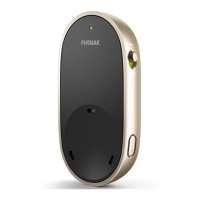
The Phonak Roger On is a versatile, intelligent microphone designed to enhance hearing in various challenging listening environments. It wirelessly transmits the voice of a speaker directly to your ears, offering five main use cases: on a table, pointing, wide pointing, presenter, and TV/multimedia streaming, as well as online calls.
Function Description:
The Roger On microphone automatically adapts its settings based on its position and the surrounding sound environment. When placed on a table, it picks up voices from people sitting around it, indicated by a table icon on the display. In pointing mode, you hold the device in the direction of the person you want to hear, and it focuses on that speaker. Wide pointing mode, enabled via the myRogerMic app, allows the device to pick up a wider beam of sound. For distant talkers or presenters, the Roger On can be clipped onto their lapel, focusing the microphone on their voice. It also functions as a streaming device for TV or other audio sources when placed in its docking station, and can be used as a microphone during online calls when connected to a computer or tablet.
The device features a function button, four microphones, an on/off slider, and a display that shows the current microphone mode, device status (automatic, locked, audio input, call, no radio send), and battery status (full, mid, empty/recharge).
Important Technical Specifications:
- Range: Up to 25 meters / 80 feet. This distance may be reduced by obstacles like walls. Line of sight provides the furthest range.
- Battery Lifetime: A fully charged battery typically lasts for 8 hours of streaming.
- Charging Time: With the supplied charger, the Roger On reaches 80% charge after 1 hour and 100% charge after 3 hours.
- Frequency Range: The device operates between 2.4-2.48 GHz.
- Power Level: Less than 100 mW.
- Operating Temperature: 0° to +40° Celsius (+32° to +104° Fahrenheit).
- Storage Temperature: -20° to +60° Celsius (-4° to +140° Fahrenheit).
- Humidity during transportation and storage: <90% (non-condensing).
- Humidity operation: <90% (non-condensing).
- Atmospheric pressure: 500 hPa to 1060 hPa.
- Charger Rating: 5VDC, min. 500 mA, max. 2000 mA, up to an altitude of 2000 m.
- Connectivity: USB C connector for charging and audio streaming, 3.5 mm analog and optical digital (Toslink) audio input on the docking station.
Usage Features:
- Switching On/Off: Move the on/off switch to the on position. A short start-up animation indicates readiness.
- Connecting to Hearing Aids/Receivers: To connect to a Roger receiver or Roger-compatible hearing aid, switch on both devices, press the Connect button on the back of the Roger On, and hold it close (within 10 cm/4 inches) to the hearing aid/receiver. A successful connection is indicated on the display.
- Connecting Multiple Microphones: The Roger On can be combined with other Roger microphones (e.g., Roger Table Mic). To connect another microphone, switch on both Roger microphones, press the Connect button on the Roger On, and hold it close (within 10 cm/4 inches) to the other microphone.
- Disconnecting Devices: To disconnect Roger On from all connected receivers or other Roger microphones, hold the 'Connect' button for 8 seconds.
- Microphone Modes:
- Automatic Mode: The device automatically selects the best microphone mode based on its position.
- Table Mode: Place Roger On in the center of a table to hear people around it.
- Pointing Mode: Hold Roger On in the direction of the person you want to hear.
- Presenter Mode: Clip Roger On onto the lapel of a distant talker.
- Wide Pointing Mode: Enabled via the myRogerMic app, this mode broadens the sound pickup beam.
- Lock Microphone Mode: To maintain a specific microphone mode regardless of device position, press the function button repeatedly until the desired mode is locked. A lock icon appears on the display.
- Mute Function: Press and hold the function button for two seconds to mute the microphone. A crossed microphone and radio icon on the display indicate muting. Press and hold again for two seconds to unmute.
- Streaming Audio from Devices:
- Using Charging Cable: Connect the USB C end of the charging cable to Roger On and the USB A end to your audio device (computer, tablet, smartphone). Start music or an audio app. Roger On automatically turns on when audio is streamed.
- Using Analog Audio Cable: If your audio device lacks optical output, an analog audio cable can be used to connect it to the docking station.
- TV/Multimedia Streaming with Docking Station: Insert Roger On into the docking station, connect the docking station to the TV's optical OUTPUT (or analog audio output) using the provided cables, and switch on the TV. Roger On will automatically transmit the audio. The audio input volume can be adjusted on the docking station.
- Online Calls: Connect Roger On to your computer or tablet via the charging cable. It functions as a microphone, allowing you to hear participants and for them to hear you. For best voice pickup, clip it to your shirt or place it flat on the table, pointing in your direction.
- myRogerMic App: This app allows remote control of Roger On from your smartphone, including steering the direction of the beam, changing microphone mode, enabling stereo mode, enabling wide pointing mode, muting/unmuting, and checking current device status.
- Reset: If Roger On stops responding, press the center and connect buttons together for 10 seconds to reset it.
- Shipping Mode: To return the device for repair, press and hold the connect button and switch the device off. Shipping mode is confirmed by an indication on the display.
Maintenance Features:
- General Care: The Roger On microphone is protected against splashes of water and dust. After exposure to water, sweat, or dust, it should be cleaned and dried.
- Cleaning Instructions: Clean surfaces with a lint-free cloth. Avoid household detergents, soap, or rinsing with water. For intensive cleaning, consult a hearing care professional.
- Docking Station Care: Ensure the charging slot and ports are clean and free of dust or dirt. Do not use household detergents or soap.
- Cable Care: Always ensure the Roger microphone, docking station, and charger cables are dry and clean before use.
- Battery: The device contains an embedded, non-replaceable lithium-ion battery. Do not attempt to open the product or remove the battery. Contact a local recycling facility for battery removal.
- Software Updates: If a software issue is suspected, contact your hearing care professional to check for available software updates.
The Phonak Roger On is a CE-marked product, with the CE mark applied in 2024. It is manufactured by Sonova Communications AG in Switzerland.

 Need help?
 General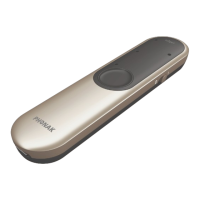

 To Next Page