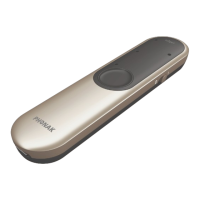
Contents
1. Welcome 5
2. Getting to know your Roger On 6
2.1 Device description 11
2.2 Docking station 12
2.3 Accessories 13
2.4 Display 14
2.5 Technical data 15
3. Charging your Roger microphone 16
4. Using your Roger On 19
4.1 Switching on your Roger On 19
4.2 General use 20
4.3 Using on a table 21
4.4 Using in loud noise 23
4.5 Listening to a distant talker 25
5. Lock microphone mode 27
6. Mute 29
7. Listening to TV or other stationary
audio device 30
7.1 Setting up the docking station 30
7.2 Listening to TV using the docking station 32
8. Listening to a portable audio device 34
8.1 Streaming audio using charging cable 34
8.2 Streaming audio using analog audio cable 36
9. Using Roger On during online calls 36
10. Stereo mode 38
11. myRogerMic app 39
12. Network functions 40
11.1 Connect to a hearing aid or
Roger receiver 40
11.2 Connect another microphone 43
11.3 Disconnecting Roger devices 45
13. Using in a large group 46
12.1 Using multiple microphones 47
14. Reset 48
15. Shipping mode 49
16. Care and maintenance 50
17. Troubleshooting 52
18. Compliance information 56
19. Information and explanation of symbols 60
20. Important safety information 63
21. Service and warranty 70
PH_UserGuide_RogerOn3_92x125_EN_029-1379-02.indd 2-3PH_UserGuide_RogerOn3_92x125_EN_029-1379-02.indd 2-3 31.05.24 10:0231.05.24 10:02


 To Next Page
 Loading...