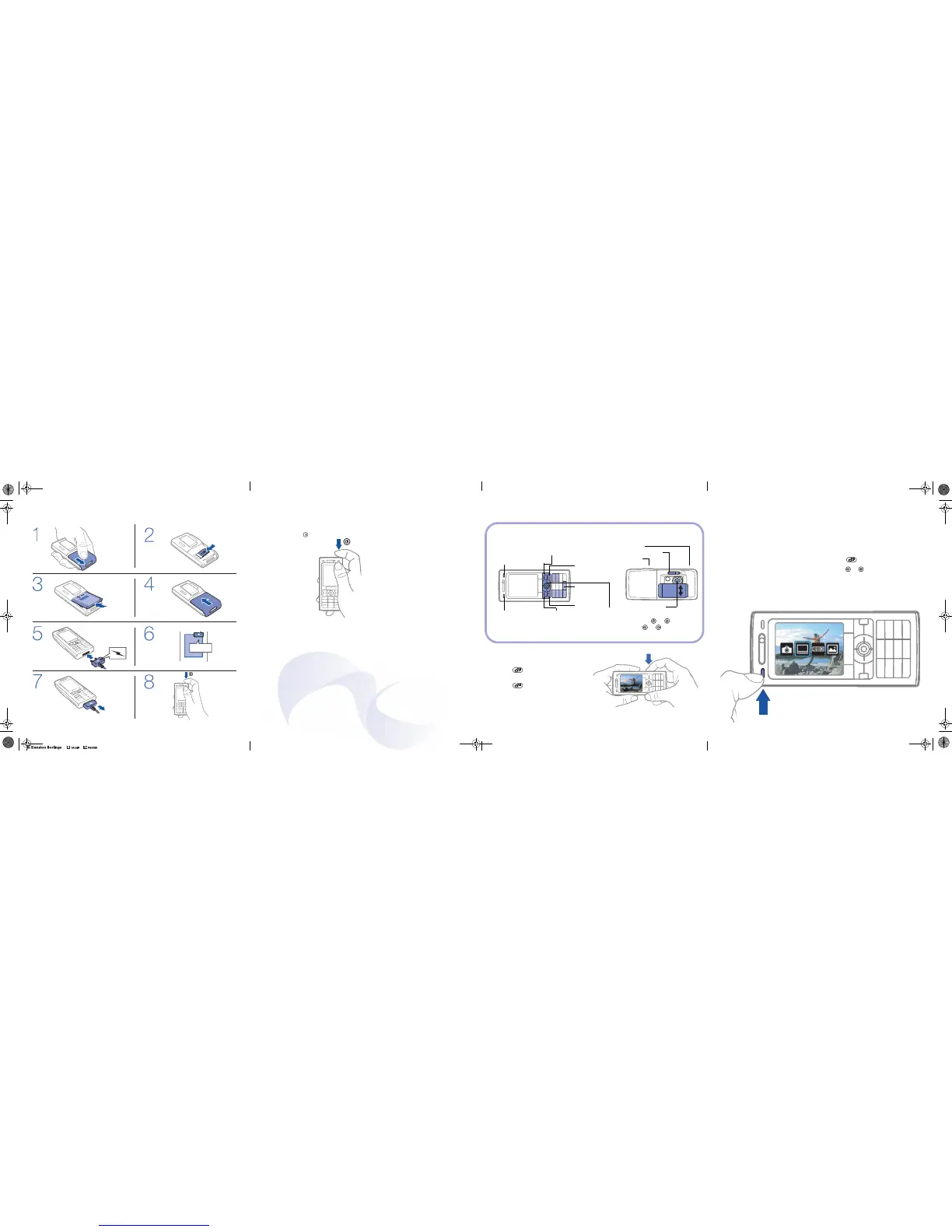
Turn on and set up
To turn on the phone
1. Press and hold .
The first startup
may take a few
minutes.
2. Select an option:
Normal Mode with
full functionality or
Flight Mode with
limited functionality
as all radio
transceivers are
turned off.
3. To complete
setup follow the
instructions that
appear.
Make a call
To make calls
The phone must be in normal mode.
1. Enter a phone number (with international
prefix and area code if applicable).
2. Press Call to make the call.
3. Press End Call to disconnect the call.
Write messages
To write and send a text message
1. Press Menu } Messaging } Write New
} Text Message.
2. Write your message.
3. Press Continue.
a number.
SIM card and battery
≈ 2,5 h
Take photos
Camera keys overview
To take a photo
1. Slide open the camera lens cover.
2. Press halfway down to auto
focus.
3. Press all the way down to take
aphoto.
4. To take another photo, repeat
steps 2 and 3.
Take photos
Options
Settings
Delete
Photo key (upper):
Scenes
In standby mode:
Camera album
Photo key (lower):
Shoot Mode
In standby mode:
Last taken photo
Back
Navigation key:
Switch camera/video or
Adjust brightness or
Automatic Xenon flash
Camera
Zoom in or out
Shortcuts
Catch the action
BestPic™
Never miss a perfect moment. Use
BestPic™ to catch the moment when
taking photos. Capture a range of nine
photos with a single camera button press.
Browse the photo series and save
the best photos.
To use BestPic™
1. Slide open the active lens cover.
2. Press the lower photo key once.
3. Press to take a photo.
4. Press or to select the best photo.
You can save one or more with
BestPic™.
For more information, see www.sonyericsson.com/support or the User guide.
K800i-K790i-QG-R1A-AE.book Page 1 Monday, June 5, 2006 11:41 AM
4. Select Enter Phone No. and enter
5. Press OK } Send.
PPreflighted byreflighted byPreflighted by
( )( )( )













 To Previous Page