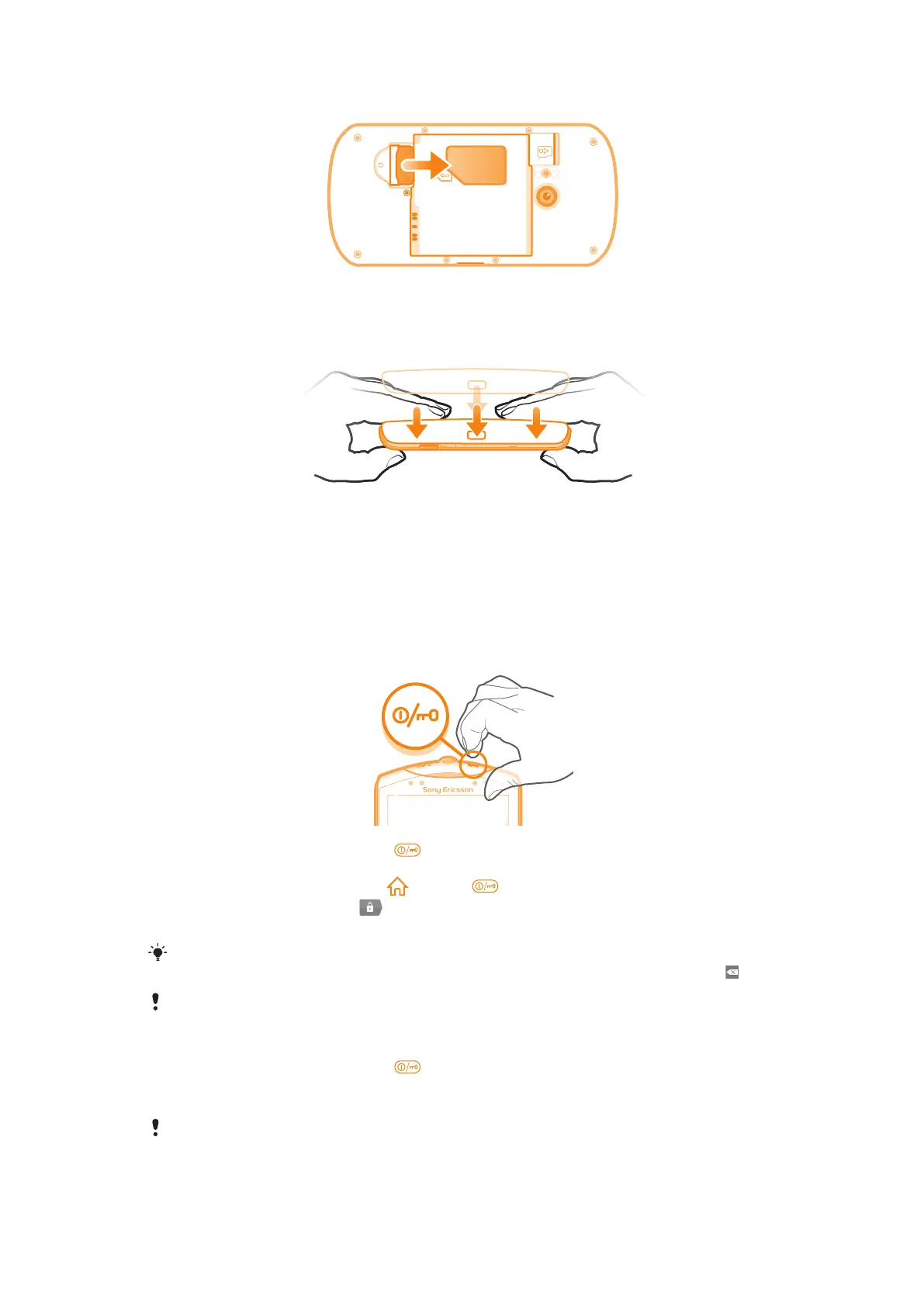
To remove the SIM card
1
Remove the battery cover and the battery.
2
Place the tip of your finger on the SIM card and slide it out of its slot.
To attach the battery cover
1
Place the cover over the back of the phone so that the camera lens hole in the cover
fits over the camera lens.
2
Press down firmly on all edges of the battery cover to make sure it gets attached
tightly.
Turning on the phone
To turn on the phone
1
Press and hold down the power key on the top of the phone until the phone
vibrates.
2
If your screen goes dark, press or press briefly to activate the screen.
3
To unlock the screen, drag to the right across the screen.
4
Enter your SIM card PIN when requested, and select OK.
Your SIM card PIN is initially supplied by your network operator, but you can change it later from
the Settings menu. To correct a mistake made while entering your SIM card PIN, press .
It might take a while for the phone to start up.
To turn off the phone
1
Press and hold down the power key until the options menu opens.
2
In the options menu, tap Power off.
3
Tap OK.
It may take a while for the phone to shut down.
9
This is an Internet version of this publication. © Print only for private use.














 To Next Page