This is the Internet version of the user's guide. © Print only for private use.
76 Transferring and exchanging information
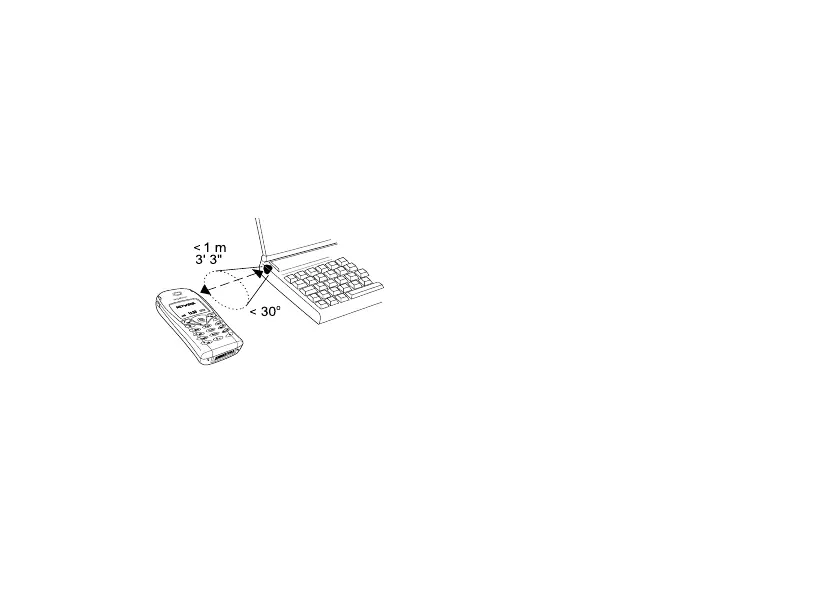
To connect two devices
1. Place your phone as in the picture. The infrared port
on the phone must face the infrared port on the
other device.
Note: If you are connecting to a PC, make sure your
PC has activated infrared communication (Start/
Settings/Control Panel/Infrared/Options tab/Enable
infrared communication).
2. Your phone now establishes contact with the
other device.
Synchronization
You can synchronize the calendar and phone book in
your phone with similar programs in, for example,
a PC, PDA or mobile phone and with similar programs
on the Internet.
• To select which order first name and last name appear
in the phone when you synchronize contacts, scroll to
Phone book/Options/Sync. view.
Synchronization with nearby devices
After installing the synchronization program from the
Sony Ericsson Web site,
www.SonyEricsson.com/support/, you can synchronize
your phone with your PC.
A status bar shows the progress of the
synchronization. If you use a cable, the
synchronization starts as soon as you connect the
cable. For more information, please refer to the
synchronization software online help.












 To Next Page