4
Memory card
Your phone supports a Memory Stick Micro™ (M2™) memory
card, adding more storage space to your phone. It can also be
used as a portable memory card with other compatible devices.
You can move content between the memory card and the phone
memory. See Entertainment on page 14 and Bluetooth™
wireless technology on page 29.
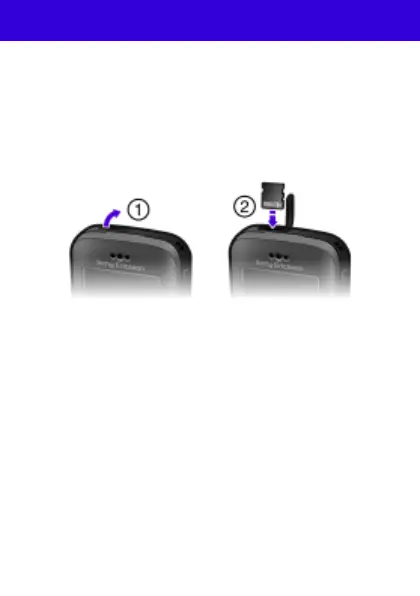
To insert a memory card
1 Open the cover.
2 Insert the memory card with the gold-colored contacts
facing towards you.
To remove a memory card
1 Open the cover.
2 Press the edge of the memory card to release and remove it.
This is the Internet version of the User guide. © Print only for private use.










 To Next Page