GB
12
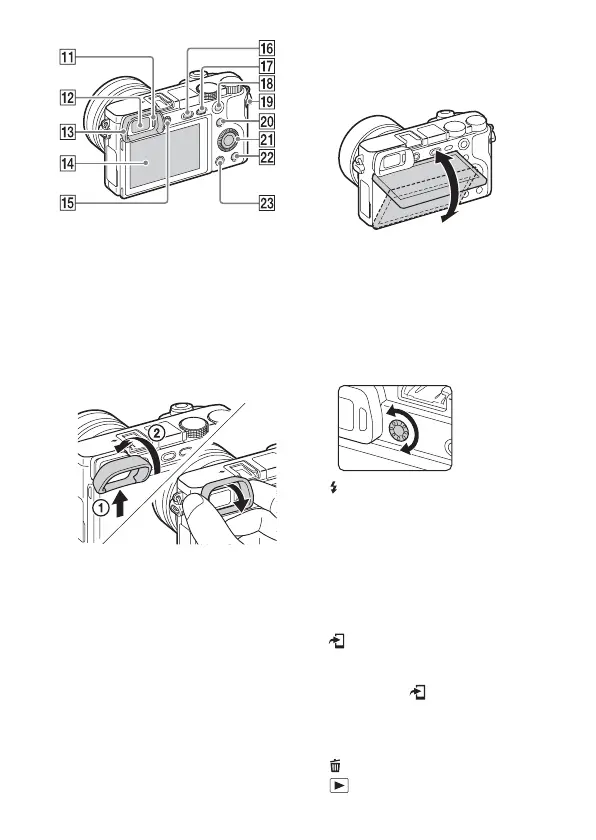
K Eye sensor
L Viewfinder
M Eyepiece cup
• Not attached to the camera at the
factory. It is recommended that
you attach the eyepiece cup when
you intend to use the viewfinder.
Attaching/removing the
eyepiece cup
• Remove the eyepiece cup when
you attach an accessory (sold
separately) to the Multi Interface
Shoe.
N LCD screen
• You can adjust the screen to an
easily viewable angle and shoot
from any position.
O Diopter-adjustment dial
• Adjust the diopter-adjustment
dial to your eyesight until the
display appears clearly in the
viewfinder. If it is difficult to turn
the diopter-adjustment dial,
remove the eyepiece cup and then
adjust the dial.
P (Flash pop-up) button
Q MENU button
R For shooting: AEL button
For viewing: Playback zoom
S MOVIE (Movie) button
T For shooting:
Fn (Function) button
For viewing:
(Send to Smartphone) button
• You can display the screen for
[Send to Smartphone] by
pressing the (Send to
Smartphone) button.
U Control wheel
V C2 (Custom 2) button/
(Delete) button
W (Playback) button


 To Next Page