GB
11
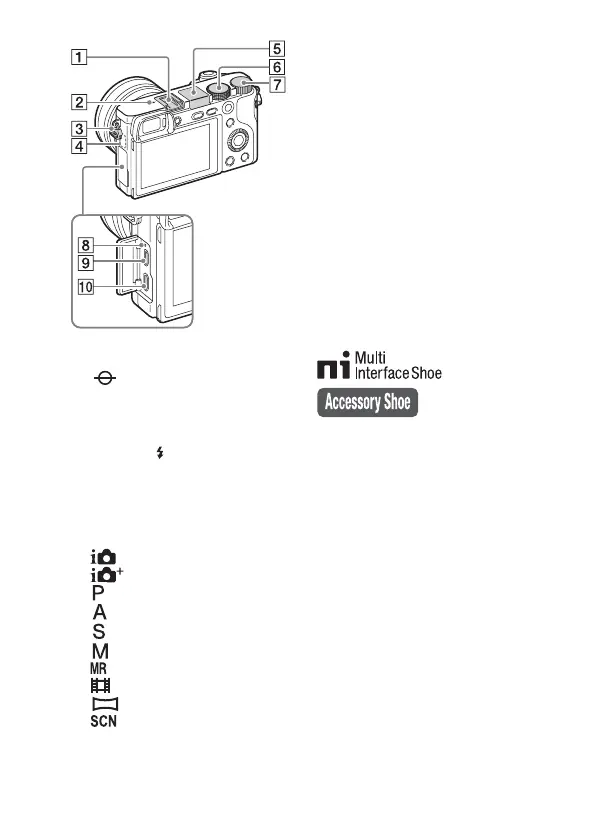
A Multi interface shoe
1)
B Image sensor position mark
C Hook for shoulder strap
D Wi-Fi sensor (built-in)
E Flash
• Press the (Flash pop-up)
button to use the flash. The flash
does not pop up automatically.
• When not using the flash, press it
back into the camera body.
F Mode dial
(Intelligent Auto)/
(Superior Auto)/
(Program Auto)/
(Aperture Priority)/
(Shutter Priority)/
(Manual Exposure)/
(Memory recall)/
(Movie)/
(Sweep Panorama)/
(Scene Selection)
G Control dial
H Charge lamp
I Multi/Micro USB Terminal
1)
• Supports Micro USB compatible
device.
J HDMI micro jack
1)
For details on compatible
accessories for the multi interface
shoe and the Multi/Micro USB
Terminal, visit the Sony web site, or
consult your Sony dealer or local
authorized Sony service facility.
You can also use accessories that
are compatible with the accessory
shoe. Operations with other
manufacturers’ accessories are not
guaranteed.


 To Next Page