GB
18
x
Memory cards that can be used
*1
Movies cannot be recorded in 100 Mbps or more.
*2
SD Speed Class 4: or faster, or UHS Speed Class 1: or faster
*3
Memory cards that fulfill all of the following conditions:
– Capacity of 4 GB or more
– SD Speed Class 10: , or UHS Speed Class 1: or faster
When recording in 100 Mbps or more, UHS Speed Class 3: is required.
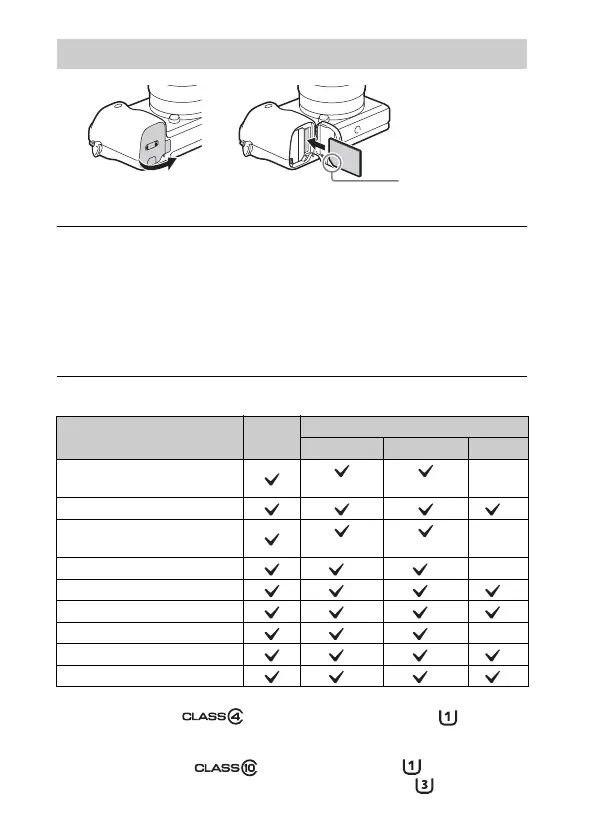
Inserting a memory card (sold separately)
1
Open the cover.
2
Insert the memory card.
• With the notched corner facing as illustrated, insert the memory card
until it clicks into place.
3
Close the cover.
Memory card
For still
images
For movies
MP4 AVCHD XAVC S
Memory Stick PRO Duo
(Mark2 only) (Mark2 only)
—
Memory Stick PRO-HG Duo™
*1
Memory Stick Micro™ (M2)
(Mark2 only) (Mark2 only)
—
SD memory card
*2 *2
—
SDHC memory card
*2 *2 *3
SDXC memory card
*2 *2 *3
microSD memory card
*2 *2
—
microSDHC memory card
*2 *2 *3
microSDXC memory card
*2 *2 *3
Ensure the notched
corner faces
correctly.


 To Next Page