ILCE-7SM3
5-021-320-41(1)
GB
6
C:\Users\gotanda\Desktop\5021320411ILCE7SM3CEC\01GB-ILCE7SM3CEC\020PRE.indd
DTP data saved: 2020/06/25 15:34
PDF file created: 2020/07/01 15:36
3: Inserting a memory card into the
camera
You can use CFexpress Type A memory cards and SD memory cards with
this camera (page 79).
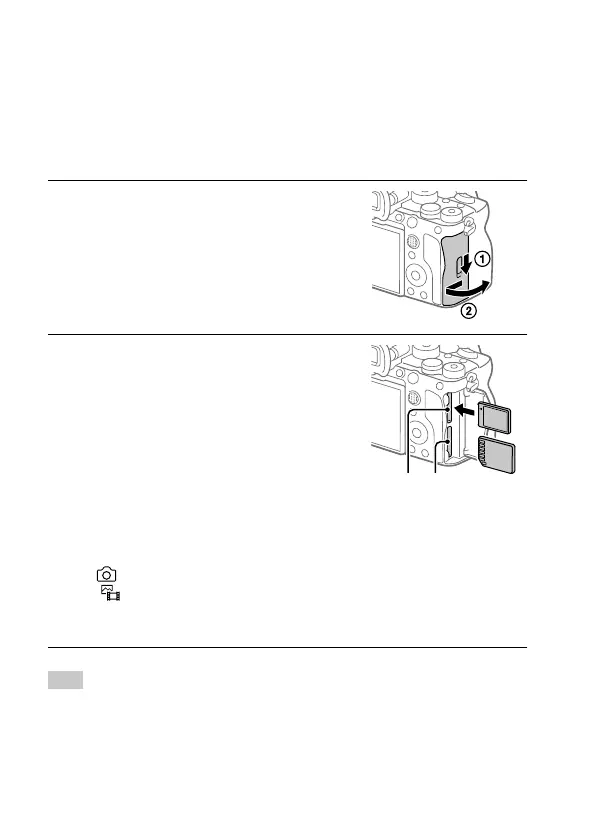
1
Open the memory card cover.
2
Insert the memory card into the
Slot 1.
• Both Slot 1 and Slot 2 support
CFexpress Type A memory cards and
SD memory cards.
• Insert a CFexpress Type A memory card
with the label facing the monitor, and
an SD memory card with the terminal
facing the monitor. Insert the card until
it clicks into place.
• You can change which memory
card slot to use by selecting MENU
(Shooting) [Media]
[
Rec. Media Settings]
[Prioritize Rec. Media]. The Slot 1 is
used in the default settings.
Slot 1 Slot 2
Hint
• When you use a memory card with the camera for the first time, it is
recommended that you format the card on the camera for more stable
performance of the memory card (page 42).



 To Next Page