ILCE-7SM3
5-021-320-41(1)
GB
71
C:\Users\gotanda\Desktop\5021320411ILCE7SM3CEC\01GB-ILCE7SM3CEC\090PAR.indd
DTP data saved: 2020/06/25 15:34
PDF file created: 2020/07/01 15:36
GB
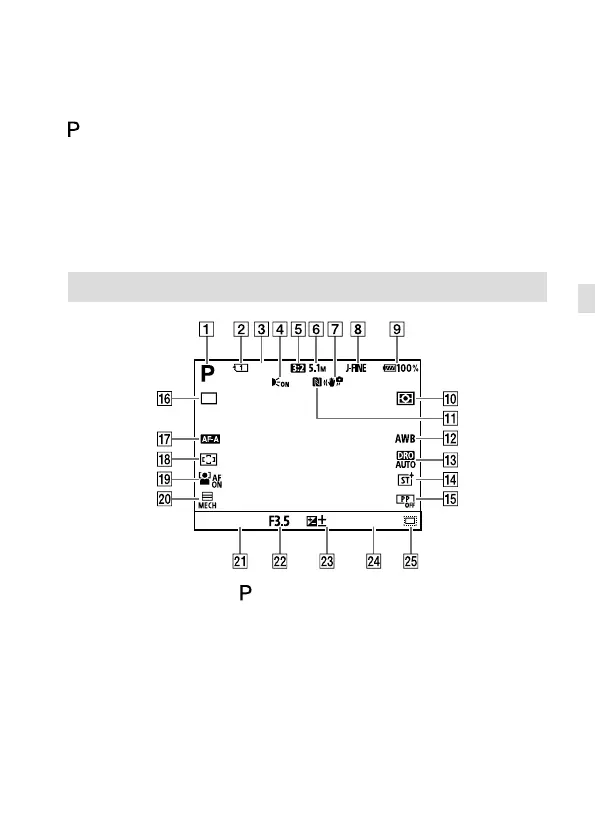
Basic icons
This section describes the screen display when the shooting mode is
(Program Auto).
• The examples are of the display when the screen is in the all-
information display mode.
• The displayed content and positions are for reference only, and may
differ from the actual display. Some icons may not be displayed
depending on the camera settings.
• For other icons, refer to the “Help Guide.”
During still image shooting
699
ISO AUTO
0.01/8
The mode dial is set to (Program Auto).
Number of the memory card slot recording the shooting data
Number of still images that can be recorded on the memory card in
the slot indicated by
Displayed when [AF Illuminator] is set to [Auto] and the camera
detects that the AF Illuminator is required
[Aspect Ratio] is set to [3:2].
[JPEG Image Size] is set to [L: 5.1M].



 To Next Page