EasyManua.ls Logo

Sony AC-V60A - Service Adjustments and Calibration; VTR Output Voltage Calibration; Battery Charging Current Calibration

Sony AC-V60A
14 pages
Print Icon
To Previous Page IconTo Previous Page
Loading...
AC-V60A/V65A
SECTION
7
ELECTRICAL
ADJUSTMENTS
@
First
of
all,
remove
the
MA
Board
from
the
LS
Board,
and
make
the
following
adjustment:
1.
Adjusting
VTR
output
voitage
2.
Adjusting
output
current
|
|
:
1)
Short-circuit
pins
@
amd
©
of
CN201
with
a
wire.
(VTR
1)
Short-circuit
pins
@)
and
@),
and
pins
@
and
©,
respectively
mode)
with
a
wire.
(Charge
mode)
2)
Turn
the
power
of
the
MA
Board
ON.
(Plug
the
power
cord
2)
Connect
an
ammeter
(3
A
class)
and
batteries
(NP
s
series
in
a
receptacle.)
|
such
as
NP-S5S,
or
other
batteries
of
6
to
7
V
open
terminal
©
3)
Adjust
RV202
so
that
the
output
voltage
of
the
connection
voltage)
to
pins
@)
and
@
of
CN201.
cord
is
in
the
limits
of
7.7
+
0.05
V.
3)
Tum
the
power
of
the
MA
Board
os
(Plug
the
EEOUES
cord
4)
Remove
the
short-circuit
wire
from
pins
@
and
©).
ina
receptacle.)
|
4)
Adjust
RV201
so
that
the
charging
current
is
in
the
limits
of
V2
005A;
5)
Disconnect
the
ammeter
and
batteries
from
pins
and
of
CN201.
|
Then
remove
the
short-circuit
wires
.
from
pins
@)
and
@
@
and
pins
@)
and
©
of
CN201.
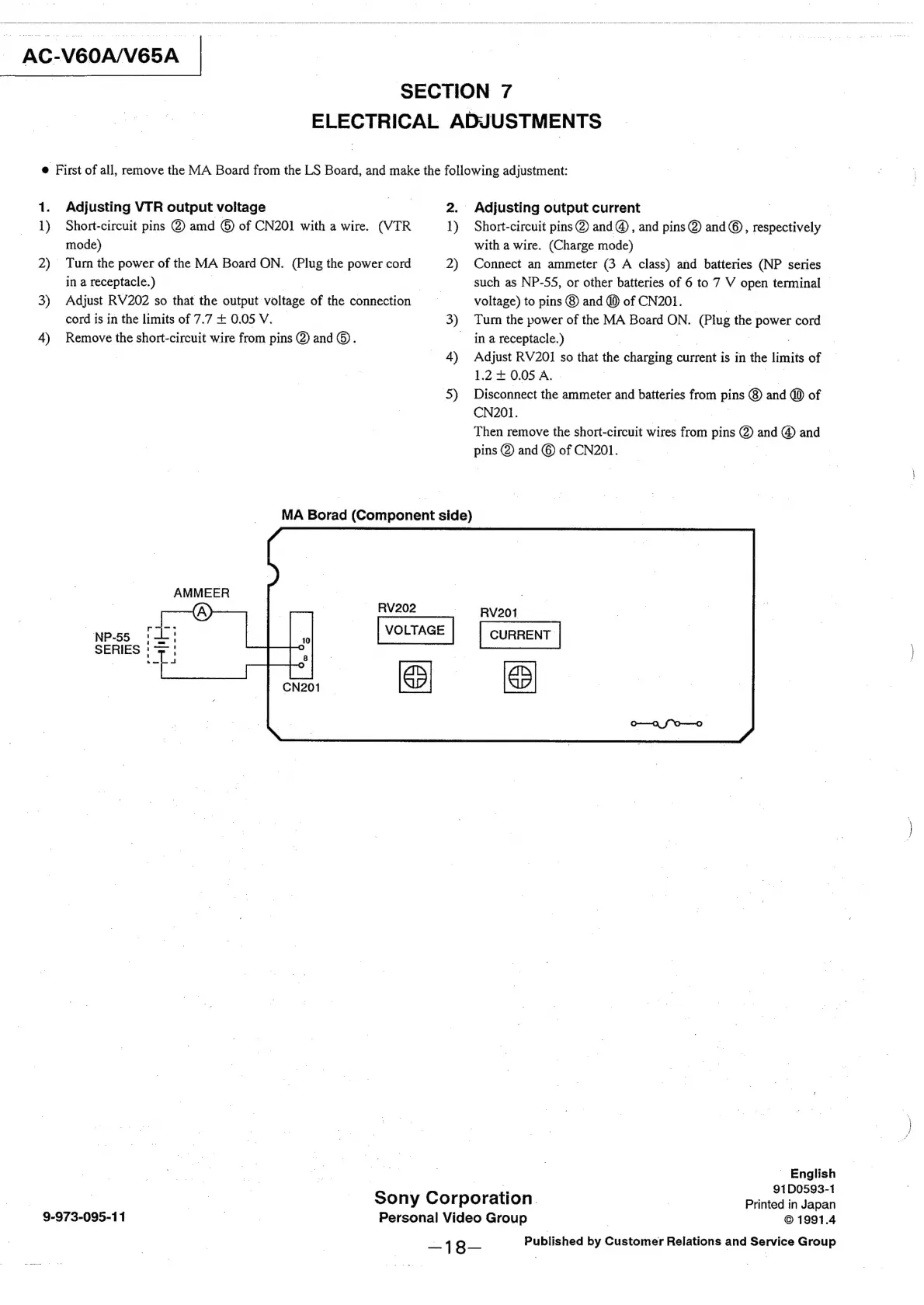
MA
Borad
(Component
side)
AMMEER
~
RV202
RV201
NP-55
1
SERIES
|
~
English
e
91D0593-1
Sony
Corporation.
Printed
in
Japan
9-973-095-11
Personal
Video
Group
©
1991.4
Published
by
Customer
Relations
and
Service
Group

Related product manuals