15
Playback
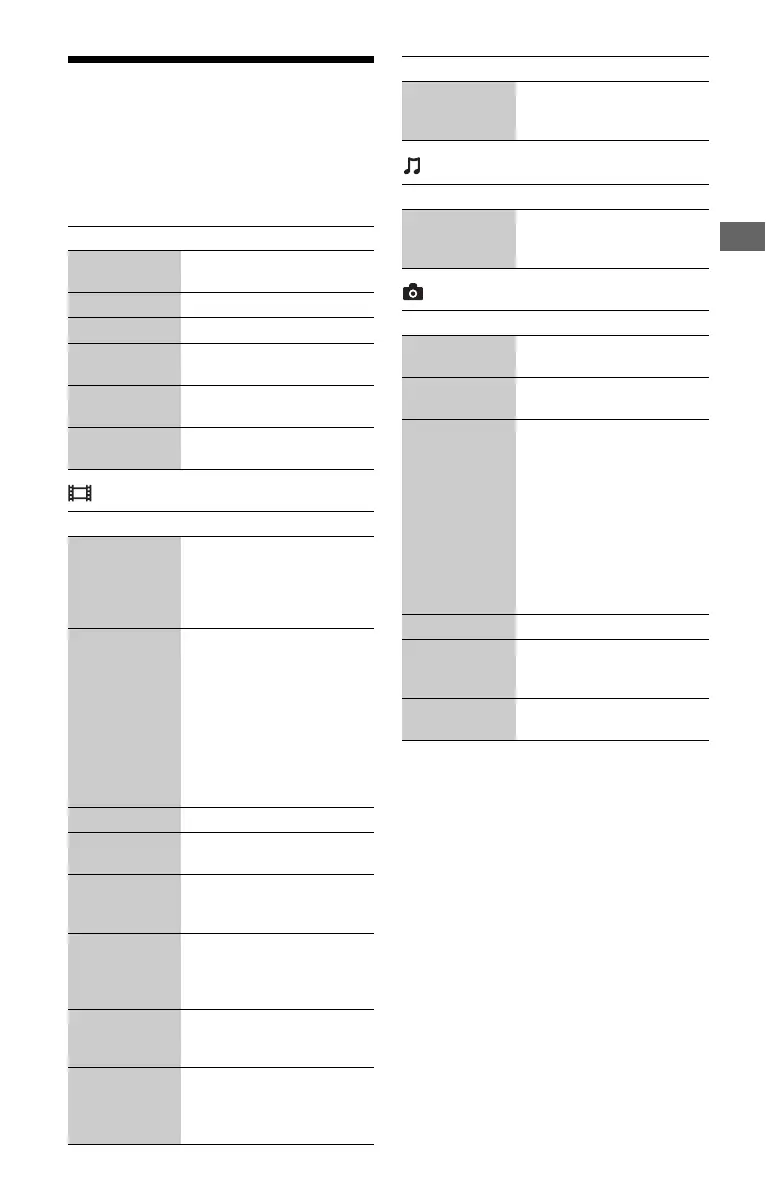
Available Options
Various settings and playback operations are
available by pressing OPTIONS. The
available items differ depending on the
situation.
Common options
[Video] only
[Music] only
[Photo] only
Items Details
[Repeat
Setting]
Sets the repeat mode.
[Favorites List] Displays the Favorites List.
[Play/Stop] Starts or stops the playback.
[Play from
beginning]
Plays the item from the
beginning.
[Add to
Favorites]
Adds Internet content to the
Favorites List.
[Remove from
Favorites]
Removes Internet content
from the Favorites List.
Items Details
[A/V SYNC] Adjusts the gap between
picture and sound, by
delaying the sound output in
relation to the picture output
(0 to 120 milliseconds).
[Video
Settings]
• [Picture Quality Mode]:
Selects the picture settings
for different lighting
environments.
• [BNR]: Reduces the
mosaic-like block noise in
the picture.
• [MNR]: Reduces minor
noise around the picture
outlines (mosquito noise).
[Pause] Pauses the playback.
[Top Menu] Displays the BD’s or DVD’s
Top Menu.
[Menu/Popup
Menu]
Displays the BD-ROM’s
Pop-up Menu or DVD’s
menu.
[Title Search] Searches for a title on BD-
ROMs/DVD VIDEOs and
starts playback from the
beginning.
[Chapter
Search]
Searches for a chapter and
starts playback from the
beginning.
[Angle] Switches to other viewing
angles when multi-angles
are recorded on BD-ROMs/
DVD VIDEOs.
[IP Content
Noise
Reduction]
Adjusts the picture quality of
Internet content.
Items Details
[Add
Slideshow
BGM]
Registers music files in the
USB memory as slideshow
background music (BGM).
Items Details
[Slideshow
Speed]
Changes the slideshow
speed.
[Slideshow
Effect]
Sets the effect for
slideshows.
[Slideshow
BGM]
• [Off]: Turns off the
function.
• [My Music from USB]:
Sets the music files
registered in [Add
Slideshow BGM]. If no
music file is registered,
[(Not registered)] is
displayed.
• [Play from Music CD]:
Sets the tracks in CD-DAs.
[Slideshow] Plays a slideshow.
[Rotate Left] Rotates the photo
counterclockwise by
90 degrees.
[Rotate Right] Rotates the photo clockwise
by 90 degrees.
Items Details



 To Next Page