16
BDP-S5500/BDP-S3500/BDP-S1500
4-549-800-41(1)
master page=left
E:\SONY
DVD\SD140035\4549800411_GB\030STU.fm
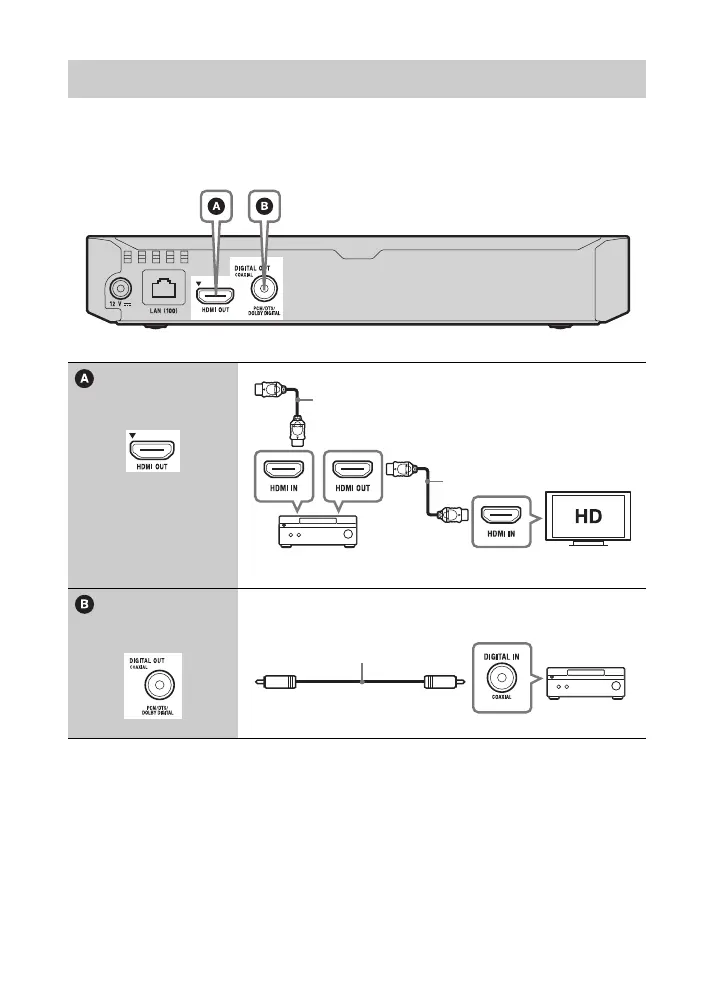
Select one of the following connection methods according to the input jacks on your
AV amplifier (receiver). When you select A or B, make the appropriate settings in
the [Audio Settings] (page 28).
* See “Supplied accessories” (page 37).
Connecting to your AV amplifier (receiver)
t Set [BD Audio MIX Setting] (page 28).
High Speed HDMI Cable*
High Speed HDMI Cable
(not supplied)
Coaxial digital cable
(not supplied)



 To Next Page