27
BDP-S5500/BDP-S3500/BDP-S1500
4-549-800-41(1)
master page=right
E:\SONY
DVD\SD140035\4549800411_GB\060ADJ.fm
Settings and Adjustments
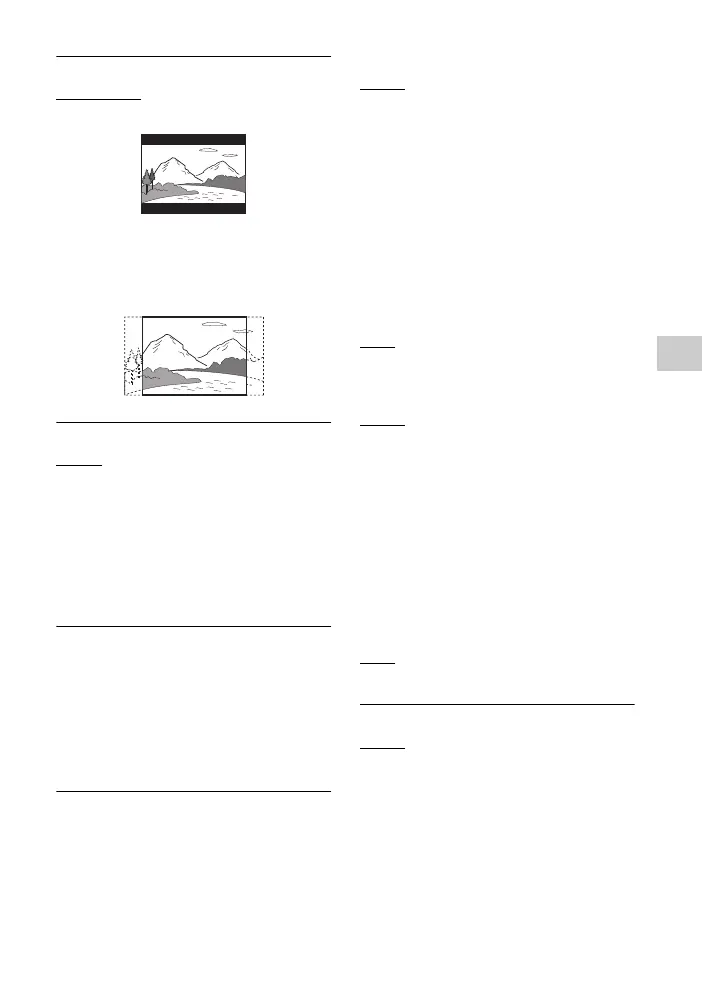
x [DVD Aspect Ratio]
[Letter Box]: Displays a wide picture
with black bands on the top and bottom.
[Pan & Scan]: Displays a full-height
picture on the entire screen, with
trimmed sides.
x [Cinema Conversion Mode]
[Auto]: Normally select this. The player
automatically detects whether the
material is video-based or film-based,
and switches to the appropriate
conversion method.
[Video]: The conversion method suited
for video-based material will always be
selected regardless of the material.
x [Output Video Resolution]
Normally select [Auto]. Select [Original
Resolution] to output the resolution
recorded on the disc. When the
resolution is lower than the SD
resolution, it is scaled up to the SD
resolution.
x [24p Output]
Outputs 24p video signals only when
you connect a 1080/24p-compatible TV
via an HDMI connection and the [Output
Video Resolution] is set to [Auto] or
[1080p].
[BD-ROM 24p Output]
[Auto]: Outputs 1920 × 1080p/24 Hz
video signals only when connecting a
1080/24p-compatible TV using the
HDMI OUT jack.
[On]: Turns on the function.
[Off]: Select this when your TV is not
compatible with 1080/24p video signals.
[DVD-ROM 24p Output]
[Auto]: Outputs 1920 × 1080p/24 Hz
video signals only when connecting a
1080/24p-compatible TV using the
HDMI OUT jack.
[
Off]: Select this when your TV is not
compatible with 1080/24p video signals.
[Data content 24p Output]
[Auto]: Outputs 1920 × 1080p/24 Hz
video signals only when connecting a
1080/24p-compatible TV using the
HDMI OUT jack.
[Off]: Select this when your TV is not
compatible with 1080/24p video signals.
[Network content 24p Output]
[Auto]: Outputs 1920 × 1080p/24 Hz
video signals only when connecting a
1080/24p-compatible TV using the
HDMI OUT jack.
[
Off]: Select this when your TV is not
compatible with 1080/24p video signals.
x [YCbCr/RGB (HDMI)]
[Auto]: Automatically detects the
connected TV type, and switches to the
matching colour setting.
[YCbCr (4:2:2)]: Outputs YCbCr 4:2:2
video signals.
[YCbCr (4:4:4)]: Outputs YCbCr 4:4:4
video signals.
[RGB]: Outputs RGB video signals.



 To Next Page