8
Guide to Parts and
Controls
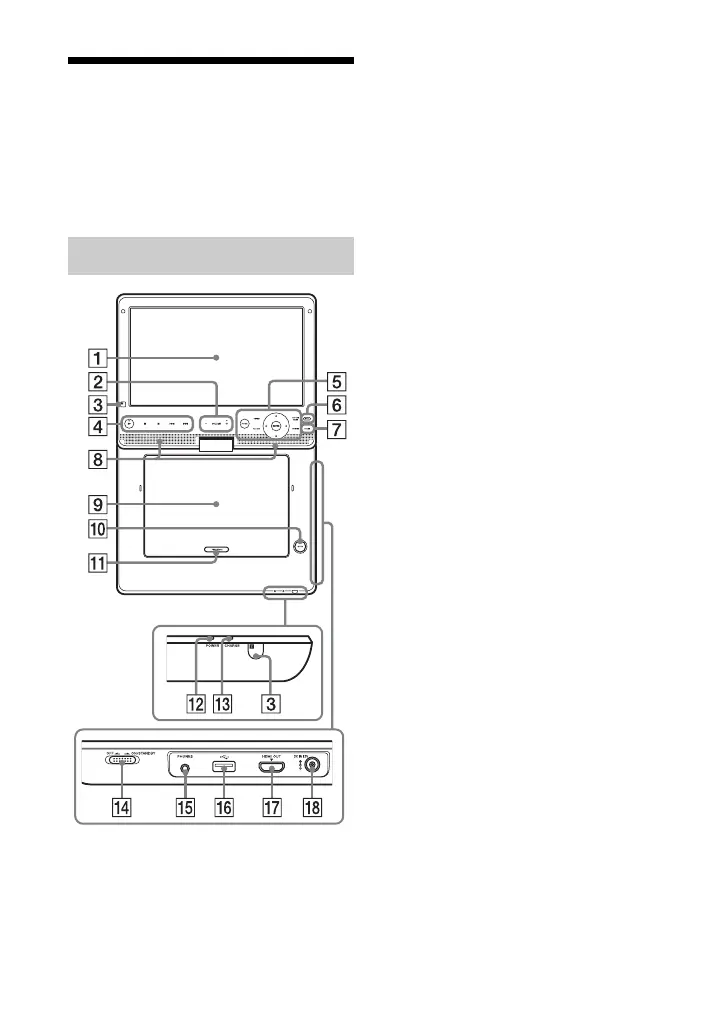
The available functions of the player and
remote differ depending on the disc or the
situation.
z
The VOLUME + and N (play) buttons have a
tactile dot. Use the tactile dot as a reference
when operating the player.
A LCD panel
B VOLUME (sound volume) +/–
Adjusts the volume.
C Remote sensor
D N (play)
Starts or re-starts playback.
X (pause)
Pauses or re-starts playback.
x (stop)
Stops playback and remembers the
stop point (resume point).
The resume point for a title/track is the
last point you played or the last photo
for a photo folder.
./> (previous/next)
Skips to the previous/next chapter,
track, or file.
Only the buttons on the player have
the following functions:
• Fast reverses/fast forwards the disc
when pressed for more than one
second during playback. Each time
you press the button briefly, the
search speed changes.
• Plays in slow motion when pressed
for more than one second in pause
mode.
E HOME
Enters the player’s home menu.
Displays the wallpaper when pressed
on the category icon of the home
menu.
DISPLAY (page 14)
Displays the playback information on
the screen.
POP UP/MENU
Opens or closes the BD-ROM’s Pop-
up Menu, or the DVD’s menu.
OPTIONS (page 15)
The options menu that can be selected
appears on the screen.
Player



 To Next Page