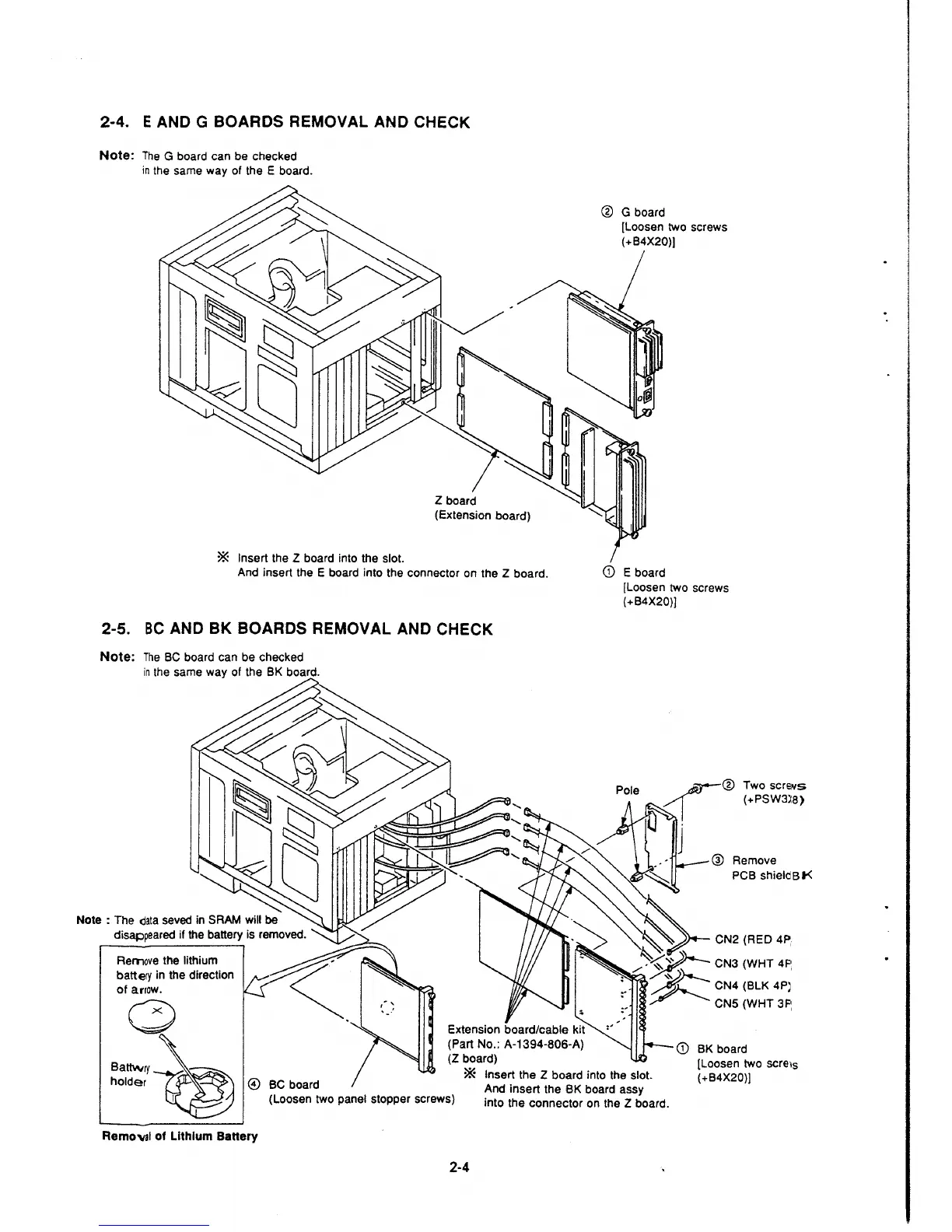
2-4. E AND G BOARDS REMOVAL AND CHECK
Note: The G board can be checked
in the same way of the E board.
* Insert the Z board into the slot.
Z board
(Extension board)
And insert the E board into the connector on the Z board.
2-5. BC AND BK BOARDS REMOVAL AND CHECK
Note: The BC board can be checked
in the same way of the BK board.
Note : The data seved in SAAM win be
disappeared if the battery is removed.
Remove the lithium
battery in the direction
of arrow.
0 Extension board/cable kit
(Part No.: A-1394-806-A)
(Z board)
® G board
[Loosen two screws
(+B4X20)]
CD E board
[Loosen two screws
(+B4X20)]
Two
SCr€'11S
(+PSW3l8)
@ Remove
PCB shieldBt<
~CN2(RED4P
/ ~D>-- CN3 (WHT 4P:
~>--
.
~~
. CN4 (BLK 4PJ
;_,IP' ..........._ CNS (WHT 3P:
BK board
Battwry~~
holder~
© BC board
* Insert the Z board into the slot.
[Loosen two
screis
(+B4X20)]
(Loosen two panel stopper screws)
And insert the BK board assy
into the connector on the
Z board.
Remo"al of Lithium Battery
2-4







 To Next Page