EasyManua.ls Logo

Sony BVU-950 - Page 69

Sony BVU-950
92 pages
Print Icon
To Next Page IconTo Next Page
To Previous Page IconTo Previous Page
Loading...
machine
conditions
for
adjustment
spec.
adjustment
Step
4.
TP401/DT-21(H-4)
@
RV305/DT-21(G-1)
«STOP
mode
DC
levei=0+0.1
Vdc
Step
5.
-Play
back
the
monoscope
seg-
|
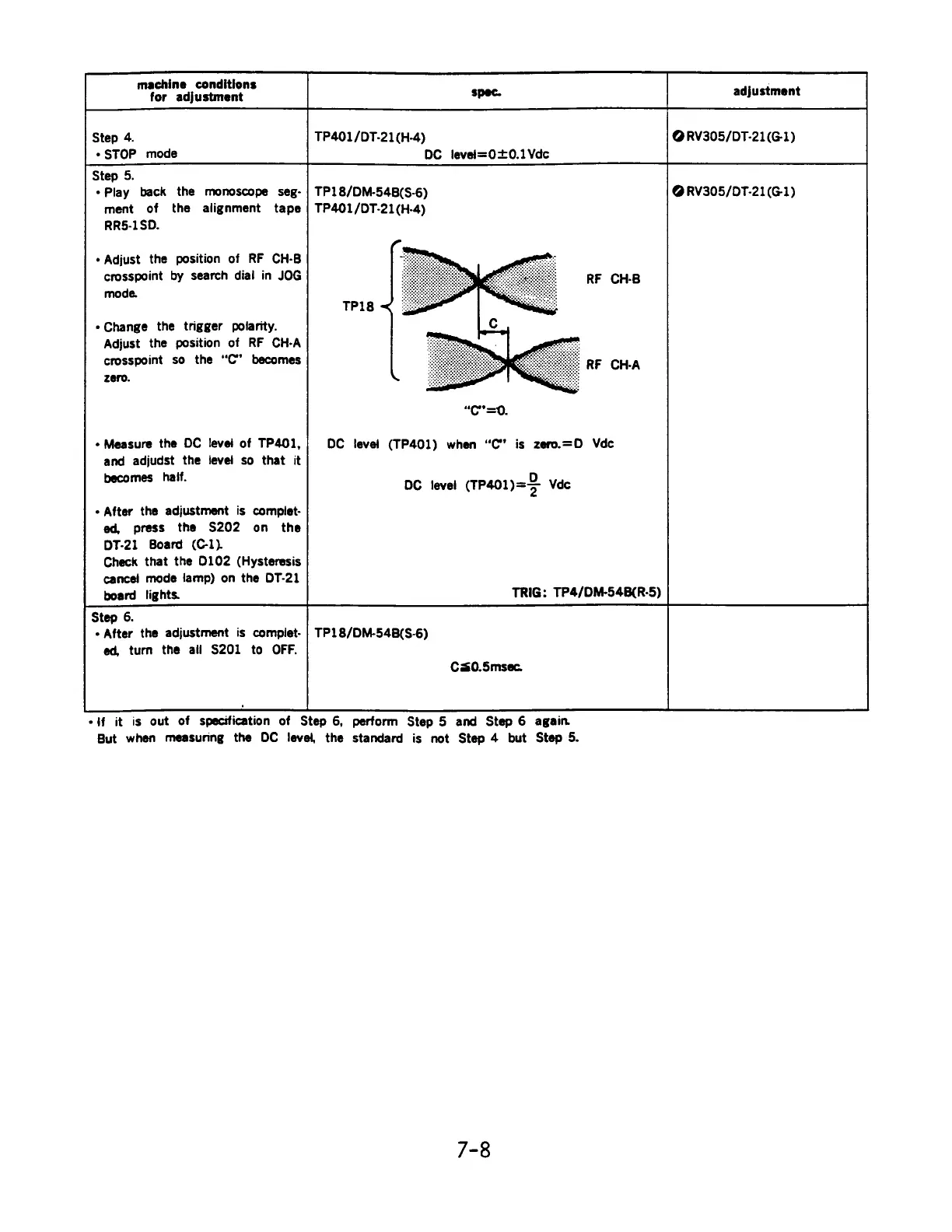
TP18/DM-54B(S-6)
@
RV305/DT-21(G-1)
ment
of
the
alignment
tape
|
TP401/DT-21(H-4)
RR5-1SD.
«Adjust
the
position
of
RF
CH-B
crosspoint
by
search
dial
in
JOG
mode.
«Change
the
trigger
polarity.
Adjust
the
position
of
RF
CH-A
crosspoint
so
the
“C’
becomes
zero.
¢
Measure
the
OC
levei
of
TP401,
and
adjudst
the
level
so
that
it
becomes
haif.
e
After
the
adjustment
is
complet-
ed,
press
the
S202
on
the
DT-21
Board
(C-1).
Check
that
the
0102
(Hysteresis
cance}
mode
lamp)
on
the
DOT-21
board
lights.
~~
TPI8
«<
3
“Cc”
=0.
DC
level
(TP401)
when
“C”
is
zero.=D
Vdc
DC
level
(TP401)
=>
Vde
TRIG:
TP4/DM-54B(R-5)
Step
6.
¢
After
the
adjustment
is
compilet-
ed,
turn
the
all
S201
to
OFF.
TP18/DM-54B(S-6)
C30.5msec.
eff
it
is
out
of
specification
of
Step
6,
perform
Step
5
and
Step
6
again
But
when
measuring
the
DC
level,
the
standard
is
not
Step
4
but
Step
5.
7-8

Related product manuals