CCB-WD1
4-735-433-11(1)
GB
5
C:\4735433111\4735433111CCBWD1CEE\01GB-CCBWD1CEE\01GB.indd
DTP data saved: 2017/11/29 16:03
PDF file created: 2017/11/29 16:09
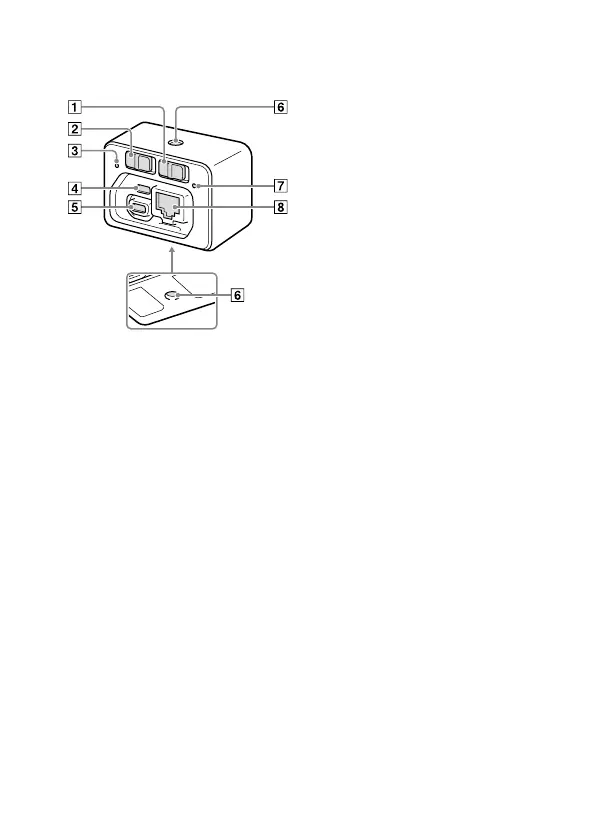
Identifying parts
ON/OFF (Power) switch
This switch turns the power on
or off.
MASTER/CLIENT (Master/
Client) switch
Set this switch to “MASTER”
for one of the camera control
boxes, and to “CLIENT” for the
others.
Access lamp
Micro USB connector
Use this connector to connect
the product to the AC Adaptor
(supplied).
Multi terminal
Use this terminal to connect
the product to a camera.
Tripod socket hole
Use a tripod with a screw less
than 5.5mm (7/32inches)
long. Otherwise, you cannot
firmly secure the product, and
damage to the product may
occur.
Power lamp
LAN terminal
Use this terminal to connect
the product to a computer or a
switching hub.










 To Next Page