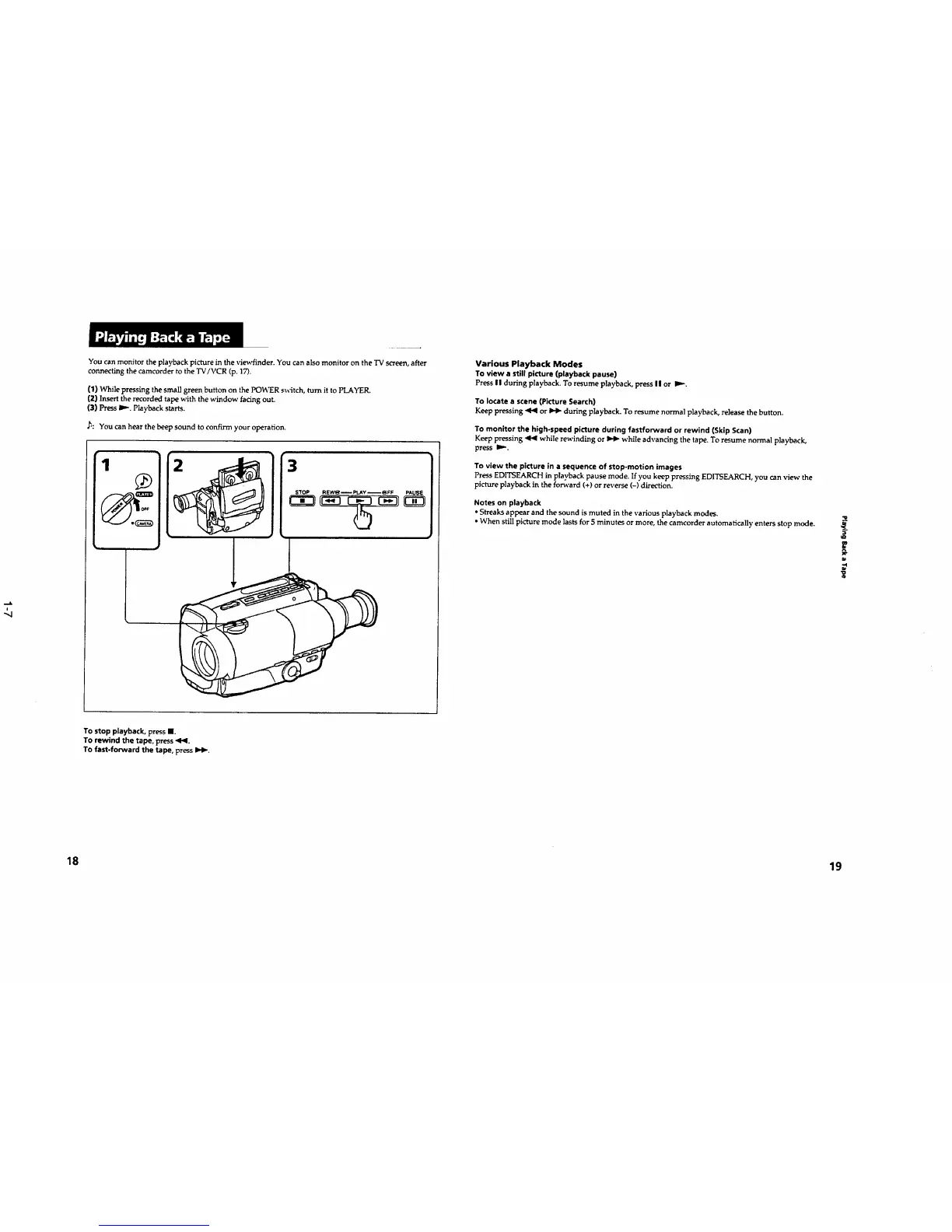
You can monitor the playback picture in the viewfinder. You can also monitor on the TV screen, after
connecting the camcorder to the TV/VCR (p. 17).
{1) While pressing the small green button on the POWER s_sitch, turn it to PLAYER.
(2) Insert the recorded tape with the window facing out.
(3) Press I_-. Playback starts.
,h: You can hear the beep sound to confirm your operation.
1
O_F
3
STOP REW_ i PLAY _FF PAUSE
To stop playback, press II.
TO rewind the tape, press <l<l.
TO fast-forward the tape, press IH,-.
Various Playback Modes
To view a still picture (playback pause)
Press II during playback. To resume playback, press II or D,,-.
To locate a scene (Picture Search)
Keep pressing '41<1or _ during playback. To resume normal playback, release the button.
TO monitor the high-speed picture during fastforward or rewind (Skip Scan)
Keep pressing <1<1 while rewinding or _ while advancing the tape. To resume normal playback,
press II,.-.
To view the picture in a sequence of stop-motion images
Press EDITSEARCH in playback pause mode. If you keep pressing EDITSEARCH, you can view the
picture playback in the forward (+) or reverse (-) direction.
Notes on playback
• Streaks appear and the sound is muted in the various playback modes.
• When still picture mode lasts for 5 minutes or more, the camcorder automatically enters stop mode.
€€
18 19










 To Next Page