o_
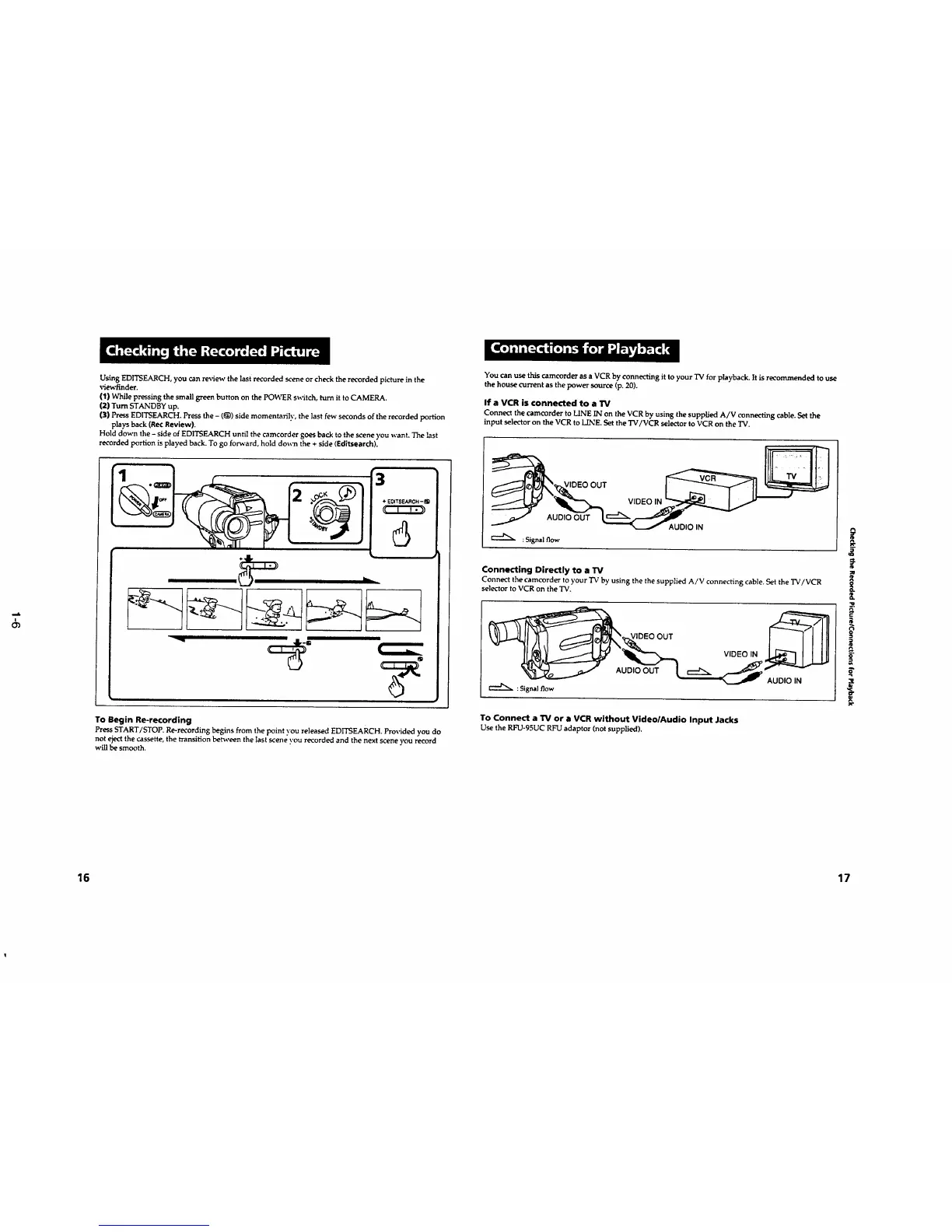
UsingED1TSEARCH,youcan reviewthe last recorded sceneorcheck the recorded picture in the
viewfindec.
(1) Whilepressing the smallgreenbutton on the POWERswitch, turnit toCAMERA.
(2) TurnSTANDBYup.
(3) PressEDITSE.M_CH.Pressthe- (g)) side momentari]y, the lastfew seconds ofthe recordedportion
plays back(Re¢Review}.
Hold down the- side ofEDITSEARCHuntilthe camcorder goes backtothe scene you want. The last
recordedportion is played back.Togo forward,hold down the + side (Editsearch).
3
÷E0tTSF3_CH-
6
To Begin Re-recording
Press START/STOP Re-recording begins from the point you released EDITSEARCH. Provided you do
not eject the cassette, the transition between the last scene you recorded and the next scene you record
will be smooth.
You can use this camcorder as a VCR by connecting it to your TV for playback. It is recommended to use
the house current as the power source (p. 20).
If a VCR is connected to a TV
Connect the camcorder to LINE IN on the VCR by using the supplied A/V connecting cable. Set the
input selector on the VCR to LINE. Set the TV/VCR selector to VCR on the 'IV.
,--,.,..
OUT
AUDIO OUT
:Signal flow
VIDEO IN
AUDIO IN
Connecting Directly to a 13/
Connect the camcorder to your "IVby using the the supplied A/V connecting cable. Set the TV/VCR
selector to VCR on the 'IV.
l
li
;
: Signalflow
To Connect a TV or a VCR without Video/Audio Input Jacks
Use the RFU°95UC RFU adaptor (not supplied).
16
17










 To Next Page