14
Installing the battery pack
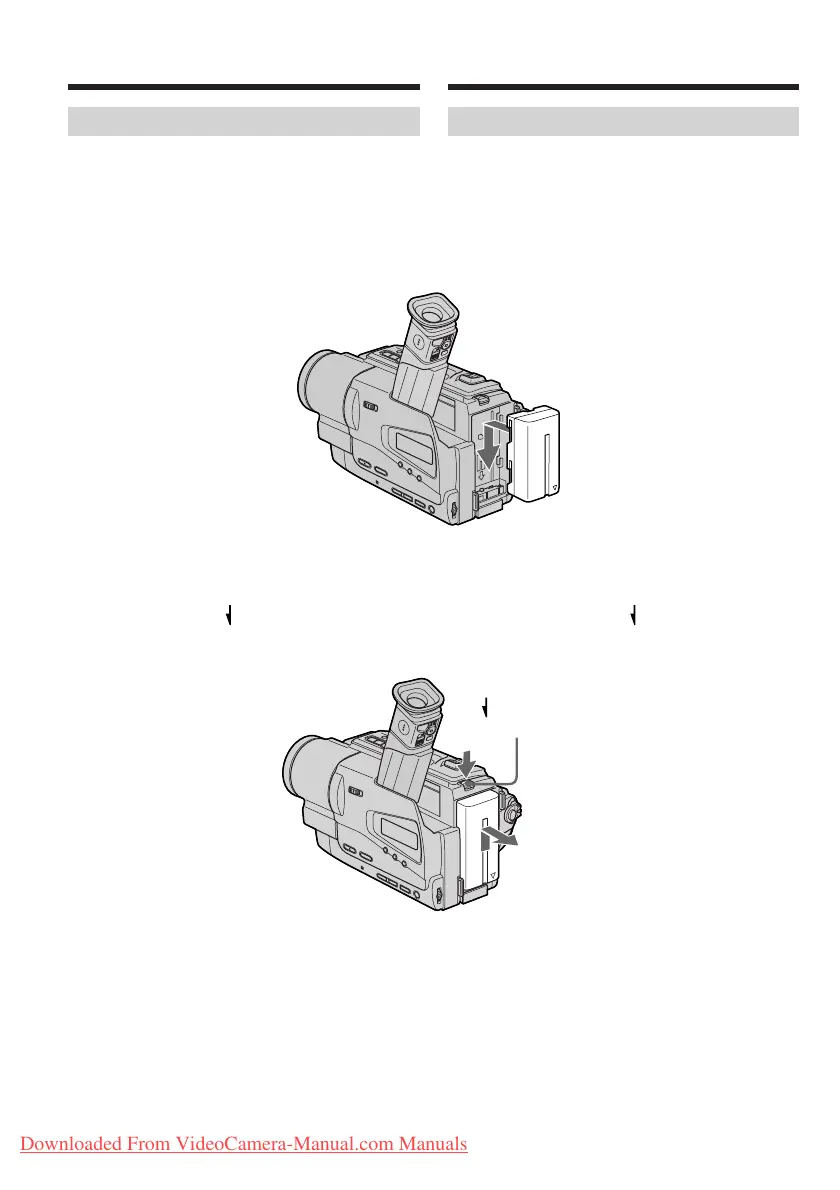
Install the battery pack to use your camcorder
outdoors.
Slide the battery pack down until it clicks.
To remove the battery pack
Slide the battery pack out in the direction of the
arrow while pressing BATT RELEASE down.
Step 1 Preparing the
power supply
Установка батарейного блока
Установите батарейный блок для того, чтобы
использовать Вашу видеокамеру вне
помещения.
Передвиньте батарейный блок вниз, чтобы он
защелкнулся на месте.
Для снятия батарейного блока
Передвиньте батарейный блок в направлении
стрелки, нажав кнопку BATT RELEASE
вниз.
Пункт 1
Подготовка
источника питания
BATT RELEASE
Downloaded From VideoCamera-Manual.com Manuals








 To Next Page