66
WARNING
The battery may explode if mistreated. Do not
recharge, disassemble, or dispose of in fire.
Changing the lithium battery
When replacing the lithium battery, keep the
battery pack or other power source attached.
Otherwise, you will need to reset the date, time
and other items in the menu system retained by
the lithium battery.
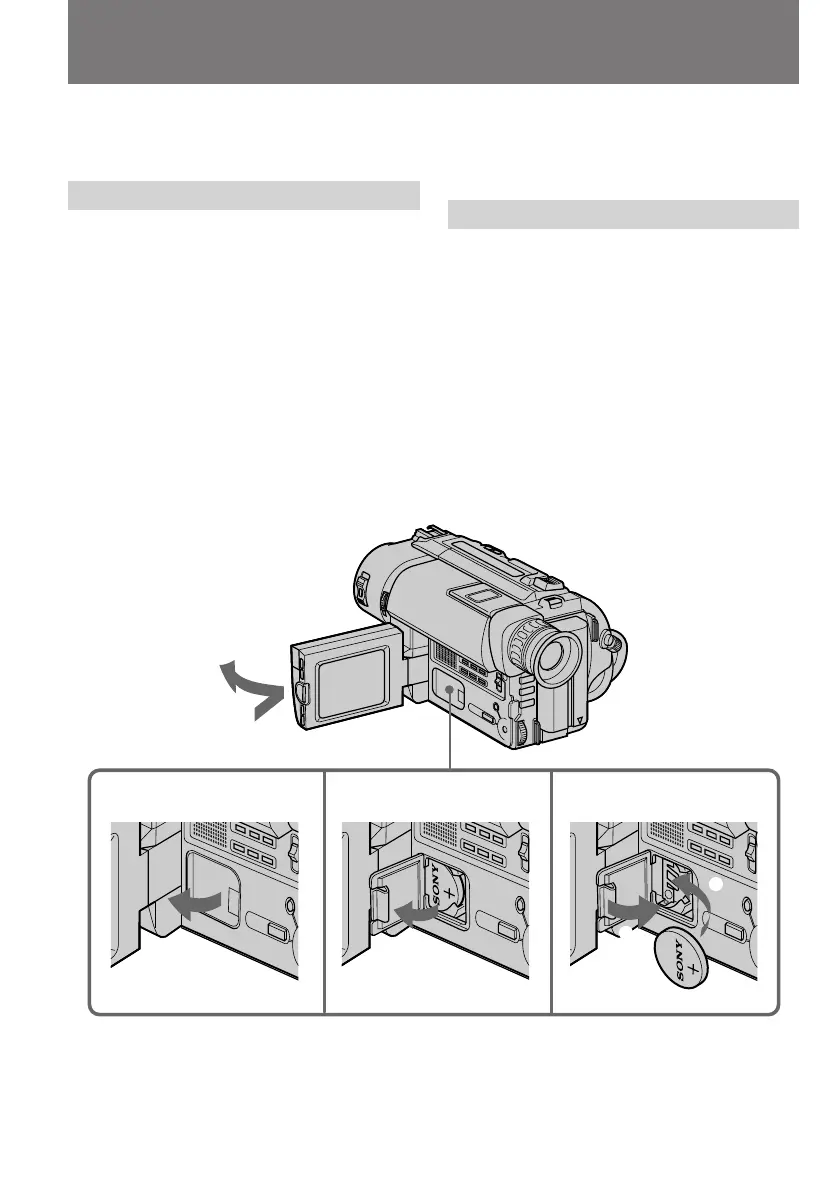
(1)Open the LCD panel and open the lid of the
lithium battery compartment.
(2)Push the lithium battery down once and pull
it out from the holder.
(3)Install the lithium battery with the positive (+)
side facing out. Close the lid.
Changing the lithium battery
in the camcorder
C
R
2
0
2
5
2
1
C
R
2
0
2
5
1
3
1
2
ПРЕДУПРЕЖДЕНИЕ
При неправильном обращении батарейка
может взорваться. Не перезаряжайте, не
разбирайте и не бросайте батарейку в огонь.
Замена литиевой батарейки
При замене литиевой батарейки, оставьте
подсоединенным батарейный блок или
другой источник питания. В противном случае
Вам понадобится снова устанавливать дату,
время и другие установки в системе меню,
хранимые посредством литиевой батарейки.
(1)Откройте панель ЖКД и откройте крышку
отсека литиевой батарейки.
(2)Нажмите батарейку вниз и вытащите ее из
держателя.
(3)Установите литиевую батарейку
положительной (+) стороной, обращенной
наружу. Закройте крышку.
Замена литиевой батарейки в
видеокамере










 To Next Page