EasyManua.ls Logo

Sony CDP-CX205 - Page 9

Sony CDP-CX205
18 pages
Print Icon
To Next Page IconTo Next Page
To Previous Page IconTo Previous Page
Loading...
je
When
you
turn
off
the
player
by
pressing
the
POWER
switch
(standby
mode)
The
player
remembers
the
last
playing
disc
and
the
play
mode
(Continuous,
Shuffle
(see
page
12)
or
.
Program
(see
page
13)).
When
you
turn
on
the
player
again,
therefore,
the
player
plays
the
same
disc
in
the
same
play
mode.
Note
that
the
player
does
not
remember
this
information,
if
you
turn
off
the
player
by
pressing
the
power
switch
of
the
amplifier
or
receiver
while
the
AC
power
cord
is
connected
to
the
switched
AC
outlet
of
the
amplifier
or
receiver.
|
Basic
Operations
Press
ENTER
to
start
playing.
5
The
selected
disc
is
set
to
the
playing
position,
and
the
player
plays
all
the
discs
from
the
selected
one
(ALL
DISCS)
or
all
the
-
tracks
once
(1
DISC).
Adjust
the
volume
on
the
amplifier.
Display
information
while
playing
a
disc
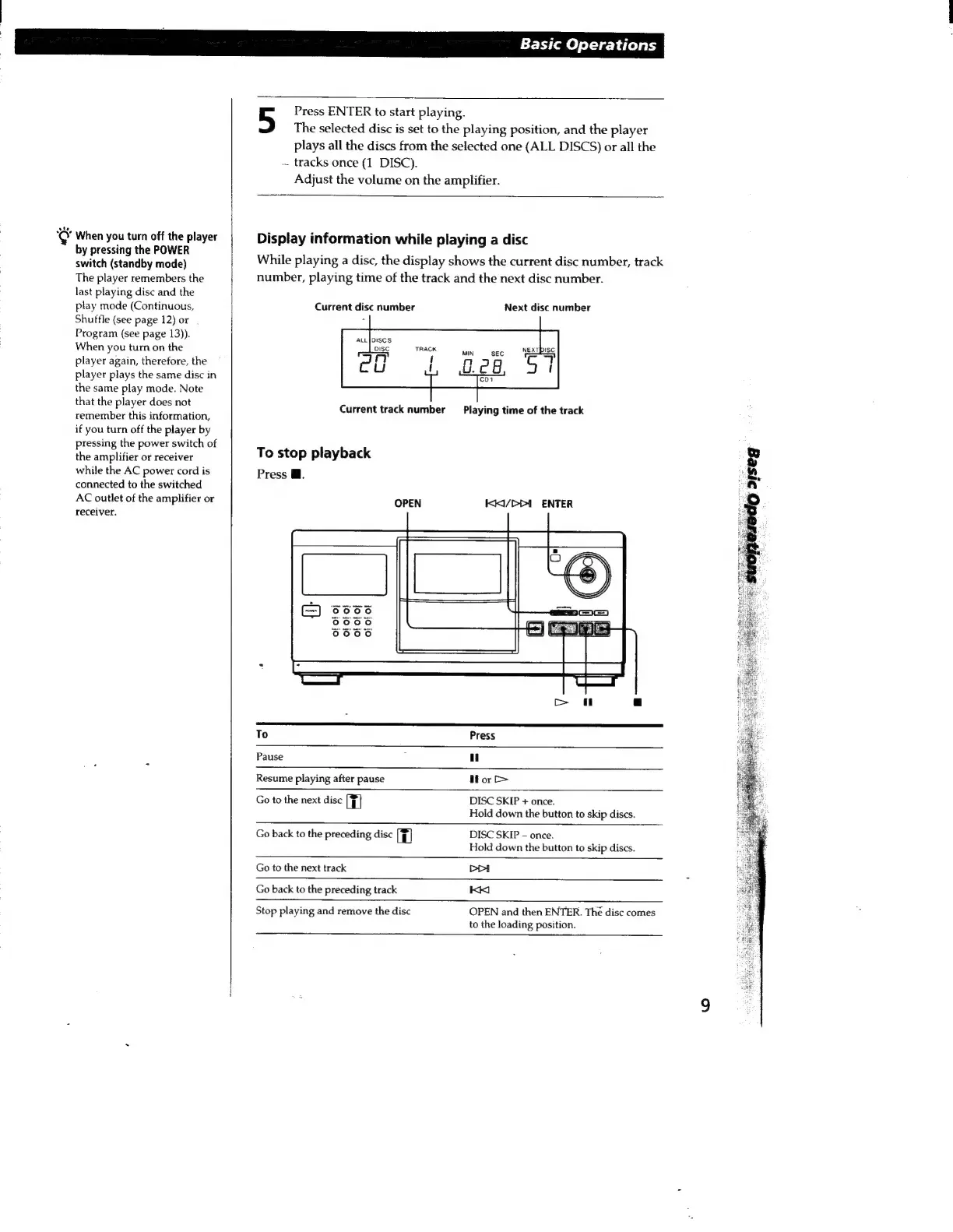
While
playing
a
disc,
the
display
shows
the
current
disc
number,
track
number,
playing
time
of
the
track
and
the
next
disc
number.
Current
disc
number
Next
disc
number
ALL
[DISCS
Current
track
number
Playing
time
of
the
track
To
stop
playback
Press
M.
OPEN
KKI/bbi
ENTER
To
Press
Pause
i
u
Resume
playing
after
pause
H
or
©
Go
to
the
next
disc
il
DISC
SKIP
+
once.
Hold
down
the
button
to
skip
discs.
DISC
SKIP
-
once.
Go
back
to
the
preceding
disc
H
Hold
down
the
button
to
skip
discs.
Go
to
the
next
track
DA
Go
back
to
the
preceding
track
KK
OPEN
and
then
ENTER.
The
disc
comes
to
the
loading
position.
Stop
playing
and
remove
the
disc

Related product manuals