23
CDX-5V661/5V661A/5V661D/5V661S
Press 2 key r R Press 1 key
Press 2 key r R Press 1 key
Press 2 key r R Press 1 key
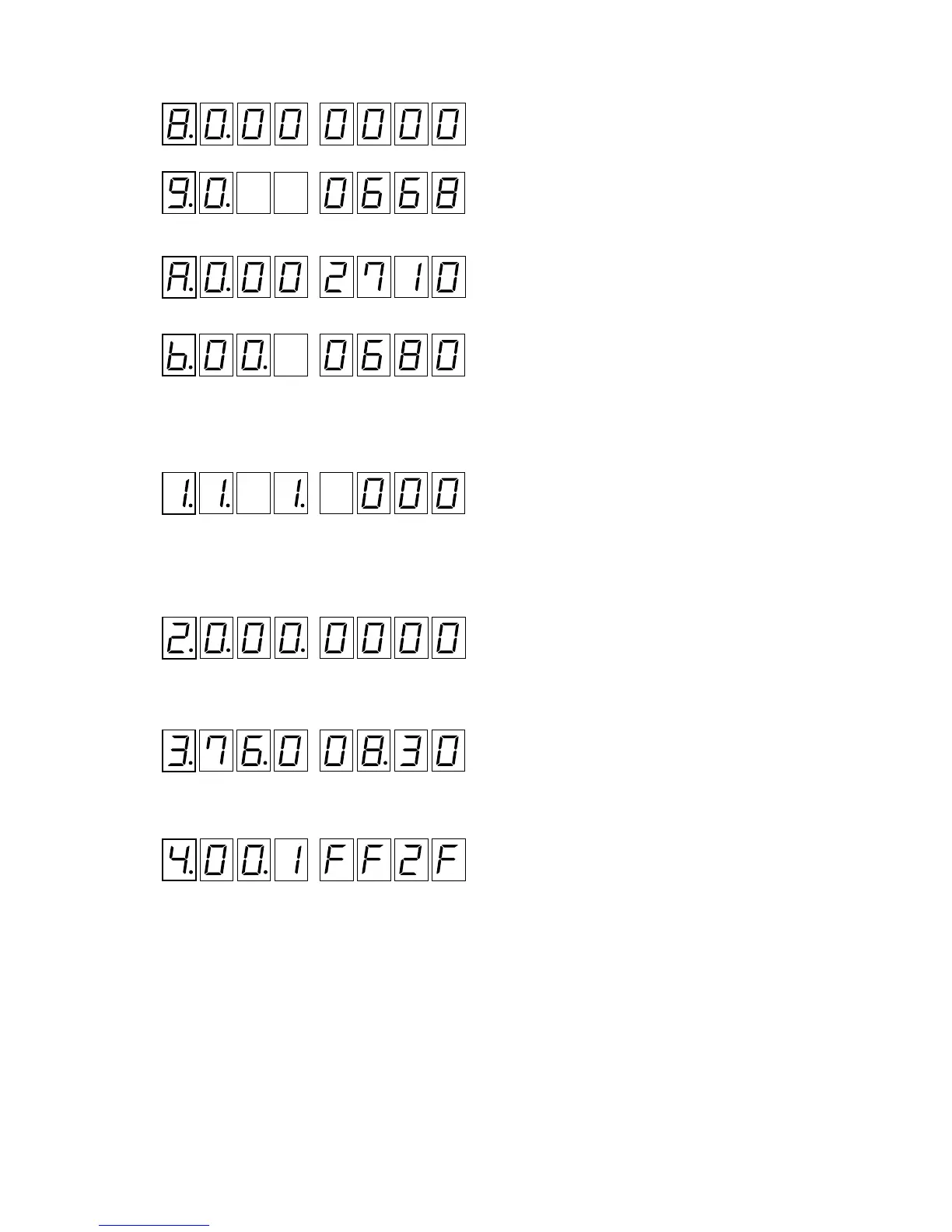
Normal Operation Check (See “Display List” on page 18 and 19)
(Example)
1. Execution mode
2. Press 3 key, and load a disc. (See “Disc Loading Method” on page 20)
3. Press qh key to check the DTMS in the PLAY status
4. Press other keys to check each operation.
5. Press qh key (STOP).
6. Press 2 key to enter the servo information mode 1.
7. Press qh key to check the servo information 1 in the PLAY status.
8. Press qh key (STOP).
9. Press 2 key to enter the servo information mode 2.
10. Press qh key to check the servo information 2 in the PLAY status.
11. Press qh key (STOP).
12. Press 2 key to enter the servo information mode 3.
13. Press qh key to check the servo information 3 in the PLAY status.
14. The check results of servo information 1-3 can be confirmed with the MODE LED.
: Line 2 displa


 To Next Page