26
CDX-5V661/5V661A/5V661D/5V661S
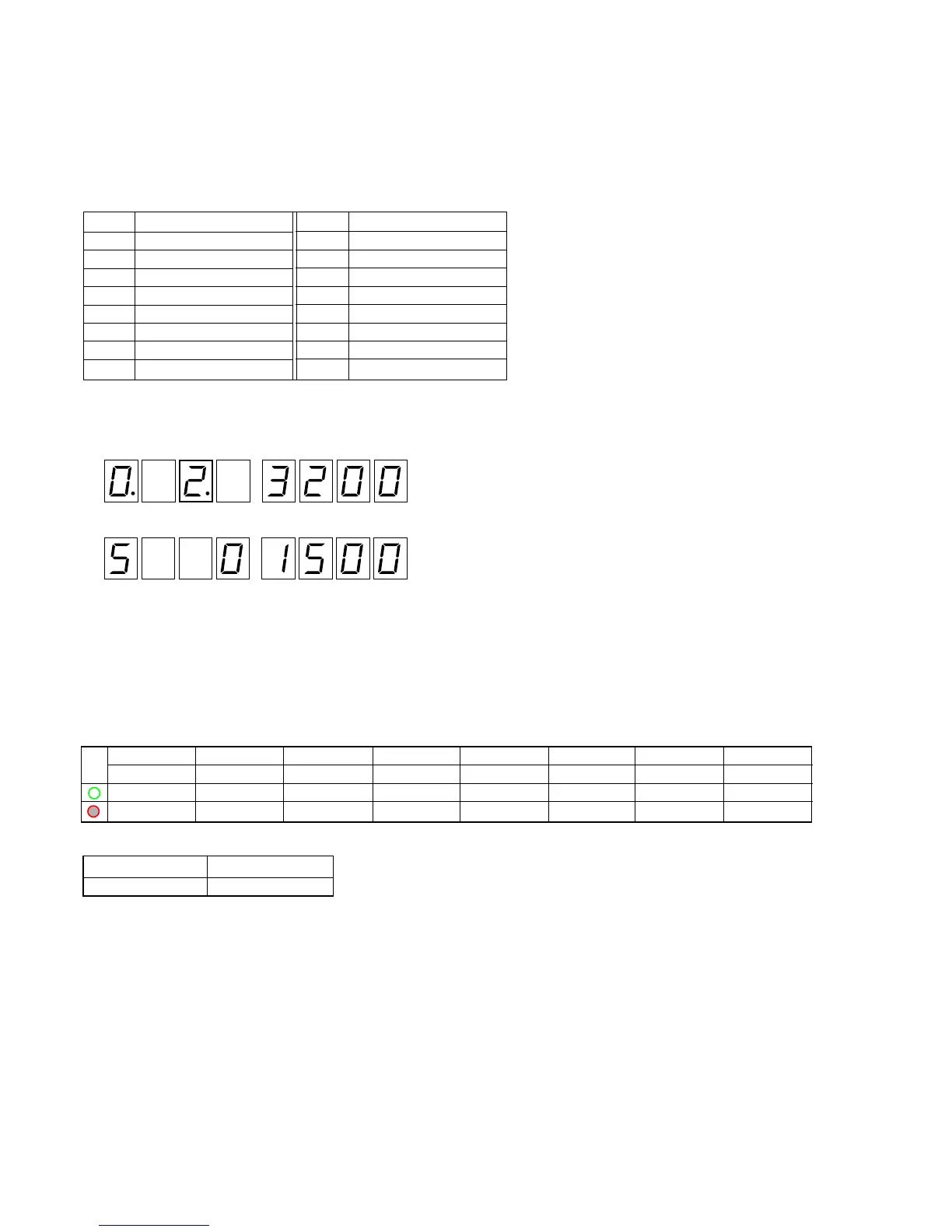
MODE LED display
L1 L2 L3 L4 L5 L6 L7 L8
––– ––– ––
––– ––– ––
––– ––– ––
* The check results of each key cannot be confirmed with the MODE LED.
How to enter the Check mode
1. Rotating the rotary switch, adjust the display (7 Seg LED) to “2” (third place).
After 2 or 3 seconds, the display will change to the execution mode.
2. The display mode number can be changed by pressing the 1 and 2 keys.
(See “Example” in step 2 in the Normal mode on page 22 and 23)
3. Press 3 and 4 keys to check manually the elevator motor operation.
4. Press 7 and 8 keys to check manually the loading motor operation.
5. Press qa and qs keys to check manually the divider motor operation.
6. The linear position can be adjusted by pressing qh key.
For the adjusted values and adjustment results, see “Display List” (page 18 and 19).
3. Mechanism Check Mode (See “Display List” on page 18 and 19)
This mode can adjust the linear position and check manually the operation of the elevator motor, loading motor, and divider motor.
Also, the disc can be ejected forcibly by moving each motor manually.
However, manual operation could destroy the mechanism depending on the mechanical position, thus requiring extreme care.
Push key (execution key) assignment
: Software version displa


 To Next Page