37
CDX-5V661/5V661A/5V661D/5V661S
7. DIAG Mode (See “Display List” on page 18 and 19)
This mode performs the following operation:
• Error history display
• 50 history data can be checked, starting from the latest data.
• Error history clear
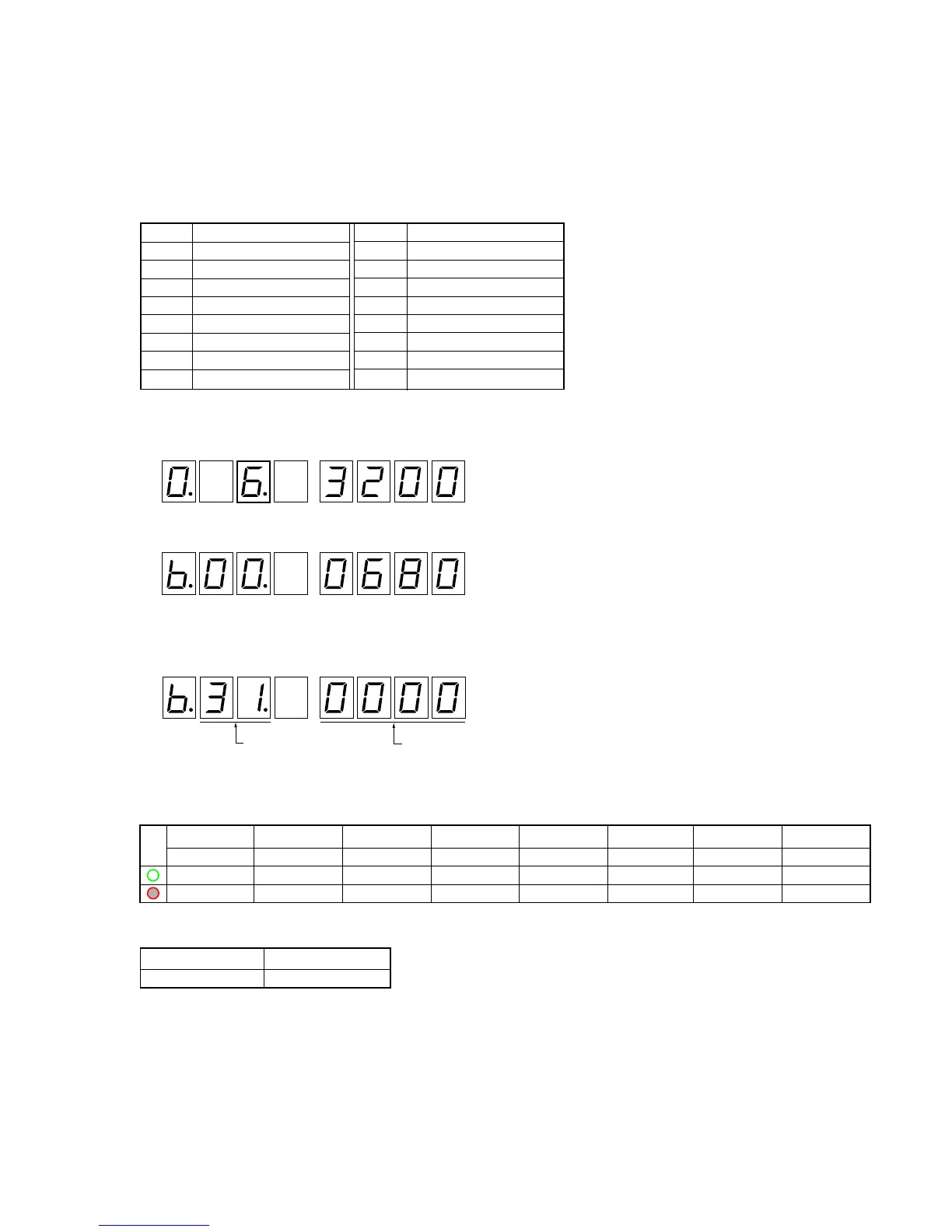
Push key (execution key) assignment
How to enter the Check mode
1. Rotating the rotary switch, adjust the display (7 Seg LED) to “6” (third place).
After 2 or 3 seconds, the display will change to the execution mode.
2. The display mode number can be changed by pressing the 1 and 2 keys.
(See “Example” in step 2 in the Normal mode on page 22 and 23)
3. Press 5 and 6 keys to read the error history and error code.
4. Press qh key to clear the error history.
MODE LED display
Default display mode
Key Description
1 DISP –
2 DISP +
3 –
4 –
5 ERROR HISTORY –
6 ERROR HISTORY +
7 –
8 –
Key Description
9 –
0 –
qa –
qs –
qd –
qf –
qg –
qh ERROR HISTORY CLEAR
: Software version displa


 To Next Page