5
wa Tasti DISC/PRESET(+/–)
10, 12
14, 15, 18
9, 11, 12, 13, 17, 19, 22, 23
ws Tasti SEEK (–/+)
9
14, 16
9, 11, 12, 13, 19, 21, 22, 23
I tasti del telecomando a scheda
corrispondenti a quelli dell’apparecchio
controllano le stesse funzioni.
1 Tasto DSPL
2 Tasto MENU
3 Tasto SOURCE
4 Tasti SEEK (</,)
5 Tasto SOUND
6 Tasto OFF
7 Tasti VOL (–/+)
8 Tasto MODE
9 Tasto LIST
q; Tasti DISC/PRESET (M/m)
qa Tasto ENTER
qs Tasto ATT
Nota
Se l’apparecchio viene spento premendo (OFF) per 2
secondi, non sarà possibile farlo funzionare con il
telecomando a scheda a meno che non sia premuto
(SOURCE) sull’apparecchio o venga prima inserito un
disco per attivare il lettore.
Suggerimento
Per i dettagli su come sostituire le batterie, fare
riferimento alla sezione relativa alla “Sostituzione della
batteria al litio” (pagina 24).
AF
TA
O
FF
D
S
MENU
LIST
SOUND
ENTER
D
I
S
C
/
P
R
E
S
E
T
SEEKSEEK
DISPLAY
O
P
E
N
SC
R
O
LL
PTY
(SEEK)
(–): per
selezionare
verso
sinistra/
.
(SEEK)
(+): per
selezionare
verso
destra/>
(DISC/PRESET)
(+): per selezionare
verso l’alto
Nel modo menu, i tasti che è possibile selezionare,
fra questi quattro, sono indicati con il simbolo “ M”
nel display.
(DISC/PRESET)
(–): per selezionare verso il basso
CD/MD
RADIO
MENU
CD/MD
RADIO
MENU
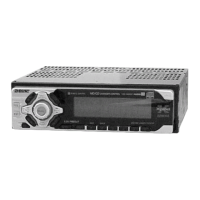
Telecomando a scheda RM-X114
(opzionale)
DISC
–
ATTOFF
DSPL MODE
SOURCE
DISC
+
VOL
+
–
PRESET
+
SEEK
+
SEEK
–
PRESET –
SOUND
E
N
TE
R
MENU
LIST


 To Next Page