6
Location of controls and basic operations
Main unit
Card remote commander
RM-X156
This section contains instructions on the location
of controls and basic operations. For details, see
the respective pages.
For optional device (CD/MD changer, etc.)
operation, see “Using optional equipment” on
page 11.
The corresponding buttons on the card remote
commander control the same functions as those
on the unit.
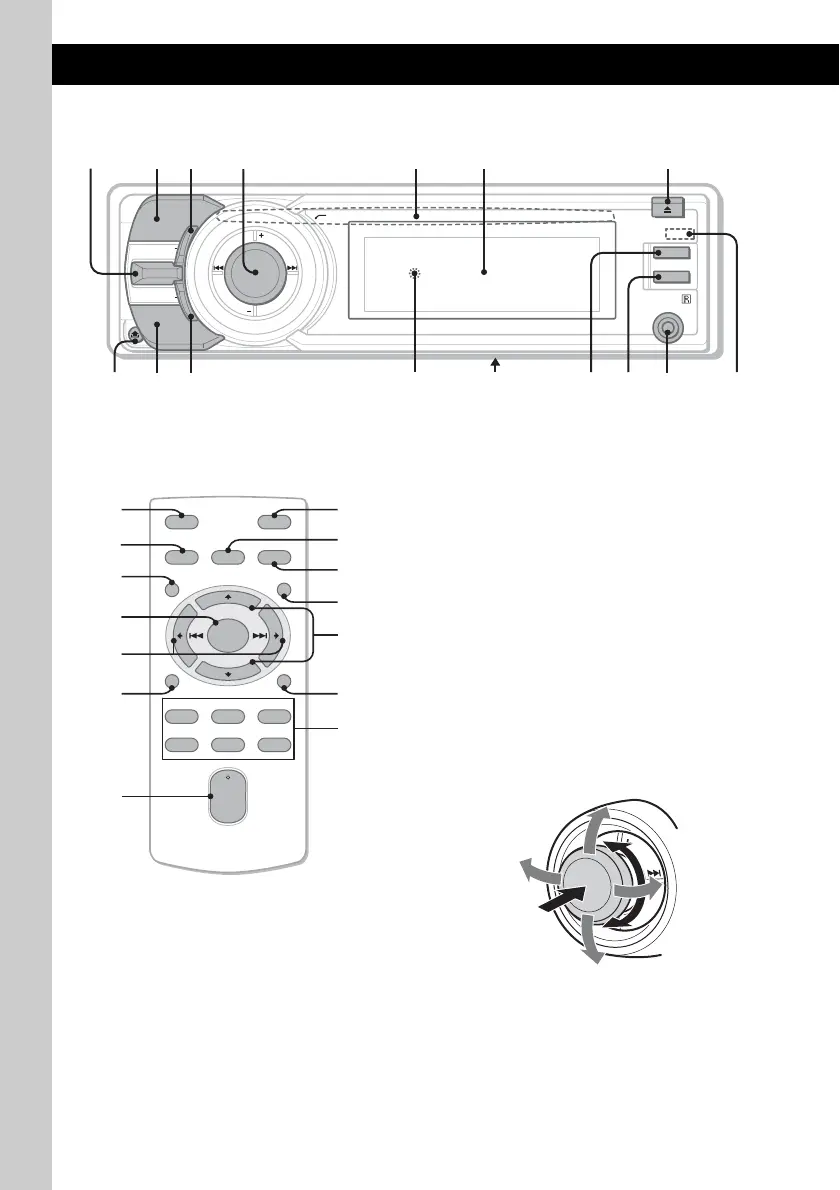
A LIST/BACK control
Push (LIST) up: to list up (Radio).
Push (BACK) down: return to the previous
display.
B MODE button page 8
To select the radio band (FM/AM)*
1
.
C SHUF (shuffle) button page 8
D Multi way encoder
Rotate to: Adjust the volume/select a menu
item.
Push up/down/left/right to: Select a menu
item.
Press to: Enter sound setting/apply a setting.
Press and hold to: Enter menu.
SCRL
OFF
MODE
SOURCE
BACK
LIST
SHUF
PUSH ENTER
/
SOUND
/
MENU
DSPL
AUX
123 645 7
d
f
;
a
g
h
s
OFF
DSPL
REP SHUF
MENU
SCRL
SOURCE SOUND
MODE
PAU SE
132
465
ATT
VOL
+
–
+
–
ENTER
LIST
9
qj
ws
qf
2
ql
qk
0
wa
w;
wg
qd
wf
wd


 To Next Page