4
Location of controls
Refer to the pages listed for details.
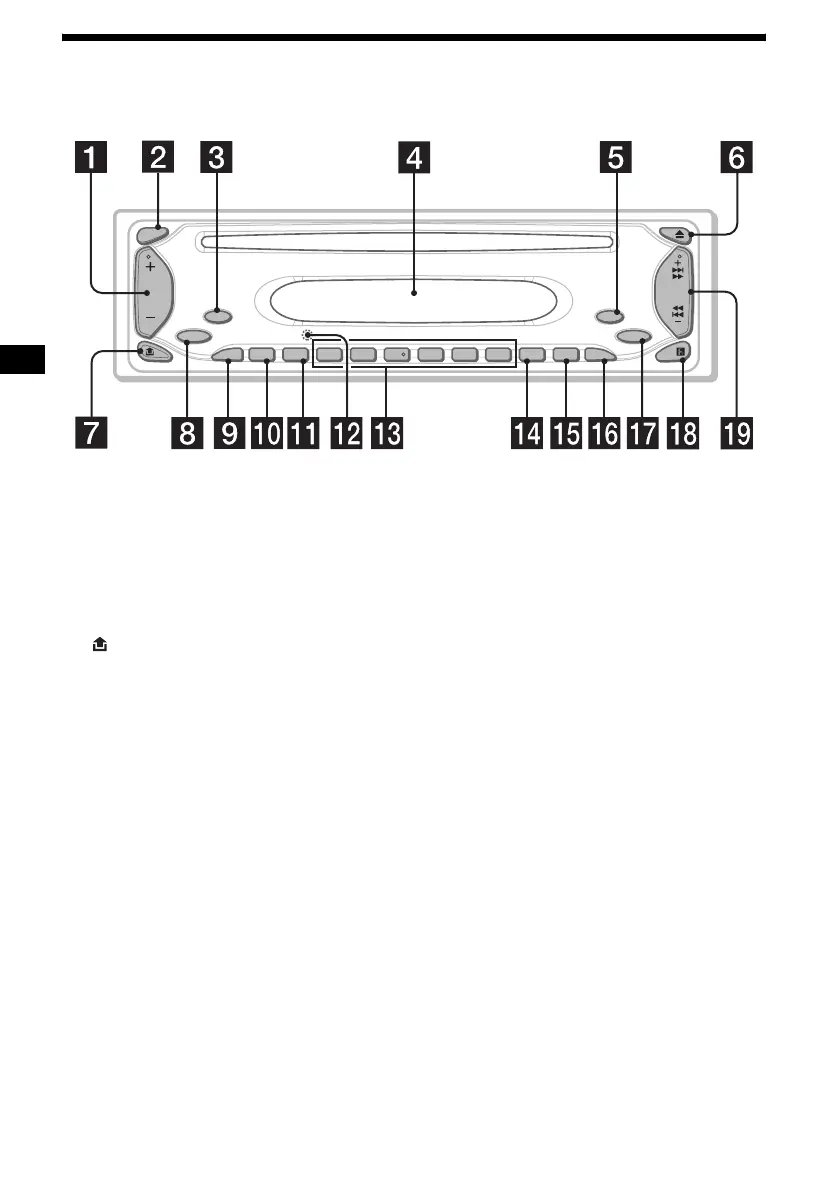
a Volume +/– button
b SEL (select) button
Selecting items.
c MODE button
Changing the operation.
d Display window
e OFF (Stop/Power off) button* 7, 9
f Z (eject) button 9
g (front panel release) button 7
h SOURCE (Power on/Radio/CD) button
Selecting the source.
i ATT (attenuate) button 12
j BTM (Best Tuning Memory) button 10
k SENS button 11
l RESET button (located on the front side of
the unit, behind the front panel) 7
m Number buttons
Radio:
Storing the desired station on each number
button.
n DSPL (display mode change) button
9
o SHUF button 10
p REP button 10
q EQ3 button 13
r Receptor for the card remote
commander
s SEEK +/– button
Radio:
Tuning in stations automatically/finding a
station manually.
CD:
Skipping tracks/fast-forwarding, reversing a
track.
* Warning when installing in a car without
an ACC (accessory) position on the
ignition switch
After turning off the ignition, be sure to press
and hold (OFF) on the unit until the display
disappears.
Otherwise, the display does not turn off and this
causes battery drain.
CDX-S1000
MODE
ATT
SEL
SOURCE
SENS
1234
BTM
REP
SHUF
56
DSPL
OFF
EQ3
SEEK


 To Next Page