5
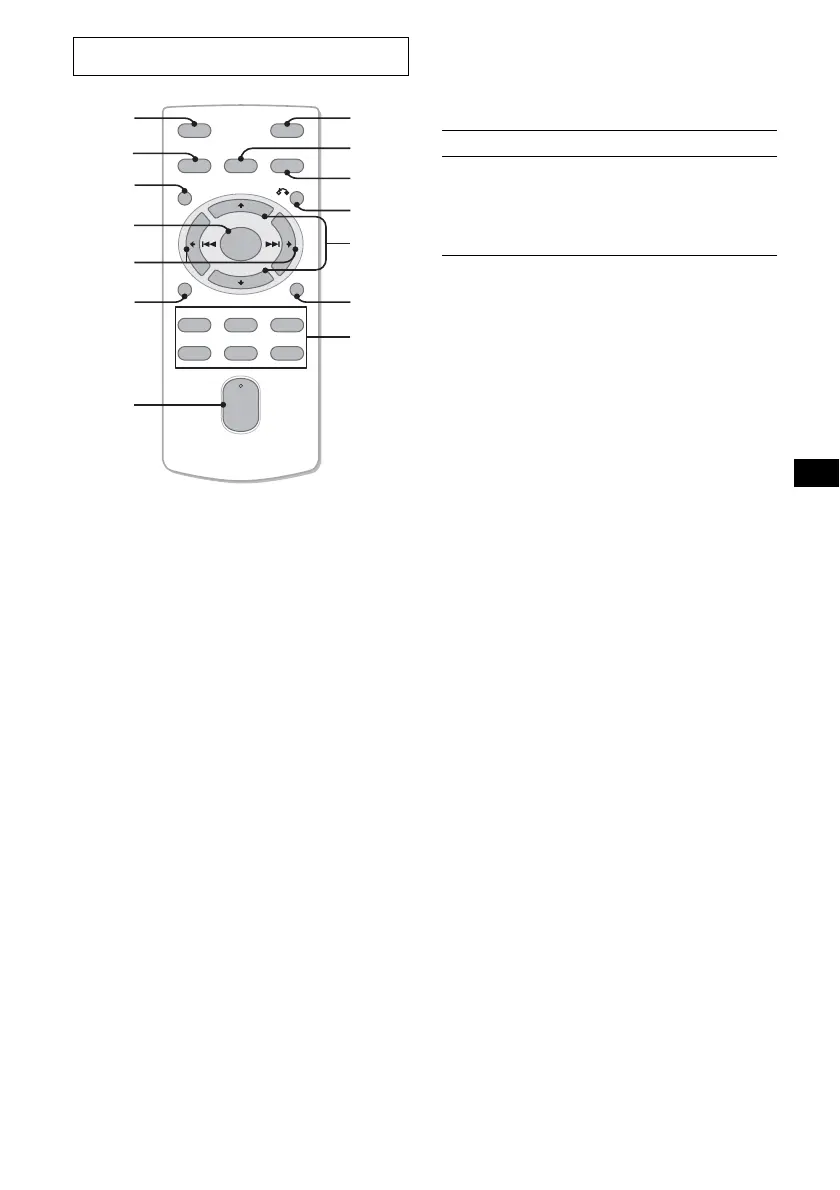
The corresponding buttons of the card
remote commander control the same
functions as those on this unit.
a OFF button
b SOURCE button
c PBC button 14
d ENTER button 14
e < (.)/, (>) buttons
f DSPL button
g VOL (+/–) button
h ATT button
i SEL button
j MODE button
k O (return) button 14
l M (+)/m (–) buttons 14
m SCRL button
n Number buttons
Note
If the display disappears by pressing (OFF), it cannot
be operated with the card remote commander unless
(SOURCE) on the unit is pressed, or a disc is inserted
to activate the unit first.
Tip
For details on how to replace the battery, see
“Replacing the lithium battery” on page 20.
Selecting an album with the card
remote commander
Album can be skipped using M (+)/m (–) on the
card remote commander.
* Available only when an MP3 file is played.
Skipping tracks continuously
Press once < or , on the card remote
commander, then press again within 2 seconds
and hold.
Card remote commander RM-X158
OFF
DSPL
REP SHUF SLOW
PBC
SCRL
SOURCE
SEL MODE
PAU SEOSDAUDIO
132
465
ATT
VOL
+
–
+
–
ENTER
2
3
9
1
qd
4
5
6
8
7
qf
qa
qs
q;
To Press
Skip albums*
– Album selection
M or m [once for each
album]
To continuously skip
albums, press and hold
either button.


 To Next Page