EasyManua.ls Logo

Sony CFD-460 - Page 11

Sony CFD-460
40 pages
Print Icon
To Next Page IconTo Next Page
To Previous Page IconTo Previous Page
Loading...
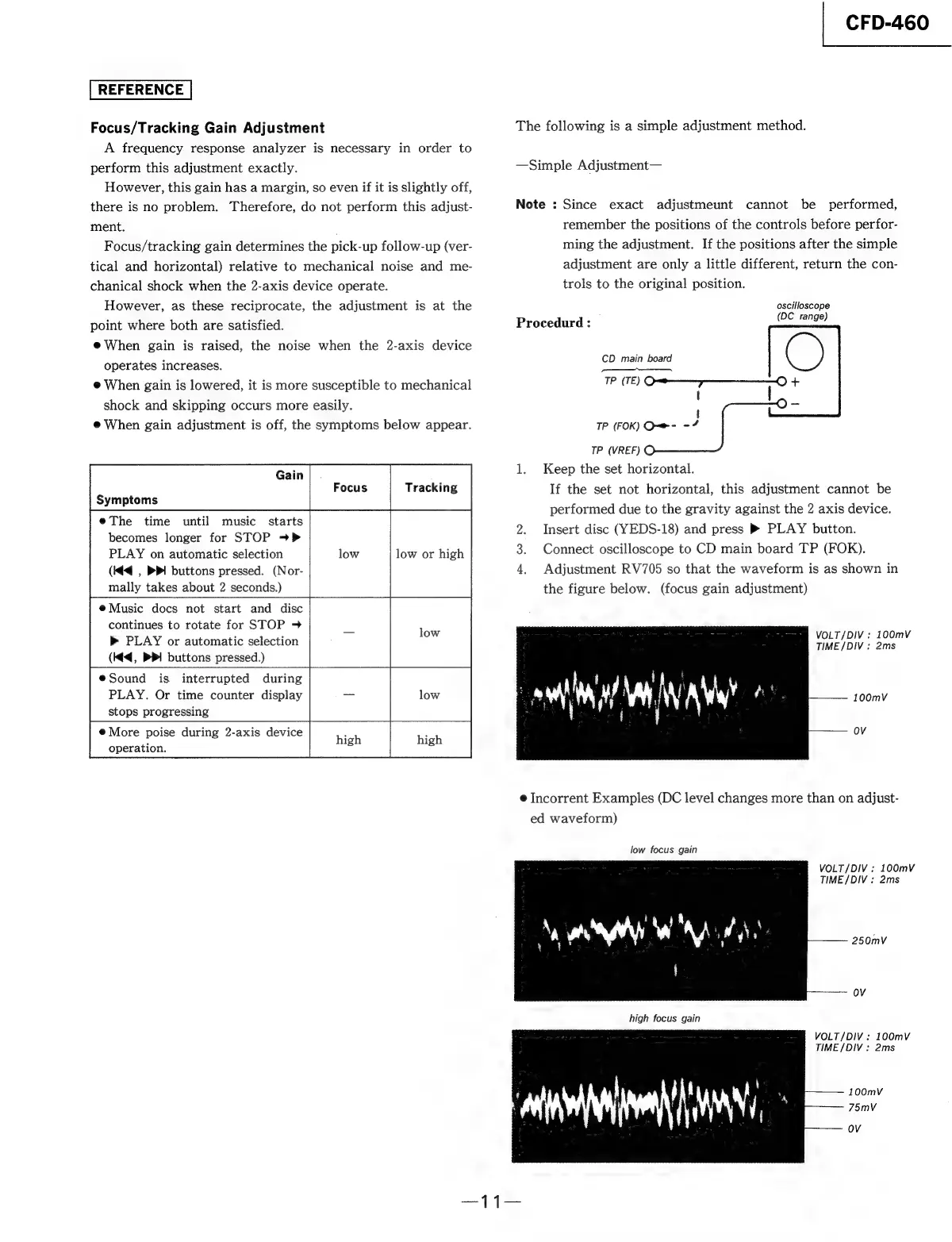
Focus/Tracking
Gain
Adjustment
A
frequency
response
analyzer
is
necessary
in
order
to
perform
this
adjustment
exactly.
However,
this
gain
has
a
margin,
so
even
if
it
is
slightly
off,
there
is
no
problem.
Therefore,
do
not
perform
this
adjust-
ment.
Focus/tracking
gain
determines
the
pick-up
follow-up
(ver-
tical
and
horizontal)
relative
to
mechanical
noise
and
me-
chanical
shock
when
the
2-axis
device
operate.
However,
as
these
reciprocate,
the
adjustment
is
at
the
point
where
both
are
satisfied.
@When
gain
is
raised,
the
noise
when
the
2-axis
device
operates
increases.
@
When
gain
is
lowered,
it
is
more
susceptible
to
mechanical
shock
and
skipping
occurs
more
easily.
@
When
gain
adjustment
is
off,
the
symptoms
below
appear.
Gain
|
.
Focus
Tracking
Symptoms
eThe
time
until
music
starts
becomes
longer
for
STOP
>>
low
or
high
PLAY
on
automatic
selection
low
low
high
(Kd
|
PPI
buttons
pressed.
(Nor-
mally
takes
about
2
seconds.)
eMusic
docs
not
start
and
disc
continues
to
rotate
for
STOP
9
»
PLAY
or
automatic
selection
(Ke,
PPI
buttons
pressed.)
eSound
is
interrupted
during
PLAY.
Or
time
counter
display
stops
progressing
@
More
poise
during
2-axis
device
operation.
|
CFD-460
The
following
is
a
simple
adjustment
method.
—Simple
Adjustment—
Note
:
Since
exact
adjustmeunt
cannot
be
performed,
remember
the
positions
of
the
controls
before
perfor-
ming
the
adjustment.
If
the
positions
after
the
simple
adjustment
are
only
a
little
different,
return
the
con-
trols
to
the
original
position.
oscilloscope
Procedurd
:
(DC
range)
CD
main
board
C)
eel
]
|
TP
(FOK)
O=e
=
ay
TP
(VREF)
1.
Keep
the
set
horizontal.
If
the
set
not
horizontal,
this
adjustment
cannot
be
performed
due
to
the
gravity
against
the
2
axis
device.
Insert
disc
(YEDS-18)
and
press
®
PLAY
button.
Connect
oscilloscope
to
CD
main
board
TP
(FOK).
4,
Adjustment
RV705
so
that
the
waveform
is
as
shown
in
the
figure
below.
(focus
gain
adjustment)
VOLT/DIV
;
100mV
TIME
/DIV
:
2ms
100mV
OV
®
Incorrent
Examples
(DC
level
changes
more
than
on
adjust-
ed
waveform)
low
focus
gain
VOLT/DIV
:
100mvV
TIME
/DIV
:
2ms
250mV
OV
high
focus
gain
VOLT/DIV
:
100mV
TIME
/DIV
:
2ms
100mV
75mV
OV

Related product manuals