EasyManua.ls Logo

Sony CFD-460 - Page 12

Sony CFD-460
40 pages
Print Icon
To Next Page IconTo Next Page
To Previous Page IconTo Previous Page
Loading...
CFD-460
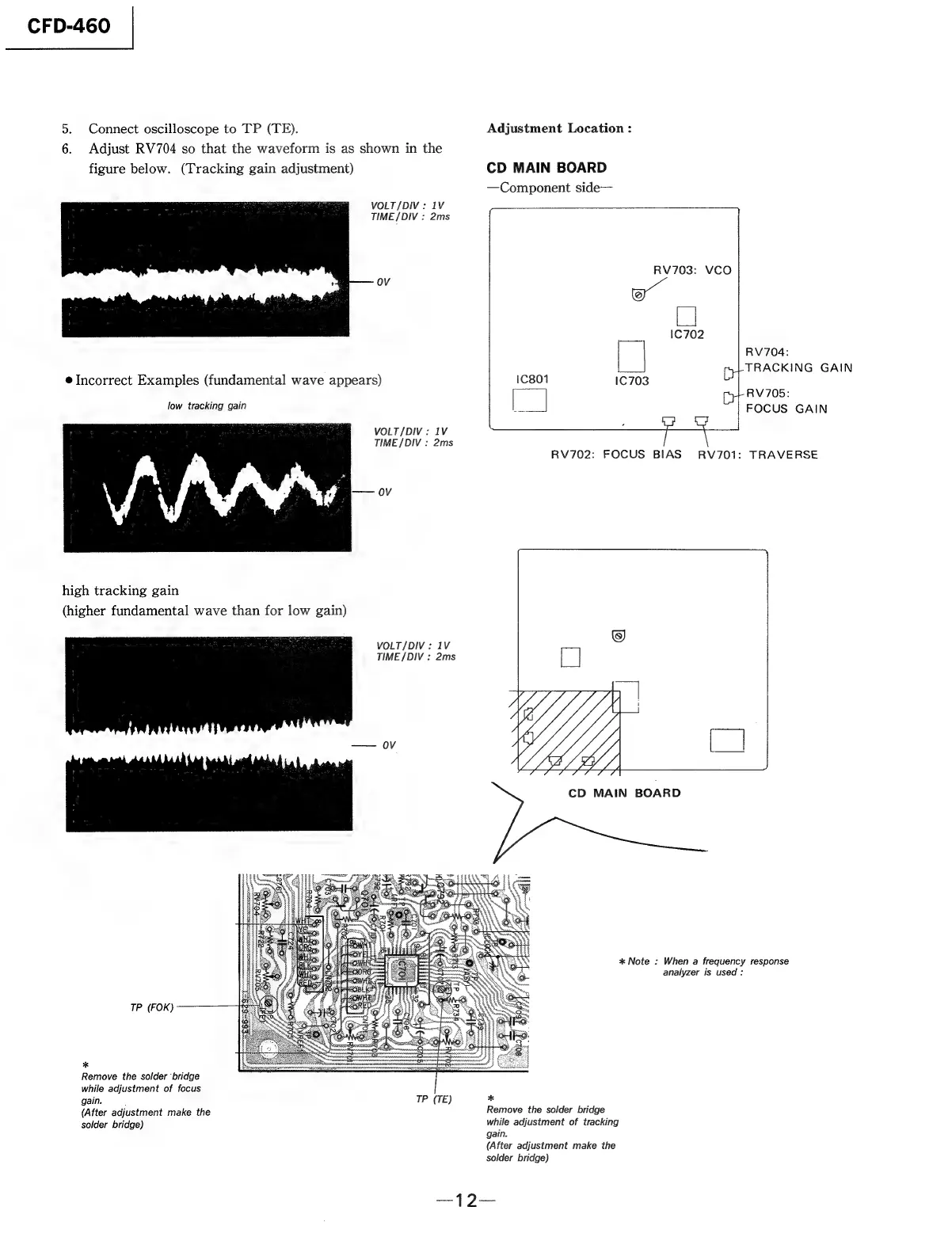
5.
Connect
oscilloscope
to
TP
(TE).
6.
Adjust
RV704
so
that
the
waveform
is
as
shown
in
the
figure
below.
(Tracking
gain
adjustment)
VOLT/DIV:
1V
TIME/DIV
:
2ms
*
OV
@
Incorrect
Examples
(fundamental
wave
appears)
low
tracking
gain
VOLT/DIV:
1V
TIME
/DIV
:
2ms
high
tracking
gain
(higher
fundamental
wave
than
for
low
gain)
VOLT/DIV:
1V
TIME
/DIV
:
2ms
OV
TP
(FOK)
*
Remove
the
solder
‘bridge
while
adjustment
of
focus
gain.
:
TP
(TE)
(After
adjustment
make
the
solder
bridge)
Adjustment
Location
:
CD
MAIN
BOARD
—Component
side—
RV703:
VCO
[|
2)
RV704:
TRACKING
GAIN
RV705:
FOCUS
GAIN
RV702:
FOCUS
BIAS
RV701:
TRAVERSE
CD
MAIN
BOARD
*
Note
:
When
a
frequency
response
analyzer
is
used
:
Remove
the
solder
bridge
while
adjustment
of
tracking
gain.
(After
adjustment
make
the
solder
bridge)

Related product manuals