EasyManua.ls Logo

Sony CFD-765 - Page 25

Sony CFD-765
40 pages
Print Icon
To Next Page IconTo Next Page
To Previous Page IconTo Previous Page
Loading...
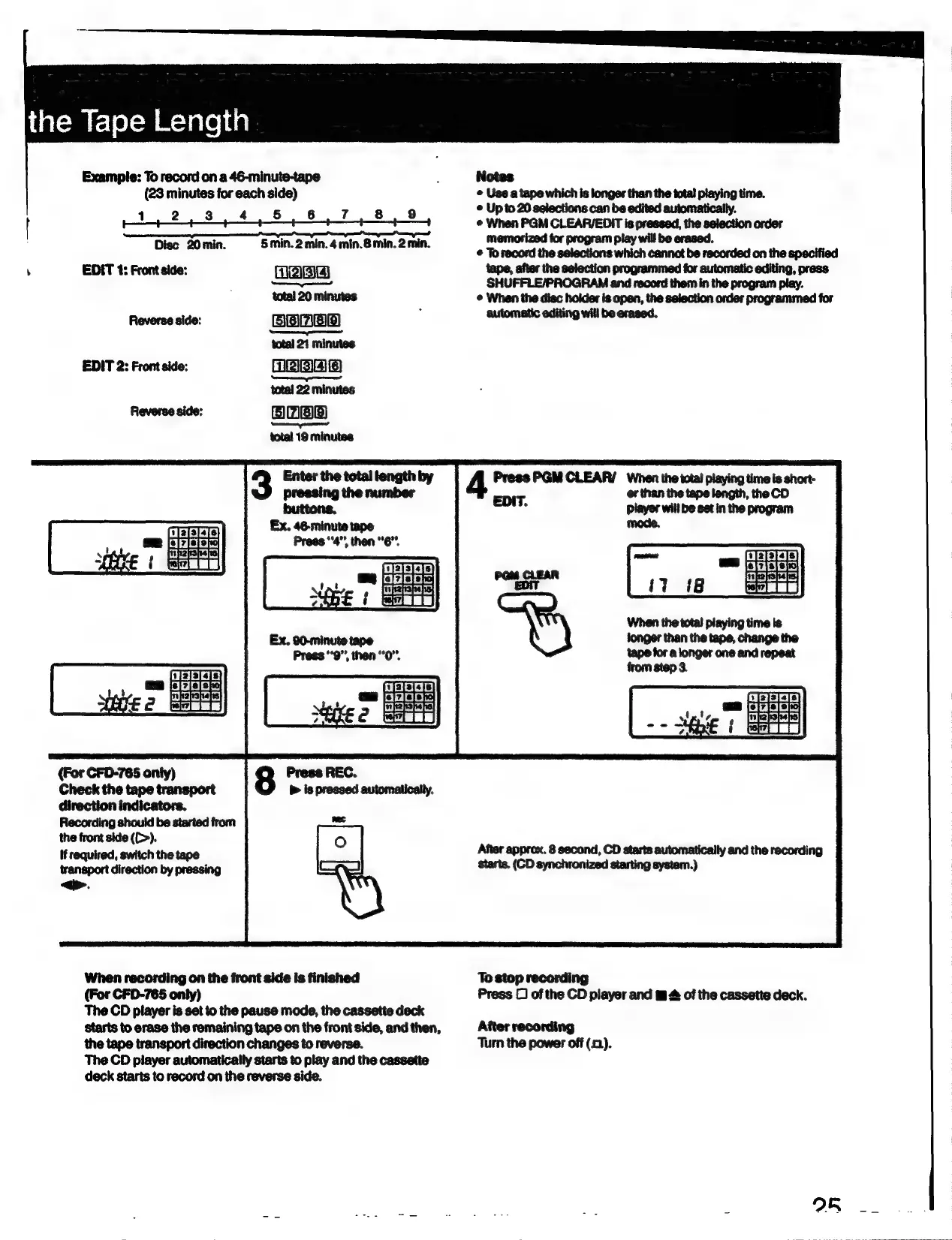
Example:
To
record
on
a
46-minute-tape
5
Notes
(23
minutes
for
each
side)
©
Use
a
tape
which
is
longer
than
the
total
playing
time.
1
2
8
4.58
8
7.
8.9
©
Upto
20
selections
can
be
edited
automatically.
[
—r
——e
——
When
PGM
CLEAR/EDIT
is
pressed,
the
selection
order
———
——
in.
5 :
2min.
memorized
for
program
play
will
be
erased.
Disc
20min.
S5min.2
min.
4min.B
min
as
the
5
re
on
the
epecified
,
EDIT
4:
Front
side:
NPA)
C3}
tape,
after
the
selection
programmed
for
automatic
editing,
press
SHUFFLE/PROGRAM
and
record
them
in
the
program
play.
total
20
minutes
©
When
the
disc
holder
is
open,
the
selection
order
programmed
for
Reverse
side:
automatic
editing
will
be
erased.
total
21
minutes
EDIT
2:
Front
side:
RBA
——
total
22
minutes
Reverse
side:
EH}
bra}
£3]
E29)
Sen
total
19
minutes
Enter
the
total
length
by
Press
PGM
CLEAR/
When
the
total
playing
time
is
short-
pressing
the
number
EDIT. er
than
the
tape
length,
the
CD
buttons.
°
player
will
be
set
in
the
program
Ex.
46-minute
tape
Press
“a
then
"6.
When
the
total
playing
time
is
tonger
than
the
tape,
change
the
tape
for
a
longer
one and
repeat
(For
CFD-765
only)
Check
the
tape
transport
direction
indicators.
Recording
should
be
started
trom
the
front
side
([>).
if
required,
switch
the
tape
transport
direction
by
pressing
<>.
After
approx.
8
second,
CD
starts
automatically
and
the
recording
starts,
(CD
synchronized
starting
system.)
When
recording
on
the
front
side
is
finished
To
stop
recording
(For
CFD-765
only)
Press
C
of
the
CD
player
and
#
&
of
the
cassette
deck.
The
CD
player
is
set
to
the
pause mode,
the
cassette
deck
Starts
to
erase
the
remaining
tape
on
the
front
side,
and
then,
After
recording
the
tape
transport
direction
changes
to
reverse.
Turn
the
power
off
(1).
The
CD
player
automatically
starts
to
play
and
the
cassette
deck
starts
to
record
on
the
reverse
side.

Related product manuals