31
MD — Editing
Moving recorded tracks
— Move Function
You can use this function to change the order
of any track on the disc. When you move
tracks, the tracks are automatically
renumbered.
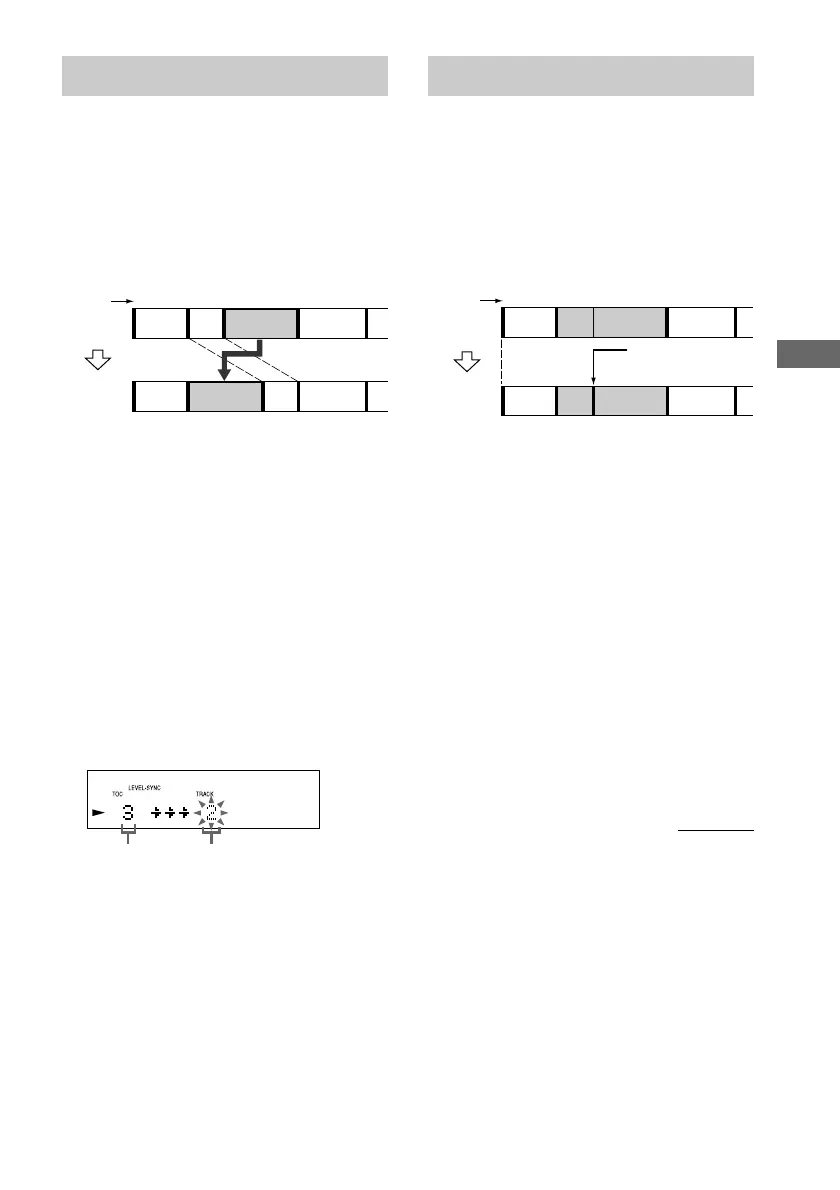
Example: Moving track 3 to position 2.
123
1
23
4
4
AB C D
CBDA
1 Press FUNCTION on the remote
repeatedly until “MD” appears in the
display.
2 Press MENU/NO on the remote to
display “Edit Menu.”
3 Press . or > repeatedly until
“Move?” appears, and then press
ENTER/YES on the remote.
4 Press . or > repeatedly until the
desired track number to move appears,
and then press ENTER/YES on the
remote.
5 Press . or > repeatedly until the
new track position appears.
6 Press ENTER/YES on the remote.
“Complete!” appears.
Dividing recorded tracks
— Divide Function
You can use this function to mark track
numbers after recording. The total number of
tracks increases by one and all the tracks
following the divided ones are renumbered.
Example: Dividing track 2 into two tracks.
12 3
123 4
A
AB C D
CBD
1 Press FUNCTION on the remote
repeatedly until “MD” appears in the
display.
2 Press MENU/NO on the remote to
display “Edit Menu.”
3 Press . or > repeatedly until
“Divide?” appears, and then press
ENTER/YES on the remote.
4 Press . or > repeatedly until the
track number of the track you want to
divide appears. Then, while listening to
rehearsal play, press ENTER/YES on
the remote at the point where you want
to divide the track.
“—Rehearsal—” appears and the portion to
be divided is played repeatedly.
continued
Track
number
Original
tracks
After
MOVE
Original track
number
New track position
Track
number
Original
tracks
After
DIVIDE
Divide track 2 into
track B and C
Downloaded from: https://www.usersmanualguide.com/


 To Next Page