6
GB
CMT-M70 4-239-398-11(1) GB
L
SPEAKER
IMPEDANCE USE 6-16
Ω
R
Jack type A
Jack type B
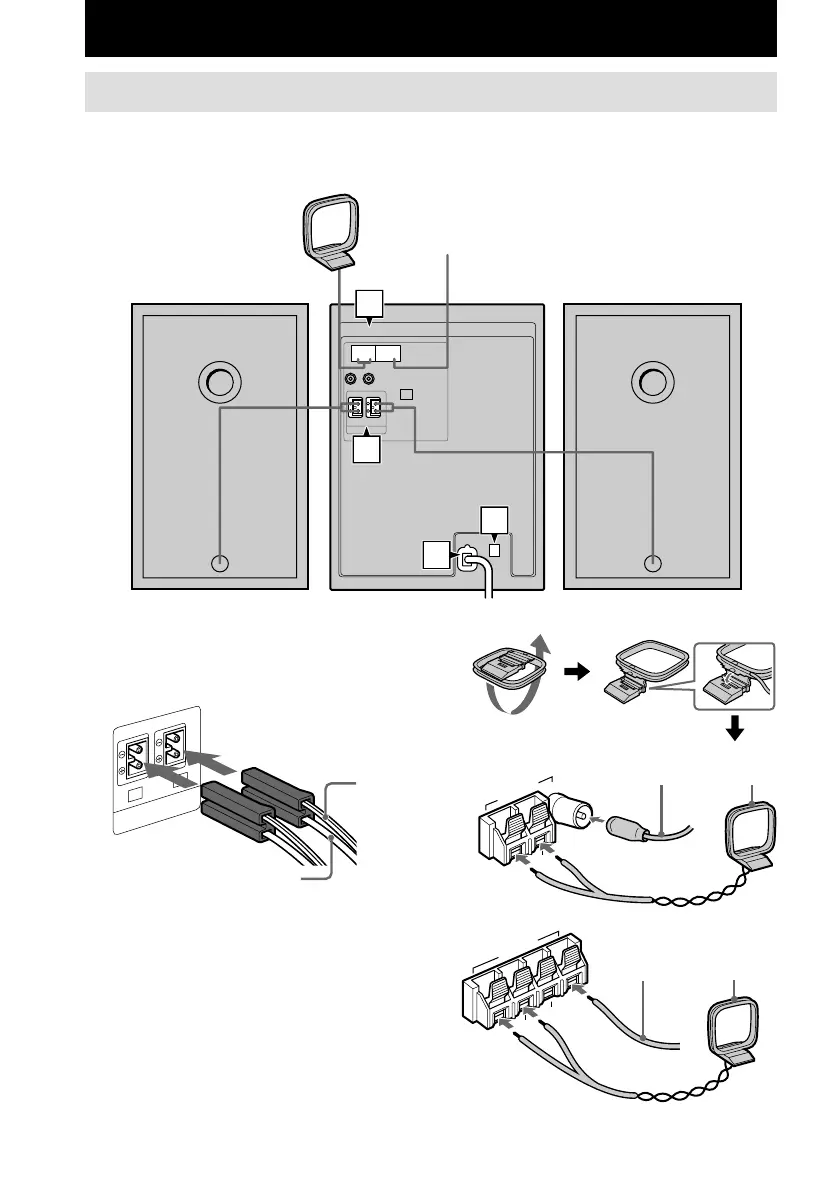
Hooking up the system
Follow steps 1 through 4 of the procedure below to hook up your system using the supplied cords
and accessories.
AM loop antenna
Left speaker
Right speaker
FM antenna
1 Connect the speakers.
Connect the right and left speaker cords to
the SPEAKER terminals as shown below.
2 Connect the FM and AM antennas.
Set the AM loop antenna up before
connecting it.
AM loop
antenna
Extend the FM wire
antenna horizontally
AM loop
antenna
Extend the FM
wire antenna
horizontally
Solid (3)
Stripe (#)
Getting Started
4
2
3
1
FM75
Ω
AM
U
A
N
T
E
N
N
A
FM75
Ω
A
M
ANTENNA
U
U







 To Next Page