EasyManua.ls Logo

Sony D-5 - Section 3: Adjustments; 3-1. Electrical Adjustments

Sony D-5
46 pages
Print Icon
To Next Page IconTo Next Page
To Previous Page IconTo Previous Page
Loading...
-
~p-5/D-50
SECTION
3
ADJUSTMENTS
3-1.
ELECTRICAL
ADJUSTMENTS
Notes
on
Adjustment
1.
Perform
adjustments
in
service
mode,
Be
sure
to
release
service
mode
after
completing
adjustment.
(Refer
to
“Service
Mode
(service
program)”
on
page
9-11.)
2.
Perform
adjustments
in
the
order
given.
3.
Use
YEDS-1,
but
only
when
disc
use
is
indi-
cated.
4.
Powersupply
voltage:
DC
9
V
Power
switch:
ON
PREPARATION
Put
the
set
into
service
mode
(see
page
9-11)
and
perform
the
following
checks.
Repair
if
there
are
any
abnormalities,
@
Sled
Motor
Check
1.
Press
the
OPEN
button
and
open
the
top
panel.
2.
Press
the
Ppl,
Keg
keys
and
make
sure
that
the
FOP
moves
smoothly,
without
catching,
from
the
inmost
>
outmost
>
inmost
circumfer-
ence.
bP:
FOP
moves
outward
\44
:
FOP
moves
inward
@
Focus
Search
Check
1.
Press
the
OPEN
button
and
open
the
top
panel.
2.
Press
the>@#M#key.
(Focus
search
is
performed
continuously,
Laser
does
not
emit.)
3.
Observe
the
FOP
objective
lens
and
check
that
it
moves
smoothly
up
and
down
with
no
catch-
ing
or
noises.
4.
Pressthe
HM
key.
Check
that
focus
search
operation
stops,
If
it
does
not,
press
the
Mf
key
again,
longer.
Note:
For
sets
using
MB88541-120M
for
microcom-
puter
IC801,
the
objective
lens
may
stay
up
and
the
disc
table
rotate
at
high
speed
when
the
»
Bikey
is
pressed.
(Sets
using
MB88541-120M
for
IC801
will
only
perform
focus
search
once
the
second
time
after
the
focus
on
state
has
been
obtained.)
If
this
happens,
1)
Press
M
key.
2)
Unplug
external
power
supply
and
press
>
Ebkey.
3)
Plug
in
external
power
supply.
4)
Press®
@key,
without
disc
inserted.
With
this,
focus
search
will
be
repeated
over
and
over.
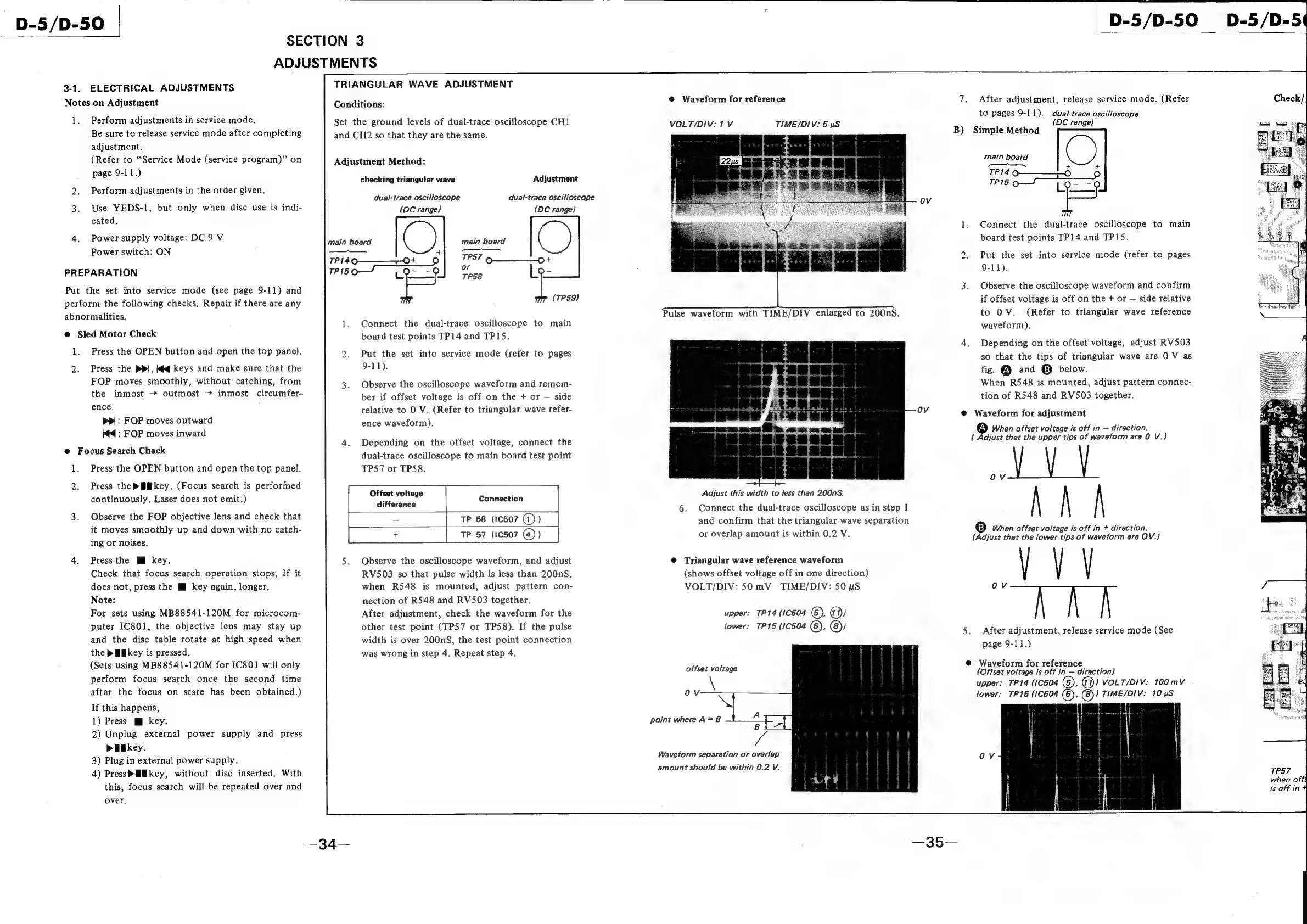
TRIANGULAR
WAVE
ADJUSTMENT
Conditions:
Set
the
ground
levels
of
dual-trace
oscilloscope
CH1
and
CH2
so
that
they
are
the
same.
Adjustment
Method:
checking
triangular
wave
Adjustment
dual-trace
oscilloscope
(DC
range)
dual-trace
oscilloscope
(DC
range}
main
board
main
board
—_—_
TP14Q90———_—~0+
=
TP57
P
ea
or
FPS
|
TP58
(TP59)
1.
Connect
the
dual-trace
oscilloscope
to
main
board
test
points
TP14
and
TP15.
2.
Put
the
set
into
service
mode
(refer
to
pages
9-11).
3.
Observe
the
oscilloscope
waveform
and
remem-
ber
if
offset
voltage
is
off
on
the
+
or
side
relative
to
0
V.
(Refer
to
triangular
wave
refer-
ence
waveform).
4.
Depending
on
the
offset
voltage,
connect
the
dual-trace
oscilloscope
to
main
board
test
point
TPS7
or
TP58.
Offset
voltage
.
Connection
difference
=
TP
58
(1C507
(1)
)
+
TP
57
(iC507
(@))
5.
Observe
the
oscilloscope
waveform,
and
adjust
RV503
so
that
pulse
width
is
less
than
200nS.
when
R548
is
mounted,
adjust
pattern
con-
nection
of
R548
and
RV503
together.
After
adjustment,
check
the
waveform
for
the
other
test
point
(TP57
or
TP58).
If
the
pulse
width
is
over
200nS,
the
test
point
connection
was
wrong
in
step
4.
Repeat
step
4.
@
Waveform
for
reference
VOLT/DIV:
1
V
TIME/DIV:
5
wS
ov
Seen
ge
«
Adjust
this
width
to
less
than
200nS.
6.
Connect
the
dual-trace
oscilloscope
as
in
step
1
and
confirm
that
the
triangular
wave
separation
or
overlap
amount
is
within
0.2
V.
@
Triangular
wave
reference
waveform
(shows
offset
voltage
off
in
one
direction)
VOLT/DIV:
50
mV
TIME/DIV:
50
pS
upper:
TP14
(10504
G),
Gi)
lower:
TP15
(10504
(6),
@))
offset
voltage
Waveform
separation
or
overlap
amount
should
be
within
0.2
V.
qs
B)
5.
D-5/D-50
After
adjustment,
release
service
mode.
(Refer
to
pages
9-11).
dua/-trace
oscilloscope
:
(DC
range)
Simple
Method
main
board
+
+
rs,
TP14
O—___-O
TP15
OY
L
ec}.
Ss
Connect
the
dual-trace
oscilloscope
to
main
board
test
points
TP14
and
TP15.
Put
the
set
into
service
mode
(refer
to
pages
9-11).
Observe
the
oscilloscope
waveform
and
confirm
if
offset
voltage
is
off
on
the
+
or
side
relative
to
OV.
(Refer
to
triangular
wave
reference
waveform),
Depending
on
the
offset
voltage,
adjust
RV503
so
that
the
tips
of
triangular
wave
are
0
V
as
fig.
@
and
©
below.
When
R548
is
mounted,
adjust
pattern
‘connec-
tion
of
R548
and
RV503
together.
Waveform
for
adjustment
®
When
offset
voltage
is
off
in
direction.
(
Adjust
that
the
upper
tips
of
waveform
are
0
V.)
VV
A
A
'B)
When
offset
voltage
is
off
in
+
direction.
(Adjust
that
the
lower
tips
of
waveform
are
OV.)
OV
hh
After
adjustment,
release
service
mode
(See
page
9-11.)
Waveform
for
reference
(Offset voltage
is
off
in
direction)
upper:
TP14
(10504
(6),
@))
VOLT/DIV:
100mV
|
lower:
TP15
(1C504
©,
(8))
TIME/DIV:
10
pS
+
b
is
{
ii
i
=]
T
oll
|
{
|
Ov
TP57
when
off
is
off
in
F

Related product manuals