EasyManua.ls Logo

Sony D-5 - Page 28

Sony D-5
46 pages
Print Icon
To Next Page IconTo Next Page
To Previous Page IconTo Previous Page
Loading...
ye
CHI
djustment
-e
oscilloscope
IC
range)
+
(TP59)
»)
main
)
pages
‘emem-
side
e
refer-
ect
the
t
point
adjust
200nS.
n
con-
for
the
e
pulse
rection
@
Waveform
for
reference
VOLT/DIV:
1V
TIME/DIV:
5
uS
ov
Adjust
this
width
to
less
than
200nS.
6.
Connect
the
dual-trace
oscilloscope
as
in
step
1
and
confirm
that
the
triangular
wave
separation
or
overlap
amount
is
within
0.2
V.
@
Triangular
wave
reference
waveform
(shows
offset
voltage
off
in
one
direction)
VOLT/DIV:
50
mV
TIME/DIV:
50
uS
upper:
TP14
(1IC504
6),
GD)
lower:
TP15
(1C504
6),
@))
offset
voltage
Waveform
separation
or
overlap
amount
should
be
within
0.2
V.
B)
Simple
Method
D-5/D-50
D-5/D-50
|
7.
After
adjustment,
release service
mode.
(Refer
to
pages
9-11).
dua/-trace
oscilloscope
(DC
range)
main
board
en,
TP14
O———_©
TP15
O—S
era
=
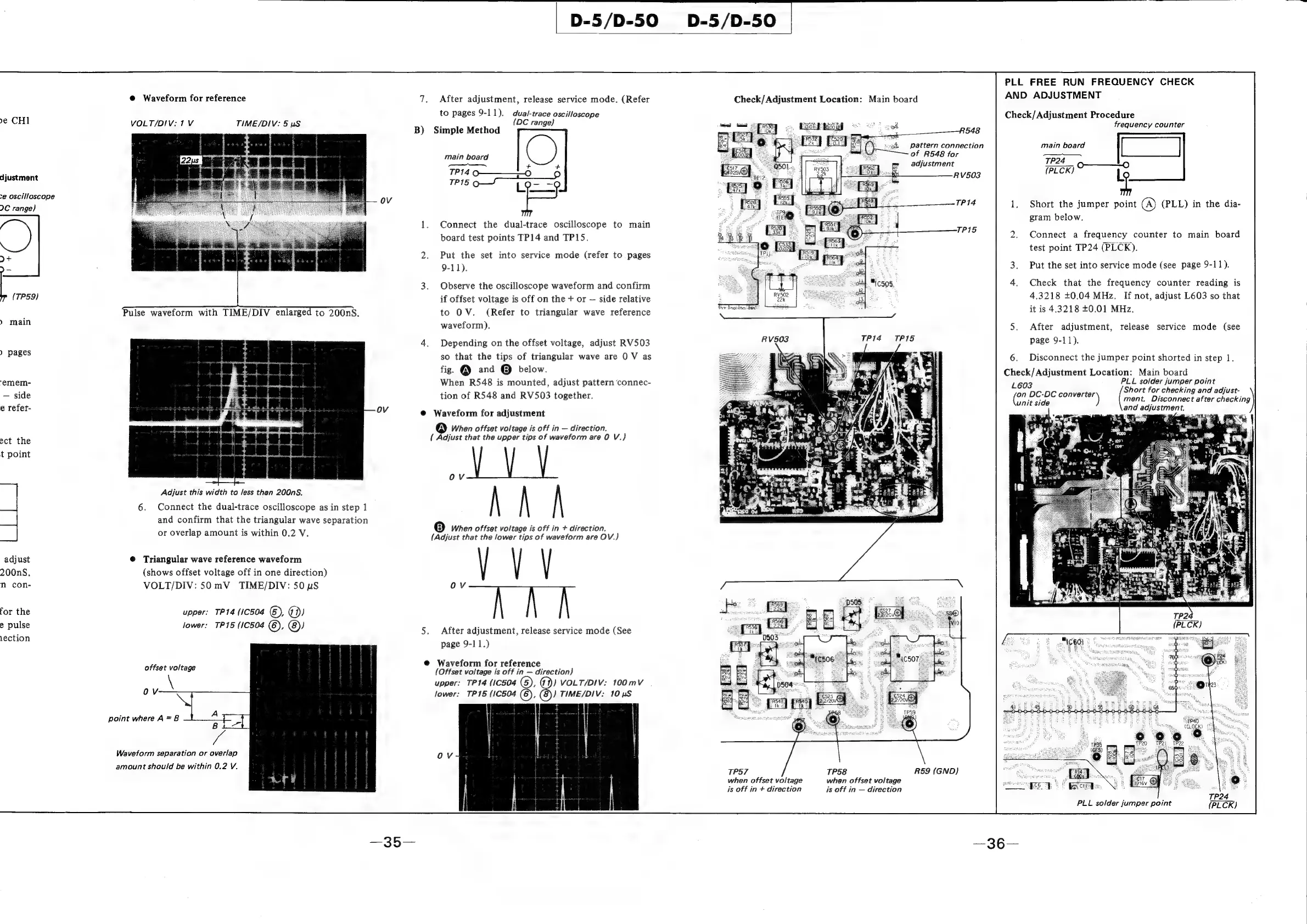
1.
Connect
the
dual-trace
oscilloscope
to
main
board
test
points
TP14
and
TP1S.
2.
Put
the
set
into
service
mode
(refer
to
pages
9-11).
3.
Observe
the
oscilloscope
waveform
and
confirm
if
offset
voltage
is
off
on
the
+
or
side
relative
to
OV.
(Refer
to
triangular
wave
reference
waveform).
4.
Depending
on
the
offset
voltage,
adjust
RV503
so
that
the
tips
of
triangular
wave
are
0
V
as
fig.
@
and
@
below.
When
R548
is
mounted,
adjust
pattern
connec-
tion
of
R548
and
RV503
together.
@
Waveform
for
adjustment
®
When
offset
voltage
is
off
in
direction.
(
Adjust
that
the
upper
tips
of
waveform
are
0
V.)
|
B)
When
offset
voltage
is
off
in
+
direction.
(Adjust
that
the
lower
tips
of
waveform
are
OV.)
“VV
5.
After
adjustment,
release
service
mode
(See
page
9-11.)
Ov
@
Waveform
for
reference
(Offset voltage
is
off
in
direction)
upper:
TP14
(1C504
(6),
@))
VOLT/DIV:
100mV
lower:
TP15
(1C504
(6),
(8))
TIME/DIV:
10
uS
Check/
Adjustment
Location:
Main
board
3
of
R548
for
RV503
TP14
TPIS
R59
(GND)
TP57
TP58
when
offset
voltage
when
offset
voltage
is
off
in
+
direction
is
off
in
direction
4,
pattern
connection
PLL
FREE
RUN
FREQUENCY
CHECK
AND
ADJUSTMENT
Check/
Adjustment
Procedure
frequency
counter
=z
main
board
ooo
TP24
adjustment
o—-——_———-O
RV503
{PLCK)
Ly
TP14
.
Short
the
jumper
point
(A)
(PLL)
in
the
dia-
gram
below.
TP15
:
Connect
a
frequency
counter
to
main
board
test
point
TP24
(PLCK).
Put
the
set
into
service
mode
(see
page
9-11).
Check
that
the
frequency
counter
reading
is
4.3218
+0.04
MHz.
If
not,
adjust
L603
so
that
it
is
4.3218
+0.01
MHz.
After
adjustment,
release
service
mode
(see
page
9-11).
6.
Disconnect
the
jumper
point
shorted
in
step
1.
Check/
Adjustment
Location:
Main
board
L603
PLL
solder
jumper
point
an
DC:DC
converter
Short
for
checking
and
adijust-
ee
t
side
)
ment.
Disconnect
after
checking
and
adjustment.
PLL
solder
jumper
point
(PLCK)

Related product manuals