EasyManua.ls Logo

Sony D-5 - Electrical Adjustment Procedures; Tracking Balance Adjustment; Sled Motor Offset Check and Adjustment; Focus Bias Adjustment

Sony D-5
46 pages
Print Icon
To Next Page IconTo Next Page
To Previous Page IconTo Previous Page
Loading...
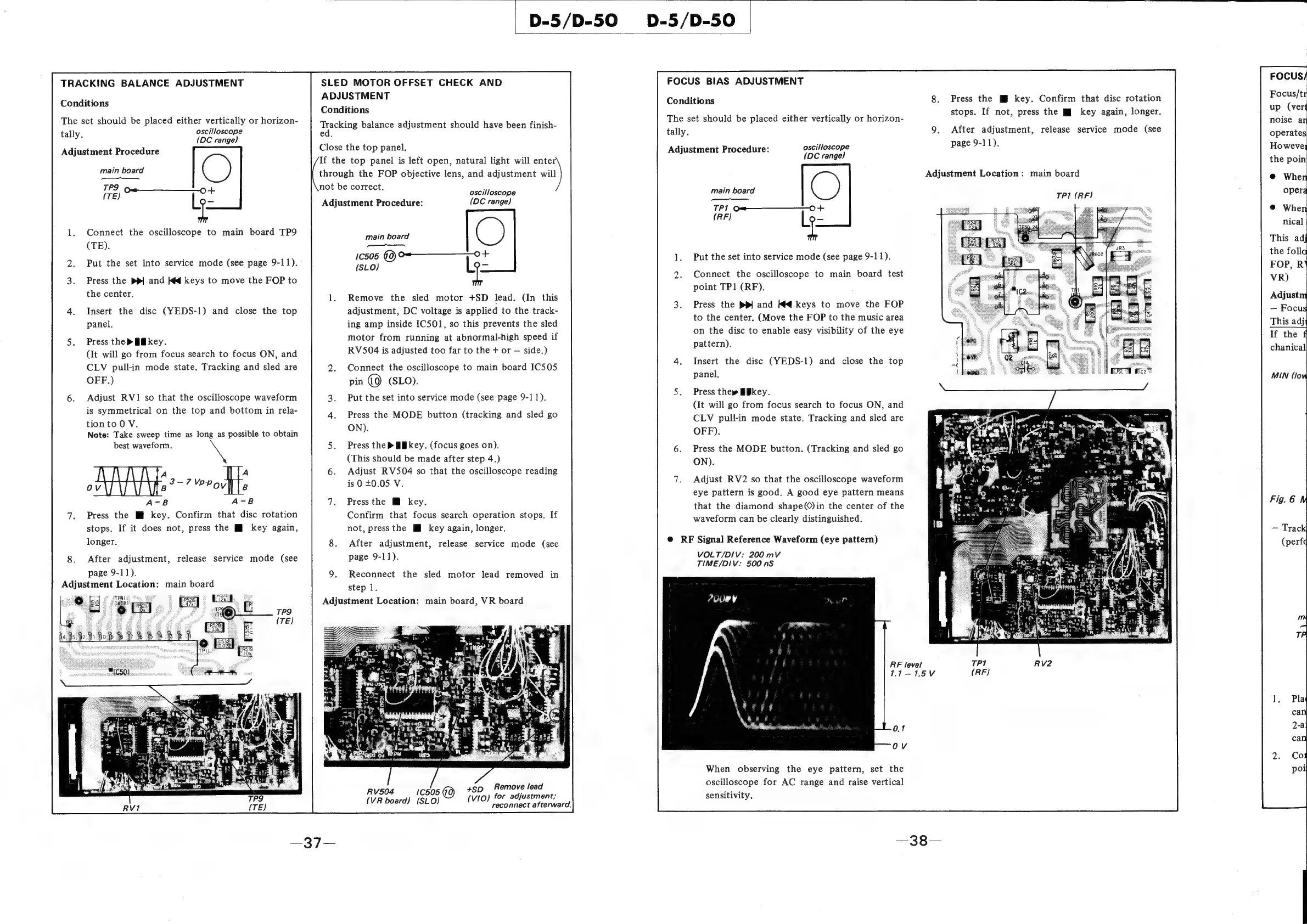
TRACKING
BALANCE
ADJUSTMENT
Conditions
The
set
should
be
placed
either
vertically
or
horizon-
ly.
oscilloscope
tally
(DC
range)
Adjustment
Procedure
main
board
C)
———
TPS
Gem
o
y
(TE)
l=
Connect
the
oscilloscope
to
main
board
TP9
(TE).
Put
the
set
into
service
mode
(see
page
9-11).
-
Press
the
ppl
and
Kg
keys
to
move
the
FOP
to
the
center.
Insert
the
disc
(YEDS-1)
and
close
the
top
panel.
Press
the
>
Bikey.
(It
will
go
from
focus
search
to
focus
ON,
and
CLV
pull-in
mode
state.
Tracking
and
sled
are
OFF.)
Adjust
RV1
so
that
the
oscilloscope
waveform
is
symmetrical
on
the
top
and
bottom
in
rela-
tion
to
0
V.
Note:
Take
sweep
time
as
long
as
possible
to
obtain
best
waveform.
\
.
3-7Y
ss
ov
Bp.’
”Poville
A=B
A=B8
Press
the
Ml
key.
Confirm
that
disc
rotation
stops.
If
it
does
not,
press
the
Mf
key
again,
longer.
After
adjustment,
release
service
mode
(see
page
9-11).
Adjustment
Location:
main
board
D-5/D-50
SLED
MOTOR
OFFSET
CHECK
AND
ADJUSTMENT
Conditions
precking
balance
adjustment
should
have
been
finish-
ed.
Close
the
top
panel,
If
the
top
panel
is
left
open,
natural
light
will
enter
through
the
FOP
objective
lens,
and
adjustment
will
not
be
correct.
:
oscilloscope
Adjustment
Procedure:
(DC
range)
main
board
C)
me
10505
(0)
<0
+
(SLO)
Le
Remove
the
sled
motor
+SD
lead.
(In
this
adjustment,
DC
voltage
is
applied
to
the
track-
ing
amp
inside
IC501,
so
this
prevents
the
sled
motor
from
running
at
abnormal-high
speed
if
RV504
is
adjusted
too
far
to
the
+
or
side.)
Connect
the
oscilloscope
to
main
board
IC505
pin
()
(SLO).
Put
the
set
into
service
mode
(see
page
9-11).
Press
the
MODE
button
(tracking
and
sled
go
ON).
Press
the
>
Bikey.
(focus
goes
on).
(This
should
be
made
after
step
4.)
Adjust
RV504
so
that
the
oscilloscope
reading
is
0
+0.05
V.
Press
the
@
key.
Confirm
that
focus
search
operation
stops.
If
not,
pressthe
M
key
again,
longer.
After
adjustment,
release
service
mode
(see
page
9-11).
Reconnect
the
sled
motor
lead
removed
in
step
1.
Adjustment
Location:
main
board,
VR
board
RV504
C505
(GQ)
tSD_
Remove
lead
VIO)
for
adjustment;
(VR
board)
(SLO)
(vio)
reconnect
afterward.
FOCUS
BIAS
ADJUSTMENT
Conditions
The
set
should
be
placed
either
vertically
or
horizon-
tally.
Adjustment
Procedure:
oscilloscope
(DC
range)
main
board
C)
TN,
TP1
Om_—————_0
+
(RF)
Le
Put
the
set
into
service
mode
(see
page
9-11).
Connect
the
oscilloscope
to
main
board
test
point
TP1
(RF).
Press
the
pp)
and
Kd
keys
to
move
the
FOP
to
the
center.
(Move
the
FOP
to
the
music
area
on
the
disc
to
enable
easy
visibility
of
the
eye
pattern).
Insert
the
disc
(YEDS-1)
and
close
the
top
panel.
Press
the»
&Bkey.
(It
will
go
from
focus
search
to
focus
ON,
and
CLV
pull-in
mode
state.
Tracking
and
sled
are
OFF).
Press
the
MODE
button.
(Tracking
and
sled
go
ON).
Adjust
RV2
so
that
the
oscilloscope
waveform
eye
pattern
is
good.
A
good
eye
pattern
means
that
the
diamond
shape()in
the
center
of
the
waveform
can
be
clearly
distinguished.
@
RF
Signal
Reference
Waveform
(eye
pattern)
VOLT/DIV:
200
mV
TIME/DIV:
500
nS
Pu
i”
V
RF
level
When
observing
the
eye
pattern,
set
the
oscilloscope
for
AC
range
and
raise
vertical
sensitivity.
Press
the
key.
Confirm
that
disc
rotation
stops.
If
not,
press
the
Mj
key
again,
longer.
After
adjustment,
release service
mode
(see
page
9-11).
Adjustment
Location:
main
board
TP1
(RF)

Related product manuals