EasyManua.ls Logo

Sony D-555 - Focus Bias Adjustment Procedure

Sony D-555
34 pages
Print Icon
To Next Page IconTo Next Page
To Previous Page IconTo Previous Page
Loading...
D-555/Z555
|
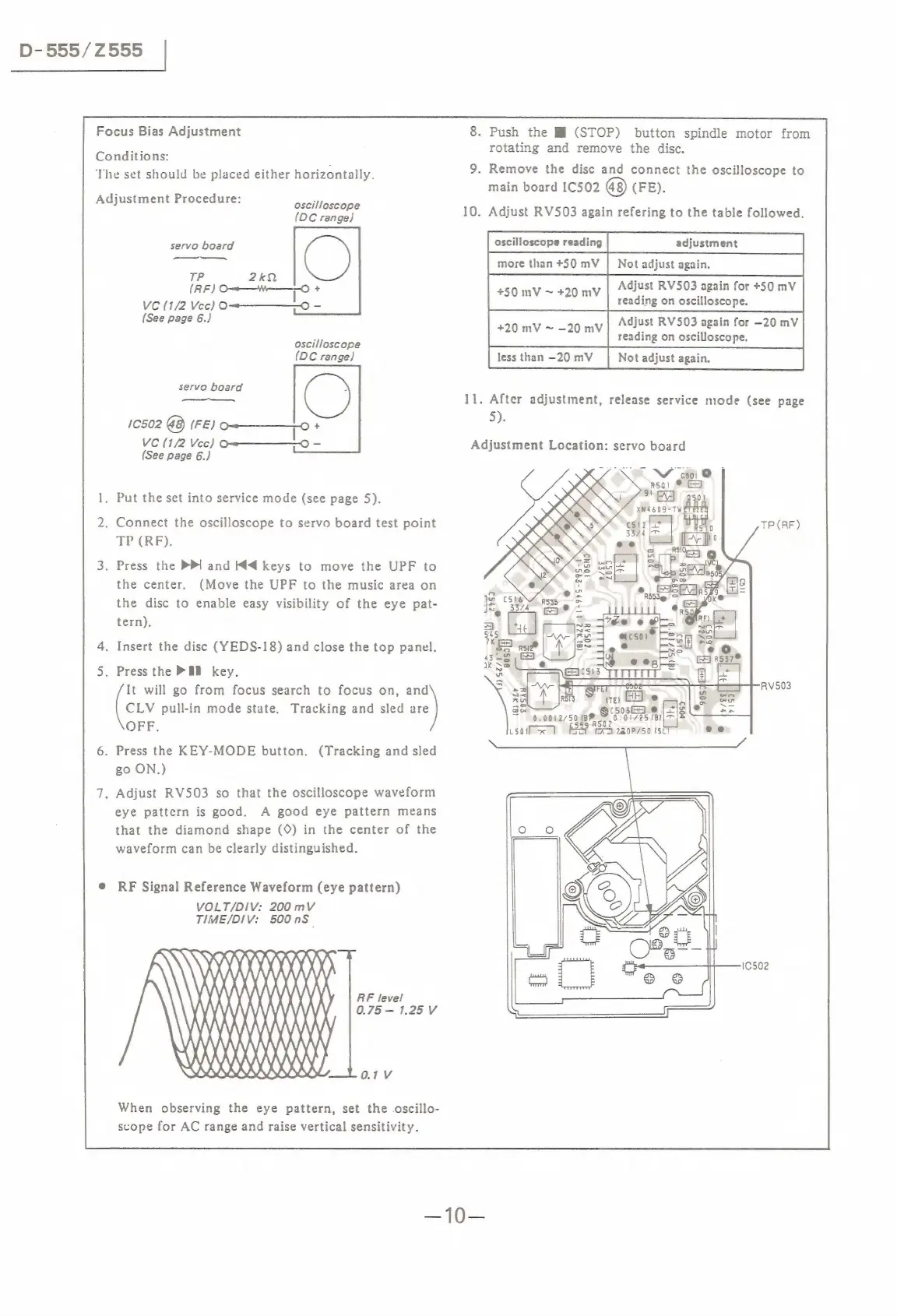
Focus
Bias
Adjustment
Conditions:
The
set
should
be
placed
either
horizontally.
Adjustment
Procedure:
oscilloscope
(DC
range)
servo
board
C)
Le
2k2
(RF)
O——"——O
+
Vc
(1/2
Vcc)
O=———_©
-
(See
page
6.)
oscilloscope
(DC
range)
O
1C502
@8)
(FE)
+
VC
(1/2
Vec)
!
=
(See
page
6.)
servo
board
.
Put
the
set
into
service
mode
(see
page
5).
.
Connect
the
oscilloscope
to
servo
board
test
point
TP
(RF).
.
Press
the
PPI
and
M4
keys
to
move
the
UPF
to
the
center.
(Move
the
UPF
to
the
music
area
on
the
disc
to
enable
easy
visibility
of
the
eye
pat-
tern).
.
Insert
the
disc
(YEDS-18)
and
close
the
top
panel.
.
Press
the
P&B
key.
It
will
go
from
focus
search
to
focus
on,
and
[cuv
pull-in
mode
state.
Tracking
and
sled
re)
OFF.
.
Press
the
KEY-MODE
button.
(Tracking
and
sled
go
ON.)
.
Adjust
RV503
so
that
the
oscilloscope
waveform
eye
pattern
is
good.
A
good
eye
pattern
means
that
the
diamond
shape
(©)
in
the
center
of
the
waveform
can
be
clearly
distinguished.
RF
Signal
Reference
Waveform
(eye
pattern)
VOLT/DIV:
200
mV
TIME/DIV:
500nS_
\
RNIN
_
KKK
KAALKAY.
|
B6de%
og
y
MA
A)
0.1
V
-
Push
the
Hi
(STOP)
button
spindle
motor
from
rotating
and
remove
the
disc.
.
Remove
the
disc
and
connect
the
oscilloscope
to
main
board
IC502
@8)
(FE).
.
Adjust
RV503
again
refering
to
the
table
followed.
more
than
+50
mV
|
Not
adjust
again.
+50
mV
~
+20
mV
Adjust
RV503
again
for
+50
mV
reading
on
oscilloscope.
+20
mV
~
—20
mV
Adjust
RV503
again
for
-20
mV
reading
on
oscilloscope.
11.
After
adjustment,
release
service
mode
(see
page
5).
Adjustment
Location:
servo
board
<M
csi
@
|
Ral
©
"ed
XN4609-TW
10SN9
(WH)
WZZ41+99S-£95-4
=,
=
wn
o
is
(i

Related product manuals