EasyManua.ls Logo

Sony D-66 - Page 5

Sony D-66
18 pages
Print Icon
To Next Page IconTo Next Page
To Previous Page IconTo Previous Page
Loading...
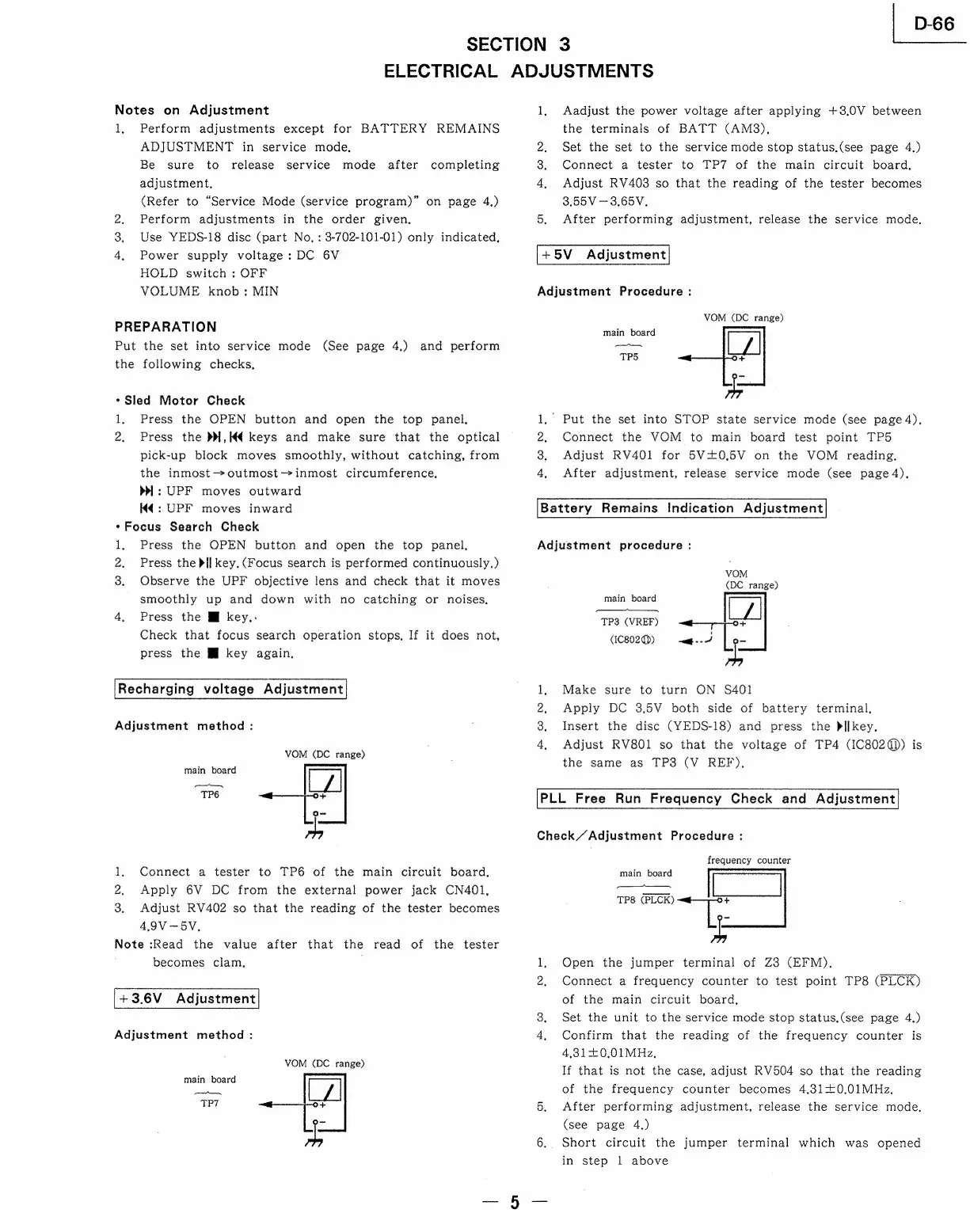
SECTION
3
ELECTRICAL
ADJUSTMENTS
Notes
on
Adjustment
1,
Perform
adjustments
except
for
BATTERY
REMAINS
ADJUSTMENT
in
service
mode,
Be
sure
to
release
service
mode
after
completing
adjustment,
(Refer
to
“Service
Mode
(service
program)”
on
page
4.)
2,
Perform adjustments
in
the
order
given,
3.
Use
YEDS-18
disc
(part
No,
:
3-702-101-01)
only
indicated,
4,
Power
supply
voltage:
DC
6V
HOLD
switch
:
OFF
VOLUME
knob:
MIN
PREPARATION
Put
the
set
into
service
mode
(See
page
4.)
and
perform
the
following
checks,
«Sled
Motor
Check
1,
Press
the
OPEN
button
and
open
the
top
panel,
2,
Press
the
DW,K€
keys
and
make
sure
that
the
optical
pick-up
block
moves
smoothly,
without
catching,
from
the
inmost->outmost—inmost
circumference,
>|:
UPF
moves
outward
Kd
:.UPF
moves
inward
*Focus
Search
Check
1,
Press
the
OPEN
button
and
open
the
top
panel,
2,
Press
theif
key.
(Focus
search
is
performed
continuously,)
3.
Observe
the
UPF
objective
lens
and
check
that
it
moves
smoothly
up
and
down
with
no
catching
or
noises.
4,
Press
the
MM
key.-
Check
that
focus
search
operation
stops,
If
it
does
not,
press
the
MJ
key
again,
Recharging
voltage
Adjustment
Adjustment
method
:
VOM
(DC
range)
main
board
omc,
TP6
Connect
a
tester
to
TP6
of
the
main
circuit
board,
Apply
6V
DC
from
the
external
power
jack
CN401,
Adjust
RV402
so
that
the
reading
of
the
tester
becomes
4,9V
—-5V.
Note
:Read
the
value
after
that
the
read
of
the
tester
becomes
clam,
+3.6V
Adjustment
Adjustment
method
:
cle
ai
oa
VOM
(DC.
range)
main
board
os
TP7
LL
o&
1,
Aadjust
the
power
voltage
after
applying
+3.0V
between
the
terminals
of
BATT
(AMS),
2,
Set
the
set
to
the
service
mode
stop
status,(see
page
4.)
3.
Connect
a
tester
to
TP7
of
the
main
circuit
board,
4,
Adjust
RV403
so
that
the
reading
of
the
tester
becomes
3,55V
—3.65V.
5.
After
performing
adjustment,
release
the
service
mode.
+5V
Adjustment
Adjustment
Procedure
:
VOM
(DC
range)
main
board
Vomeemtomenn
TPS
'
Put
the
set
into
STOP
state
service
mode
(see
page
4),
Connect
the
VOM
to
main
board
test
point
TP5
Adjust
RV401
for
5V0,5V
on
the
VOM
reading,
After
adjustment,
release
service
mode
(see
page4),
Nw
e
Battery
Remains
Indication
Adjustment
Adjustment
procedure
:
VOM
(DC
range)
main
board
wa
TP3
(VREF)
+
:
(IC802@)
wage
|
ce
Make
sure
to
turn
ON
S401
Apply
DC
3.5V
both
side
of
battery
terminal.
Insert
the
disc
(YEDS-18)
and
press
the
bilkey.
Adjust
RV801
so
that
the
voltage
of
TP4
(IC802q))
is
the
same
as
TP3
(V
REF),
ee
OI
PLL
Free
Run
Frequency
Check
and
Adjustment
Check/“Adjustment
Procedure
:
frequency
counter
7
7
.
Open
the
jumper
terminal
of
Z3
(EFM).
2,
Connect
a
frequency
counter
to
test
point
TP8
(PLCK)
main
board
panes
War
eaane
TP8
(PLCK)
of
the
main
circuit
board,
3,
Set
the
unit
to
the
service
mode
stop
status.(see
page
4.)
4,
Confirm
that
the
reading
of
the
frequency
counter
is
4,31+0.01MHz,
If
that
is
not
the
case,
adjust
RV504
so
that
the
reading
of
the
frequency
counter
becomes
4,.31+0.01MHz,
5.
After
performing
adjustment,
release
the
service
mode,
(see
page
4.)
6..
Short
circuit
the
jumper
terminal
which
was
opened
in
step
1
above
|
D-66

Related product manuals